Skills, Tools, and the Building Blocks That Make AI Agents Actually Work
A practitioner's guide to the core building blocks of agentic AI. What skills, tools, memory, planning, guardrails, and observability actually do, why each matters, and how they compose into agents that survive production.
Most teams build their first AI agent by picking a framework and connecting tools. The demo works. Production does not.
The agent hallucinates tool calls that do not exist. It forgets context from three turns ago. When it hits an error, it stops without explanation. The usual response is to switch frameworks or upgrade the model. Neither helps, because the problem was never the framework or the model. The problem was that nobody designed the agent’s capabilities.
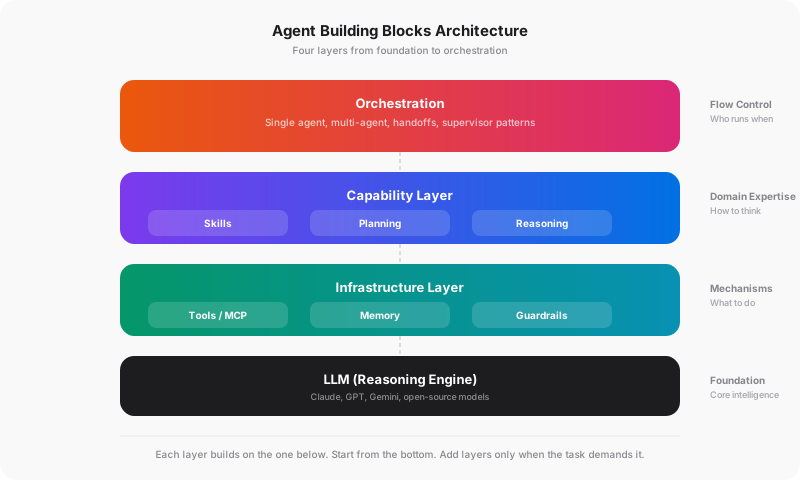
An AI agent is not a monolith. It is a composition of building blocks: skills, tools, memory, planning, and guardrails. Each one solves a specific problem. Skip one, and you get an agent that works in demos but fails under real conditions.
The Capability Layer
In an earlier post on agentic AI architecture, I laid out a five-layer model: reasoning core, tool layer, memory and state, guardrails and safety, and observability. That was the structural view. This post goes deeper on the capability layer, the part that determines what your agent can actually do and how well it does it.
The capability layer is where most agent projects succeed or fail. Not because teams skip it entirely, but because they conflate things that should be separate. A team connects an LLM to a PDF parser and a database, writes a long system prompt with domain instructions, and calls it done. Six weeks later, they are debugging why the agent extracts invoice fields from purchase orders, forgets vendor-specific formatting between sessions, and occasionally writes malformed SQL.
Each building block below solves one of those problems. Understanding what each one does, and knowing when to add it, is the difference between an agent that demos well and one that runs in production.
Skills vs. Tools: The Distinction That Matters
The most important and most overlooked distinction in agent design.
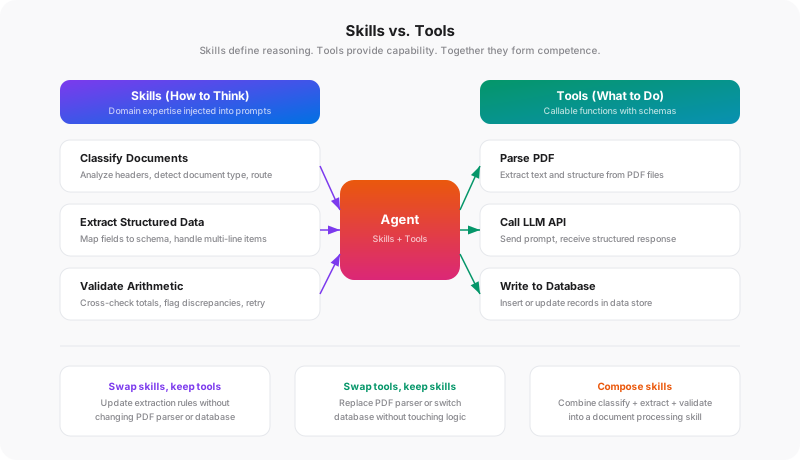
Tools are what an agent can do. Parse a PDF. Query a database. Call an API. Send an email. A tool is a function with a schema that the model can invoke. It takes input, performs an action, and returns a result.
Skills are how an agent thinks about a domain. Classify a document by analyzing headers and looking for invoice numbers. Extract structured data by mapping fields to a schema and validating totals. Write a security review by checking for OWASP Top 10 patterns in order of severity.
The difference is subtle but critical. A tool is a capability. A skill is expertise. You can give two agents the same tools and get completely different results, because one has skills and the other does not.
A Concrete Example
Consider the document processing agent from this earlier post. It has three distinct capabilities: classify, extract, and validate. Look at what the classification module actually does:
CLASSIFICATION_PROMPT = """Classify this document into exactly one category.

Categories:
- invoice: A bill requesting payment for goods or services
- purchase_order: A buyer's request to a vendor for goods/services
- contract: A legal agreement between parties
- receipt: Proof of payment already made
- unknown: Does not fit any category above

Respond with JSON: {{"category": "...", "confidence": 0.0-1.0, "reasoning": "..."}}

Document text (first {limit} characters):
{text}"""


def classify_document(doc: dict) -> dict:
    text_preview = doc["full_text"][:PREVIEW_CHAR_LIMIT]

    def _call() -> dict:
        response = create_message(
            model="claude-sonnet-4-6-20250514",
            max_tokens=CLASSIFICATION_MAX_TOKENS,
            messages=[{"role": "user", "content": CLASSIFICATION_PROMPT.format(
                text=text_preview, limit=PREVIEW_CHAR_LIMIT
            )}],
        )
        return parse_json(response.text)

    result = call_with_retry(_call)
    if result["confidence"] < MIN_CONFIDENCE:
        result = _classify_with_full_context(doc)
    return result
The skill is the CLASSIFICATION_PROMPT: it defines what categories exist, what each means, and how to evaluate confidence. It is domain expertise encoded as text. The tools are create_message() (LLM API call), call_with_retry() (execution with resilience), and parse_json() (output parsing). Together they produce a classification.
But notice the problem: the skill and tools are coupled in the same file. The domain reasoning (prompt) is embedded inside the tool module. You cannot reuse that classification expertise with a different execution strategy, test the prompt logic independently, or swap it for a different domain without editing the function. This is how most real-world agents work, and it works fine at small scale.
It stops working when you need to:
- Reuse skills across agents. A classification skill useful in the doc-agent might also be useful in a routing agent or audit agent. If the skill is embedded in a tool module, you are copying code.
- Update domain logic without touching execution. When a new document category is added, you should be editing the skill, not the function that calls the LLM.
- Test skills in isolation. You can evaluate whether the classification prompt produces correct results without running the full tool chain.
In production on roughly 400 documents per day, the three skills (classify, extract, validate) were the difference between 84% straight-through automation and constant human intervention. The skills are what make the agent effective. The tools just give it the ability to act.
The Separation Spectrum
Skill-tool separation is a spectrum, not a binary. Most production agents start with skills embedded in tool modules (like the doc-agent) and refactor toward separation as the system grows.
Embedded skills (most common). Domain expertise lives as prompt templates inside Python modules. Simple, works for single-agent systems. The doc-agent started here and it works fine for one pipeline.
Prompt-as-config. Extract prompts into separate files (YAML, JSON, or plain text) loaded at runtime. The tool module becomes execution-only. This is a small refactor with a large payoff: prompts can be versioned, A/B tested, and reviewed by domain experts who do not read Python.
Formalized skills. CrewAI takes this furthest with a SKILL.md format that separates metadata (YAML frontmatter) from domain instructions (markdown body):
---
name: invoice-extraction
description: Extract structured data from invoice documents
version: 1.0.0
dependencies:
  tools: [pdf_parser, schema_validator]
---

When processing invoices:
1. Identify the vendor from the header block
2. Extract line items as array with description, quantity, unit price
3. Compute expected totals and cross-check against stated totals
4. Flag any arithmetic discrepancy greater than 0.01
The skill injects domain expertise into the agent’s prompt. The tools give it the ability to act. At this level of separation, you can swap tools (different PDF parser, different LLM provider) without touching the skill, update skills (new extraction rules) without changing the tool layer, and compose skills by combining multiple SKILL.md packages.
Other frameworks express the same concept differently, and the terminology varies. What this post calls “skills,” LangGraph implements as composable subgraphs with their own state and tool bindings. OpenAI’s Agents SDK captures it as agent instructions paired with @function_tool decorated tools. Anthropic’s approach uses system prompts paired with typed tool schemas. The label changes, but the underlying principle is the same: separate what the agent knows how to do from the mechanisms it uses to do it. Where you land on the spectrum depends on how many agents share skills and how often the domain logic changes independently of the execution code.
What Practitioners Get Wrong
Stuffing everything into the system prompt. When all domain expertise lives in one giant system prompt, you cannot reuse skills across agents, version them independently, or test them in isolation. A 3,000-token system prompt with extraction rules, validation logic, and formatting instructions mixed together is impossible to maintain at scale. Modularize.
Treating tool descriptions as skill instructions. A tool description should say what the tool does (“Parses a PDF file and returns text content by page”). It should not contain domain reasoning (“When you see an invoice, look for the PO number in the top right corner”). That reasoning belongs in a skill. When tool descriptions carry skill logic, changing the reasoning requires changing every tool definition that embeds it.
No skill composition. Skills should compose. A “document processing” skill can combine “classify,” “extract,” and “validate” sub-skills. This mirrors how human expertise works: a senior analyst is not just someone with access to more tools. They have layered skills that build on each other.
Tool Use: The Foundation Layer
Tools are the foundation of every agent. Without tools, an agent is just a chatbot. The model receives tool schemas, decides when to call them, and returns structured calls that your application code executes.
The Basics
Every major provider implements tool use as a request-response cycle. You define a tool schema, the model returns a tool_use call when it decides to invoke it, your code executes the call, and you send a tool_result back:
# Define a tool schema (Anthropic format)
tools = [{
    "name": "search_documents",
    "description": "Search the document store by semantic query. "
                   "Returns up to max_results documents sorted by relevance, "
                   "each with title, snippet, and score.",
    "input_schema": {
        "type": "object",
        "properties": {
            "query": {"type": "string"},
            "max_results": {"type": "integer", "default": 10}
        },
        "required": ["query"]
    }
}]

# The model returns: {"type": "tool_use", "name": "search_documents",
#                     "input": {"query": "Q3 revenue by region"}}
# Your code executes search_documents("Q3 revenue by region")
# You send back: {"type": "tool_result", "content": "...results..."}
The model reads the tool name, description, and schema to decide when and how to call it. This is why tool descriptions matter enormously. A vague description (“Does stuff with documents”) means the model guesses wrong about when to use it. A precise description that includes return format and constraints gives the model the information it needs to make good decisions.
Modern providers also support parallel tool calls, where the model invokes multiple tools in a single turn when the calls are independent. An agent checking inventory across three warehouses does not need three sequential turns. Understanding that this exists changes how you design multi-step workflows.
MCP: The Universal Connector
The Model Context Protocol (MCP) has become the standard for exposing tools to AI agents. Instead of building custom tool integrations for every agent framework, you write an MCP server once and any MCP-compatible client can use it.
MCP defines three primitives:
- Tools: Executable functions (same concept as function calling)
- Resources: Data sources the agent can read (files, database records, API responses)
- Prompts: Reusable interaction templates
If you have read the MCP server post, you have already seen this pattern in action. The key insight is that MCP servers are tool providers, not skill providers. They expose capabilities. The skill layer that decides how and when to use those capabilities still lives in the agent.
Anthropic, OpenAI, VS Code, Cursor, and most major agent frameworks support MCP natively. Build your tools as MCP servers and they work everywhere.
Tool Design Principles
Minimal authority. Each tool should do one thing and have the minimum permissions required. A database query tool should be read-only. A file tool should be scoped to a specific directory. This is not just security. It is a constraint that helps the model make better decisions about which tool to use and when.
Strict schemas. Use strict: true (Anthropic) or Pydantic validation (OpenAI SDK) to guarantee the model’s tool calls conform to your schema. Without strict validation, you will spend debugging time on malformed inputs that the model “almost” got right.
Idempotent where possible. Tools that can be safely retried simplify error handling significantly. If the agent calls a search tool twice with the same query, it should get the same result, not duplicate side effects.
Fail with context. When a tool errors, return a structured error message that helps the model recover. “Query failed: table ‘orders_v2’ does not exist. Available tables: orders, products, customers” is recoverable. “Internal server error” is not. The difference between an agent that self-corrects and one that gets stuck is often just the quality of error messages from tools.
Memory: What Agents Remember and Why
Memory determines whether your agent learns from experience or starts fresh every time. There are three distinct types, and each solves a different problem.
Short-term Memory (Conversation Context)
Every agent has this by default: the messages exchanged between the user and the agent within a single session. The challenge is managing it: conversations grow, context windows are finite, and not everything said in turn one is relevant in turn fifty.
The practical problem: Most agents dump the entire conversation history into every request. For a ten-turn conversation, that is fine. For a hundred-turn session processing dozens of documents, you are burning tokens on irrelevant context and degrading response quality.
The standard solutions exist on a spectrum. Sliding windows keep only the last N messages. Simple, but they lose important early context. Summarization compresses older turns into a summary that preserves key facts while reducing token count. Selective injection retrieves only the messages relevant to the current query using the same similarity search used for long-term memory. Most production agents use summarization with selective injection for the best balance of cost and quality.
Long-term Memory (Persistent Knowledge)
Information that persists across sessions. User preferences, learned facts, accumulated domain knowledge. This is where vector stores and knowledge graphs come in.
The pattern should feel familiar if you have worked with RAG pipelines. Long-term memory is essentially retrieval-augmented generation applied to the agent’s own experience. The agent stores information, and retrieves relevant memories when processing new requests.
# Simplified memory scoring pattern
def recall(query, memories, top_k=5):
    scored = []
    for memory in memories:
        relevance = semantic_similarity(query, memory.content)
        recency = decay_factor(memory.timestamp)
        importance = memory.importance_score

        # Relevance dominates (0.5) because irrelevant memories waste context.
        # Recency (0.3) favors recent information when relevance is similar.
        # Importance (0.2) keeps critical facts from being buried by volume.
        score = (0.5 * relevance) + (0.3 * recency) + (0.2 * importance)
        scored.append((memory, score))
    return sorted(scored, key=lambda x: x[1], reverse=True)[:top_k]
Three factors matter for retrieval quality: relevance (is this memory related to the current task?), recency (recent memories are usually more useful), and importance (some memories matter more regardless of age). Most frameworks default to pure relevance scoring. Adding recency and importance weighting produces noticeably better recall, particularly for agents that process high volumes of similar inputs where the most recent patterns should take priority.
Episodic Memory (Learning from Experience)
The least common but most powerful type. Episodic memory captures not just facts, but entire interaction patterns with their outcomes.
Where long-term memory stores “Vendor X uses format Y,” episodic memory would store something like “Last time I processed a batch from Vendor X, several documents had line items split across pages. Adjusting the extraction window from single-page to two-page context significantly reduced errors.” The first is a fact. The second is learned experience that changes future behavior.
In practice, episodic memory works by storing interaction traces (what the agent did, what happened, what it learned) and retrieving them when similar situations arise. The agent does not just know what happened before. It knows what worked and what did not. Over time, this should produce compounding improvement: an agent that remembers which extraction strategy worked for a specific vendor format does not need to rediscover it on every batch, while a stateless agent hits the same failure modes every time.
CrewAI’s Memory class aims to unify all three types with composite scoring and automatic consolidation. LangGraph takes a different approach with checkpointing for thread-level memory and separate stores for cross-thread persistence. The implementation varies, but the core concept is the same: memory must be structured, scored, and pruned to be useful.
The Dedup Problem
Memory without deduplication is a growing pile of redundant information. If an agent processes 100 invoices from the same vendor, it should not store 100 separate memories about that vendor’s format. It should consolidate into one memory that improves with each interaction.
CrewAI addresses this with a similarity threshold on save. If a new memory is too similar to an existing one, it updates rather than duplicates. Without dedup, memory stores bloat quickly and retrieval quality degrades as the noise-to-signal ratio increases. In high-volume systems processing hundreds of documents per day, unmanaged memory grows fast, and most of the new entries are redundant.
Planning and Reasoning: How Agents Decide
Not every agent needs planning. A single-tool agent that answers questions from a knowledge base does not need a planner. But as soon as tasks require multiple steps with dependencies, planning becomes essential.
The Reasoning Foundation
Before an agent can plan, it needs to reason. Chain-of-thought (CoT) prompting, where the model works through a problem step by step before answering, is the foundation that every other reasoning pattern builds on. Extended thinking (Anthropic) and reasoning tokens (OpenAI) formalize this by giving the model a dedicated reasoning phase before it produces output.
The practical impact is significant. An agent asked to “find all invoices over $10,000 from Q3 and flag any with unusual payment terms” will make better tool-calling decisions if it first reasons about what “unusual” means, what tools it needs, and in what order. Without structured reasoning, the agent tends to call tools immediately and hope for the best.
ReAct: The Default Pattern
Most agent frameworks implement the ReAct (Reason + Act) pattern, which alternates between reasoning steps and tool calls:
Think:   I need to find the user's recent orders, then check inventory.
Act:     search_orders(user_id="12345", limit=5)
Observe: [Order #A1: Widget x3, Order #A2: Gadget x1]
Think:   Got the orders. Now check inventory for each item.
Act:     check_inventory(item="Widget")
Observe: {in_stock: 150, warehouse: "EU-West"}
Think:   Widgets in stock. Now check Gadgets.
Act:     check_inventory(item="Gadget")
Observe: {in_stock: 0, restock_date: "2026-10-20"}
Think:   I can now give the user a complete answer.
ReAct is simple and works well for tasks with two to five steps. It struggles with longer sequences because the agent re-evaluates its entire approach at every step, which leads to drift. By step eight, the agent may have forgotten the original goal.
Plan-and-Execute: When Tasks Have Structure
For complex tasks, generate a plan first, then execute it step by step:
# Plan-and-execute pattern
plan = planner.create_plan(
    task="Process quarterly sales report",
    available_tools=["query_db", "calculate", "generate_chart", "send_email"]
)
# Returns: ["Query Q3 sales by region", "Calculate YoY growth",
#           "Generate comparison chart", "Email summary to stakeholders"]

results = {}
for step in plan.steps:
    result = executor.run(step, context=results)
    if result.failed:
        plan = planner.replan(step, result.error, remaining_steps=plan.steps)
    else:
        results[step.id] = result
Note the replan call. Pure plan-and-execute is brittle because it assumes every step succeeds. Production systems need adaptive re-planning: when a step fails or returns unexpected results, the agent revises the remaining plan rather than either aborting or blindly continuing. A quarterly report agent that cannot access the revenue database should re-plan to use the cached export, not crash.
When to use plan-and-execute: Tasks with more than five steps. Tasks where the order matters (you cannot calculate growth before you have the numbers). Tasks where you need an audit trail of what was done and why.
When to stick with ReAct: Tasks with uncertain scope where you do not know how many steps you will need until you start. Tasks where each step depends heavily on the previous result. Conversational agents where the user drives the flow.
Reflection Loops: Self-Correction
The most underused pattern. After generating an output, a second pass (or a separate evaluator) reviews the result and decides whether it meets quality criteria. If not, the agent revises.
The validation-and-retry pattern from the doc-agent is a concrete example: extract data, validate totals, and if validation fails, feed the specific errors back to the model. In production on roughly 400 documents per day, the model corrects itself 60-70% of the time on retry. The total cost per document is $0.03, including retries. That pattern generalizes to any task where output quality can be programmatically checked.
Guardrails: Safety as Architecture
Guardrails are not a compliance checkbox. They are an architectural decision that determines how your agent fails. Without them, it fails silently and unpredictably. With them, it fails loudly and recoverably.
Guardrails belong at every level of agent complexity, from the simplest single-agent setup to multi-agent orchestration. They are not something you add when the system gets complex. They are something you start with.
Three Levels of Guardrails
Input guardrails validate what goes into the agent. Is the user’s request within scope? Does it contain prompt injection attempts? Is the input well-formed?
# Input guardrail: scope check
async def check_scope(agent, user_input):
    result = await scope_checker.run(
        f"Is this request within the agent's domain? Request: {user_input}"
    )
    if not result.in_scope:
        return GuardrailResult(blocked=True, reason=result.reason)
    return GuardrailResult(blocked=False)
Output guardrails validate what the agent produces before it reaches the user. Does the response contain hallucinated information? Are the numbers within plausible ranges? Does the generated code have security vulnerabilities?
# Output guardrail: sanity check on numerical claims
async def validate_output(agent, response):
    numbers = extract_numbers(response.text)
    for claim in numbers:
        if claim.value < 0 and claim.context == "revenue":
            return GuardrailResult(
                blocked=True,
                reason=f"Negative revenue ({claim.value}) is implausible"
            )
        if claim.percent_change and abs(claim.percent_change) > 500:
            return GuardrailResult(
                blocked=True,
                reason=f"Change of {claim.percent_change}% exceeds sanity threshold"
            )
    return GuardrailResult(blocked=False)
Tool guardrails validate individual tool calls before execution. Is this database query read-only? Is this API call within rate limits? Does this file write target an allowed directory? OpenAI’s Agents SDK has one of the more mature implementations here, with dedicated guardrail decorators that can run in parallel with agent execution for minimal latency overhead. Check their current documentation for the latest API surface.
Cost Guardrails
A category that gets overlooked until the first surprise bill. Every tool call costs tokens. Every retry adds to the bill. Every multi-agent interaction multiplies it. Production agents need explicit budget controls.
At minimum: a per-request token ceiling that terminates the agent loop if exceeded, a per-tool cost tracker that alerts on anomalies (one query suddenly consuming 10x the usual tokens), and a daily spend cap that gracefully degrades rather than hard-stopping mid-task. The doc-agent’s $0.03 per document is only predictable because the retry budget is capped at three attempts. Without that cap, a single malformed document could trigger an unbounded retry loop.
Human-in-the-Loop
Some decisions should not be automated. Tool calls that modify production data. Actions that cost money. Communications sent to external parties. The pattern: the agent proposes an action, a human approves or rejects it, and the agent continues based on the decision.
MCP supports this through its sampling and elicitation capabilities, which allow servers to request user confirmation before executing sensitive operations. The key design choice is where to draw the line. Too many approval gates and the agent is useless. Too few and you are trusting an LLM with decisions it should not make alone.
As discussed in the enterprise architecture post, safety in AI systems is not a feature you bolt on at the end. It is a primary architectural constraint that shapes every other decision you make.
Observability: Seeing What the Agent Does
A building block that is easy to postpone and expensive to retrofit. When an agent produces a wrong answer, you need to trace exactly which skills, tools, memory retrievals, and planning decisions led to that result.
What to Log
Production agents need three categories of observability.
Trace logging records every tool call with inputs, outputs, and timing. A single agent request might involve five tool calls, two memory retrievals, and a planning step. Without a trace that links them together, you are debugging blind. A good trace record looks like this:
{
  "request_id": "req_8f3a",
  "step": 3,
  "type": "tool_call",
  "tool": "search_documents",
  "input": {"query": "Q3 vendor invoices", "max_results": 10},
  "output": {"count": 7, "top_score": 0.91},
  "latency_ms": 340,
  "tokens": {"input": 1200, "output": 450}
}
Decision logging captures why the agent chose one tool over another. This is where reasoning traces become critical. If the agent called search_documents instead of query_database, the decision log should show the reasoning that led to that choice. Without this, you know what the agent did but not why, and you cannot tell whether a correct result came from good reasoning or luck.
Performance metrics cover latency per step, token consumption per request, error rates by tool, and cost per completed task. Track these as time series, not just aggregates. A tool that averages 200ms but spikes to 5 seconds on Mondays is a different problem than a tool that consistently takes 1 second.
Why It Cannot Wait
The temptation is to add observability after the agent works. The problem is that without traces from the beginning, you have no baseline for what “working” looks like. When performance degrades or error rates climb, you need historical data to compare against. Retrofitting trace logging into an agent that was built without it means touching every tool call, every memory access, and every planning step. It is significantly cheaper to build it in from the start.
How They Compose
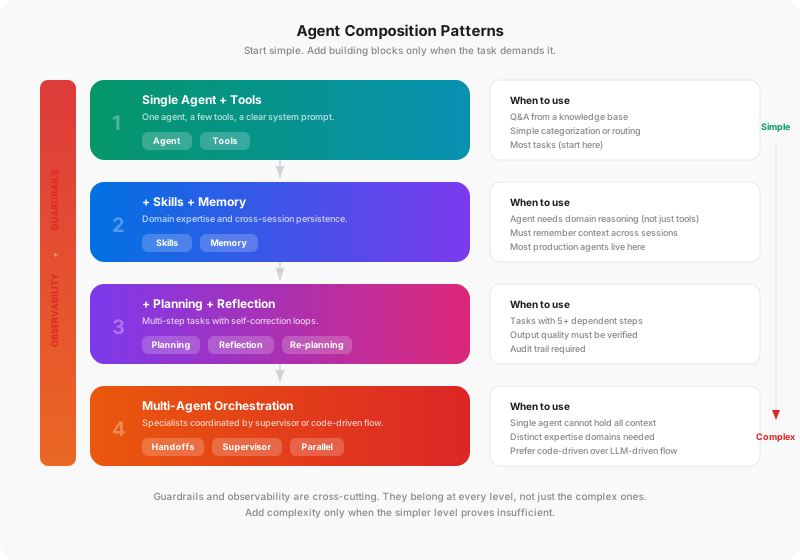
No agent needs all of these building blocks at once. The right composition depends on the task complexity, the stakes involved, and how much context the agent needs to carry. Guardrails and observability are the exception: they belong at every level.
Level 1: Single Agent + Tools
One agent, a few tools, a clear system prompt. This handles more use cases than most teams expect. If your task is “answer questions from a knowledge base” or “categorize incoming support tickets,” this is enough. Add guardrails (at minimum, scope checking and output validation) and basic trace logging, then stop. Do not add complexity until this level proves insufficient.
Level 2: Agent + Skills + Memory
When the agent needs domain expertise (skills) or needs to remember things across sessions (memory). This is where most production agents live. The doc-agent is a good example: classification, extraction, and validation skills, with memory for vendor-specific formatting patterns learned over time.
Level 3: Agent + Planning + Reflection
When tasks have multiple steps with dependencies and the output needs to be verified before delivery. A code review agent that plans its review strategy, executes checks in order, and validates findings before reporting. A data pipeline agent that plans transformations, executes them, and verifies output integrity.
Level 4: Multi-Agent Orchestration
When a single agent cannot hold all the context or expertise needed for the job. A supervisor agent routes tasks to specialists. A triage agent classifies incoming requests and hands them off. Multiple agents work in parallel on independent subtasks and a coordinator merges results.
The most important architectural decision at this level is code-driven vs. LLM-driven orchestration. In code-driven orchestration, your application code controls the flow: which agent runs when, what context it receives, how results are combined. In LLM-driven orchestration, a “manager” model decides the flow dynamically.
Code-driven orchestration is predictable, testable, and cheaper. LLM-driven orchestration is flexible but expensive and harder to debug. For production systems, default to code-driven. Use LLM-driven only when the routing logic is genuinely too complex to express in code.
One final note on composition: the levels go both ways. If a multi-agent system is producing more coordination overhead than value, step back to a single agent with better skills. The goal is the simplest composition that solves the problem, not the most sophisticated one you can build.
Quick Reference
| Building Block | What It Solves | Add When | Skip When |
|---|---|---|---|
| Tools | Agent needs to act on the world | Always (no tools = chatbot) | Never |
| Skills | Agent needs domain expertise beyond tool descriptions | Same tools produce inconsistent results | Task is generic (search, summarize) |
| Memory | Agent needs cross-session context or learns from volume | Repeated similar tasks, user preferences matter | Each request is independent |
| Planning | Multi-step tasks with dependencies | More than five steps, order matters | Single-step or user-driven flow |
| Reflection | Output quality must be verified | Errors are costly, output is programmatically checkable | Low-stakes responses |
| Guardrails | Control how the agent fails | Always, from day one | Never |
| Observability | Debug failures, track performance | Always, from day one | Never |
| Multi-Agent | Single agent cannot hold all context | Distinct expertise domains, parallel workloads | Simpler composition works |
The One Principle
Start with the simplest composition that solves the problem. One agent, clear tools, a good system prompt. Add skills when the agent needs domain expertise it cannot get from tool descriptions alone. Add memory when it needs cross-session context. Add planning when tasks have multiple dependent steps. Add guardrails and observability from day one, not after the first production incident.
Every building block you add is a building block you have to maintain, debug, and pay for. The teams that ship reliable agents are not the ones using the most sophisticated architecture. They are the ones who know exactly which building blocks they need and why they need them.
The next post in this series will put these building blocks into practice with a hands-on multi-agent orchestration build. Same concepts, working code.