Build a RAG Pipeline That Actually Works: Hybrid Search, Re-Ranking, and Evaluation
Building a production RAG pipeline from scratch. PDF ingestion, semantic chunking, hybrid retrieval (vector + BM25), reciprocal rank fusion, cross-encoder re-ranking, grounded answer generation, and a retrieval evaluation framework. Every architectural decision explained.
A retrieval pipeline that works on 10 documents will fail on 1,000. Not catastrophically. Quietly. The user asks “what is the API rate limit?” and gets a confident answer about authentication instead. The embedding model found semantically similar passages. They were the wrong passages. Nobody notices until a customer escalation or a compliance review surfaces the bad answer three weeks later.
The fix is not a better embedding model. It is a retrieval architecture that catches its own failures: hybrid search so exact terms are never missed, a fusion layer that combines evidence from multiple methods, a re-ranking stage that verifies relevance before anything reaches the LLM, and an evaluation framework so you measure retrieval quality the same way you measure uptime.
This post builds that architecture. Every concept from the production RAG theory post, implemented as a working pipeline you can clone and run.
The complete source code is on GitHub: taatal/blog-code/ai/rag-pipeline
What You Will Build
By the end of this post, you will have a working Python application that:
- Ingests PDF documents and splits them into semantically coherent chunks
- Embeds chunks using a state-of-the-art retrieval model (BAAI/bge-small-en-v1.5)
- Builds both a vector index (ChromaDB) and a keyword index (BM25) over the same corpus
- Retrieves candidates from both indexes and merges them using Reciprocal Rank Fusion
- Re-ranks the merged candidates using a cross-encoder model for precision
- Generates grounded answers with source citations using Claude
- Includes a retrieval evaluation framework with Recall@K and MRR metrics
You will run it from the command line:
rag-pipeline ingest --input ./documents
rag-pipeline query "What retry strategy does the system use when validation fails?"
And get a cited answer pulled directly from your ingested documents, with every claim traced to a specific source and page number.
Why Hybrid Search Matters
Pure vector search finds semantically similar passages. If your user asks “what is the authentication mechanism?” and your document says “OAuth client credentials with token rotation”, a good embedding model connects those concepts. That is what vector search does well.
But what happens when your user asks “what is the RPM rate limit?” The term “RPM” appears once in the document. The embedding model might not associate it strongly with “rate limit” in the vector space. A keyword search (BM25) finds it instantly because the exact term is there.
Neither method alone is reliable. Hybrid search runs both, then merges the results. The academic evidence supports this: Karpukhin et al. (2020) showed BM25 + dense retrieval combined improved Top-20 accuracy from 79.4% to 82.5% on the Natural Questions dataset, a 3% absolute improvement. In domain-specific corpora with specialized terminology, the gain is typically larger because exact term matching becomes more critical.
The merge uses Reciprocal Rank Fusion (Cormack, Clarke, and Buettcher, SIGIR 2009). Simple formula, no tuning required, consistently outperforms other fusion methods. This is the same algorithm that Elasticsearch (v8.8+) and Weaviate (v1.20+) use internally for their hybrid search features.
Prerequisites
Python 3.11+. We use modern type hints and dataclasses.
python --version # Should be 3.11 or higherAn API key. The answer generation step works with either provider:
- Anthropic (default): Sign up at console.anthropic.com. A free trial with $5 credit is enough for hundreds of queries.
- OpenAI: Any funded OpenAI account works. Set
LLM_PROVIDER=openaiin your environment.
# Option A: Anthropic (default)
export ANTHROPIC_API_KEY="sk-ant-..."

# Option B: OpenAI
export LLM_PROVIDER=openai
export OPENAI_API_KEY="sk-..."
Project setup:
git clone https://github.com/taatal/blog-code.git
cd blog-code/ai/rag-pipeline
python -m venv .venv
source .venv/bin/activate  # On Windows: .venv\Scripts\activate
pip install -e .
This installs all dependencies: anthropic, openai, chromadb, sentence-transformers, rank-bm25, and pymupdf.
First run downloads models. The embedding model (BAAI/bge-small-en-v1.5, ~130MB) and the re-ranking model (cross-encoder/ms-marco-MiniLM-L6-v2, ~90MB) download automatically on first use. Subsequent runs load from cache.
Sample documents. Drop any PDF files into the documents/ folder. Technical documentation, research papers, contracts, manuals. The pipeline handles any text-heavy PDF. For best results, use documents you actually want to query.
Cost estimate. The retrieval pipeline (ingest, search, re-rank) runs entirely locally with no API cost. Only the final answer generation step calls Claude, at approximately $0.003-0.01 per query depending on context length.
Project Structure
The project is a Python package, installable with pip install -e .:
rag-pipeline/
├── pyproject.toml
├── src/rag_pipeline/
│   ├── __init__.py         # Package metadata (__author__, __version__)
│   ├── models.py           # Dataclasses (Chunk, RetrievalResult, GenerationResult)
│   ├── cli.py              # CLI entry point (ingest + query commands)
│   ├── query.py            # RAG orchestrator (ties all stages together)
│   └── pipeline/
│       ├── ingest.py       # Stage 1: PDF extraction + recursive chunking
│       ├── embed.py        # Stage 2: Embedding + ChromaDB vector store
│       ├── bm25.py         # Stage 3: BM25 keyword index
│       ├── fusion.py       # Stage 4: Reciprocal Rank Fusion
│       ├── rerank.py       # Stage 5: Cross-encoder re-ranking
│       ├── generate.py     # Stage 6: Grounded answer generation
│       └── evaluate.py     # Retrieval quality metrics (Recall@K, MRR)
├── documents/              # Input PDFs go here
└── tests/
    └── test_retrieval.py   # Retrieval logic unit tests
Each pipeline module handles one retrieval stage. The query.py orchestrator calls them in sequence. The evaluation module runs independently against a golden test set.
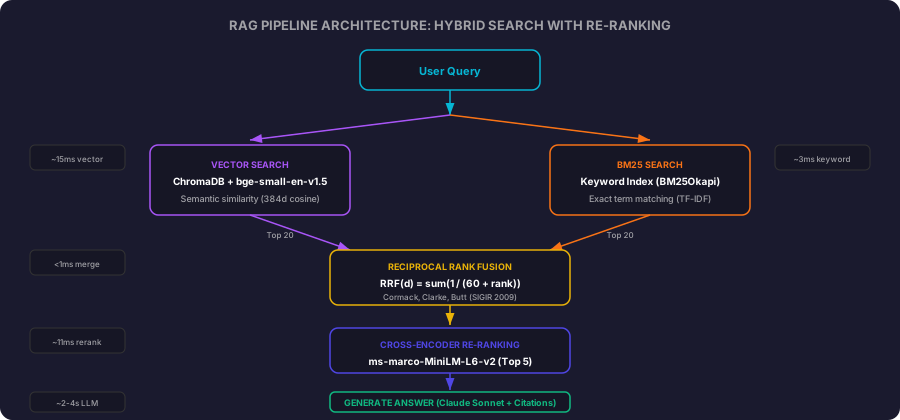
The Architecture
The pipeline processes a query through six stages:
- Ingest. PDFs are parsed, text extracted, and split into overlapping chunks
- Embed. Chunks are embedded and stored in a vector database
- Retrieve. Both vector search and BM25 return candidate passages
- Fuse. Reciprocal Rank Fusion merges the two candidate lists
- Re-rank. A cross-encoder model scores the top candidates for precision
- Generate. Claude produces a grounded answer citing specific sources
Stages 1-2 run once at ingestion time. Stages 3-6 run on every query. The separation means you can ingest a large corpus once and query it repeatedly with sub-second retrieval latency.
Stage 1: Ingestion and Chunking
Before anything touches an embedding model, we need clean text split into coherent chunks. The chunking strategy determines retrieval quality more than any other single decision.
import fitz
from pathlib import Path


def extract_text(pdf_path: Path) -> dict:
    """Extract text from a PDF file, preserving page structure."""
    doc = fitz.open(pdf_path)
    pages = []

    for page_num, page in enumerate(doc):
        text = page.get_text()
        pages.append({
            "page_number": page_num + 1,
            "text": text.strip(),
        })

    doc.close()

    return {
        "filename": pdf_path.name,
        "page_count": len(pages),
        "pages": pages,
        "full_text": "\n\n".join(p["text"] for p in pages if p["text"]),
    }
PyMuPDF handles digital PDFs with embedded text. For scanned documents (image-only PDFs), you would need an OCR layer like Tesseract upstream of get_text(). This pipeline assumes your PDFs have selectable text, which covers the majority of modern business documents. We track page numbers in metadata because they become source citations in the final answer.
Recursive Character Splitting
Fixed-size chunking (split every N characters) creates chunks that cut sentences in half, split definitions from their explanations, or combine unrelated paragraphs. The result is chunks that are semantically incoherent, which degrades retrieval quality.
Recursive splitting solves this by trying coarse boundaries first (paragraph breaks), then progressively finer ones (line breaks, sentence boundaries, words). This preserves natural document structure within each chunk.
def chunk_text(text: str, chunk_size: int = 512, overlap: int = 64) -> list[dict]:
    """Split text into overlapping chunks using recursive character splitting.

    Tries paragraph boundaries first, then sentence boundaries, then
    falls back to word boundaries. This preserves semantic coherence
    within each chunk.
    """
    separators = ["\n\n", "\n", ". ", " "]
    chunks = _recursive_split(text, separators, chunk_size, overlap)
    return chunks


def _recursive_split(
    text: str,
    separators: list[str],
    chunk_size: int,
    overlap: int,
) -> list[dict]:
    """Recursively split text, trying coarse separators first."""
    if not text.strip():
        return []

    words = text.split()
    if len(words) <= chunk_size:
        return [{"text": text.strip(), "word_count": len(words)}]

    separator = _find_separator(text, separators)
    splits = text.split(separator)

    chunks = []
    current = ""

    for split in splits:
        candidate = (current + separator + split).strip() if current else split.strip()

        if len(candidate.split()) > chunk_size and current:
            chunks.append({"text": current.strip(), "word_count": len(current.split())})
            overlap_words = current.split()[-overlap:] if overlap else []
            current = " ".join(overlap_words) + separator + split if overlap_words else split
        else:
            current = candidate

    if current.strip():
        chunks.append({"text": current.strip(), "word_count": len(current.split())})

    final = []
    remaining_separators = separators[separators.index(separator) + 1:] if separator in separators else []

    for chunk in chunks:
        if chunk["word_count"] > chunk_size and remaining_separators:
            sub_chunks = _recursive_split(chunk["text"], remaining_separators, chunk_size, overlap)
            final.extend(sub_chunks)
        else:
            final.append(chunk)

    return final


def _find_separator(text: str, separators: list[str]) -> str:
    """Find the first separator that exists in the text."""
    for sep in separators:
        if sep in text:
            return sep
    return separators[-1]
Why 512 words as the default chunk size? The chunk_size parameter counts words, not tokens. The embedding model (BAAI/bge-small-en-v1.5) has a maximum input of 512 tokens (per the HuggingFace model card). English text averages roughly 1.3 tokens per word, so 512 words maps to approximately 650-700 tokens. Some chunks will exceed the model’s context and get truncated at the tail. A more conservative setting of 384 words keeps most chunks safely within the 512-token limit. We default to 512 words as a practical trade-off: larger chunks capture more context per passage, and the truncation at the edges rarely affects retrieval quality because the most relevant content tends to appear at the start of a passage.
The 64-word overlap ensures that if a relevant passage spans a chunk boundary, at least part of it appears in both adjacent chunks. The retrieval stage will find at least one.
The Full Ingestion Function
def ingest_pdf(pdf_path: Path, chunk_size: int = 512, overlap: int = 64) -> list[dict]:
    """Full ingestion pipeline: extract text from PDF and chunk it."""
    doc = extract_text(pdf_path)
    chunks = []

    for page in doc["pages"]:
        if not page["text"]:
            continue

        page_chunks = chunk_text(page["text"], chunk_size, overlap)

        for i, chunk in enumerate(page_chunks):
            chunks.append({
                "text": chunk["text"],
                "word_count": chunk["word_count"],
                "metadata": {
                    "source": doc["filename"],
                    "page": page["page_number"],
                    "chunk_index": i,
                },
            })

    return chunks
Every chunk carries metadata: which file it came from, which page, and its position. This metadata flows through the entire pipeline and appears in the final answer as source citations.
Stage 2: Embedding and Vector Storage
The embedding model converts text chunks into 384-dimensional vectors that capture semantic meaning. Similar concepts end up near each other in vector space, enabling similarity search.
import chromadb
from sentence_transformers import SentenceTransformer


EMBEDDING_MODEL = "BAAI/bge-small-en-v1.5"


def create_embedder() -> SentenceTransformer:
    """Load the embedding model. Downloads on first use (~130MB)."""
    return SentenceTransformer(EMBEDDING_MODEL)


def index_chunks(
    chunks: list[dict],
    embedder: SentenceTransformer,
    client: chromadb.ClientAPI,
    collection_name: str = "documents",
) -> None:
    """Embed chunks and store them in ChromaDB."""
    collection = client.get_or_create_collection(
        name=collection_name,
        metadata={"hnsw:space": "cosine"},
    )

    texts = [chunk["text"] for chunk in chunks]
    embeddings = embedder.encode(texts, show_progress_bar=True, normalize_embeddings=True)

    ids = [
        f"{chunk['metadata']['source']}_p{chunk['metadata']['page']}_c{chunk['metadata']['chunk_index']}"
        for chunk in chunks
    ]
    metadatas = [chunk["metadata"] for chunk in chunks]

    batch_size = 100
    for i in range(0, len(texts), batch_size):
        end = min(i + batch_size, len(texts))
        collection.add(
            ids=ids[i:end],
            documents=texts[i:end],
            embeddings=embeddings[i:end].tolist(),
            metadatas=metadatas[i:end],
        )
Why BAAI/bge-small-en-v1.5 over the commonly recommended all-MiniLM-L6-v2? Both produce 384-dimensional vectors. But on the MTEB retrieval benchmarks, bge-small scores significantly higher (~51.7 vs ~41.9 NDCG@10). Same model size, same embedding dimensions, substantially better retrieval quality. The model is MIT-licensed and published by the Beijing Academy of Artificial Intelligence (BAAI) on HuggingFace.
ChromaDB persists the vectors to disk using HNSW (Hierarchical Navigable Small World) indexing with cosine distance. We set normalize_embeddings=True during encoding because cosine similarity on normalized vectors is equivalent to dot product, which is faster to compute.
Vector Search
def search_vectors(
    query: str,
    embedder: SentenceTransformer,
    client: chromadb.ClientAPI,
    collection_name: str = "documents",
    n_results: int = 20,
) -> list[dict]:
    """Search the vector store and return ranked results."""
    collection = client.get_collection(name=collection_name)

    query_embedding = embedder.encode([query], normalize_embeddings=True)

    results = collection.query(
        query_embeddings=query_embedding.tolist(),
        n_results=n_results,
        include=["documents", "metadatas", "distances"],
    )

    ranked = []
    for i in range(len(results["ids"][0])):
        ranked.append({
            "id": results["ids"][0][i],
            "text": results["documents"][0][i],
            "metadata": results["metadatas"][0][i],
            "score": 1 - results["distances"][0][i],
        })

    return ranked
We retrieve 20 candidates (not 5) because this is the first stage of a multi-stage retrieval pipeline. The fusion and re-ranking stages downstream will filter down to the final 5. Casting a wider net in the initial retrieval improves recall, which is the metric that matters at this stage.
Stage 3: BM25 Keyword Index
BM25 (Best Matching 25) is a probabilistic ranking function from classical information retrieval. It scores documents by term frequency and inverse document frequency, with length normalization. No machine learning, no embeddings, just statistical term matching.
from rank_bm25 import BM25Okapi


class BM25Index:
    """BM25 keyword index over a chunk corpus."""

    def __init__(self, chunks: list[dict]):
        self._chunks = chunks
        tokenized = [self._tokenize(chunk["text"]) for chunk in chunks]
        self._index = BM25Okapi(tokenized)

    def search(self, query: str, n_results: int = 20) -> list[dict]:
        """Search the BM25 index and return ranked results."""
        tokenized_query = self._tokenize(query)
        scores = self._index.get_scores(tokenized_query)

        scored_chunks = []
        for i, score in enumerate(scores):
            if score > 0:
                scored_chunks.append({
                    "id": f"{self._chunks[i]['metadata']['source']}_p{self._chunks[i]['metadata']['page']}_c{self._chunks[i]['metadata']['chunk_index']}",
                    "text": self._chunks[i]["text"],
                    "metadata": self._chunks[i]["metadata"],
                    "score": float(score),
                })

        scored_chunks.sort(key=lambda x: x["score"], reverse=True)
        return scored_chunks[:n_results]

    def _tokenize(self, text: str) -> list[str]:
        """Simple whitespace tokenization with lowercasing."""
        return text.lower().split()
The tokenization here is deliberately simple. For English text, lowercased whitespace splitting works well enough. Production systems add stemming (Porter or Snowball) and stopword removal for marginal improvement. We skip those to keep the implementation focused on the retrieval architecture rather than NLP preprocessing.
Why include BM25 when we already have vector search? Vector search excels at semantic similarity but can miss exact terminology. When a user searches for “CORS preflight configuration” and the document contains exactly that phrase, BM25 gives it a high score based on exact term match. The vector model might rank a passage about “request headers” higher because it is semantically similar, even though it discusses a different topic entirely.
The two methods have complementary failure modes. That is precisely why merging them works.
Stage 4: Reciprocal Rank Fusion
We now have two ranked lists: one from vector search (semantic relevance), one from BM25 (keyword relevance). We need to merge them into a single ranked list that captures the strengths of both.
Reciprocal Rank Fusion (RRF) does this with a simple formula published by Cormack, Clarke, and Buettcher at SIGIR 2009:
RRF(d) = sum(1 / (k + rank_i(d))) for each list iFor each document, sum the reciprocal of its rank (plus a constant k) across all lists. Documents ranked highly in multiple lists get the highest fused scores. Documents ranked highly in only one list still get a score, but lower than those appearing in both.
def reciprocal_rank_fusion(
    ranked_lists: list[list[dict]],
    k: int = 60,
) -> list[dict]:
    """Merge multiple ranked lists using Reciprocal Rank Fusion.

    Based on Cormack, Clarke, and Buettcher (2009):
    RRF(d) = sum(1 / (k + rank_i(d))) for each list i

    k=60 is the default from the original SIGIR paper and remains
    the standard in Elasticsearch, Weaviate, and LangChain implementations.
    """
    scores: dict[str, float] = {}
    docs: dict[str, dict] = {}

    for ranked_list in ranked_lists:
        for rank, doc in enumerate(ranked_list, start=1):
            doc_id = doc["id"]
            scores[doc_id] = scores.get(doc_id, 0.0) + 1.0 / (k + rank)
            if doc_id not in docs:
                docs[doc_id] = doc

    fused = []
    for doc_id, score in scores.items():
        result = docs[doc_id].copy()
        result["rrf_score"] = score
        fused.append(result)

    fused.sort(key=lambda x: x["rrf_score"], reverse=True)
    return fused
Why k=60? The original paper tested multiple values and found k=60 to be robust across datasets. It dampens the influence of very high ranks (rank 1 gives 1/61 rather than 1/1) while still differentiating meaningfully between positions. This same default is hardcoded in Elasticsearch (v8.8+), Weaviate (v1.20+), and LangChain’s EnsembleRetriever.
The function accepts any number of ranked lists. Today we merge two (vector + BM25). If you later add a third retrieval method (sparse embeddings, full-text search with a different tokenizer, even a completely different embedding model), you pass three lists to the same function. RRF scales to N retrievers without modification.
Stage 5: Cross-Encoder Re-Ranking
The fusion stage gave us a merged list ordered by RRF score. But RRF operates on ranks, not on the actual relevance of each passage to the query. A passage that ranks #1 in BM25 because it contains the query terms gets a high RRF score, even if it is only tangentially related to the question.
Cross-encoder re-ranking fixes this. Unlike the bi-encoder (embedding model) that encodes query and document separately, a cross-encoder processes them together. It sees the full interaction between query terms and document terms, producing a much more accurate relevance judgment.
The trade-off is speed. A cross-encoder is roughly 100x slower than a bi-encoder because it cannot pre-compute document representations. That is why we only run it on the top candidates from fusion, not the entire corpus.
from sentence_transformers import CrossEncoder


RERANKER_MODEL = "cross-encoder/ms-marco-MiniLM-L6-v2"


def create_reranker() -> CrossEncoder:
    """Load the cross-encoder re-ranking model. Downloads on first use (~90MB)."""
    return CrossEncoder(RERANKER_MODEL)


def rerank(
    query: str,
    candidates: list[dict],
    reranker: CrossEncoder,
    top_k: int = 5,
) -> list[dict]:
    """Re-rank candidates using a cross-encoder model.

    Cross-encoders process query and document together, producing
    more accurate relevance scores than bi-encoder similarity.
    The trade-off is speed: cross-encoders are 100x slower than
    bi-encoders, so we only run them on the top candidates from
    the initial retrieval.
    """
    if not candidates:
        return []

    pairs = [(query, doc["text"]) for doc in candidates]
    scores = reranker.predict(pairs)

    for i, doc in enumerate(candidates):
        doc["rerank_score"] = float(scores[i])

    candidates.sort(key=lambda x: x["rerank_score"], reverse=True)
    return candidates[:top_k]
We use cross-encoder/ms-marco-MiniLM-L6-v2, trained on the MS MARCO passage ranking dataset with over 500,000 query-passage pairs. The sentence-transformers documentation reports an NDCG@10 of 74.30 on TREC Deep Learning 2019 and MRR@10 of 39.01 on MS MARCO dev set. It processes approximately 1,800 documents per second on CPU, which means re-ranking 20 candidates takes about 11ms.
The model outputs raw relevance scores (not probabilities). Higher means more relevant. We sort by these scores and take the top K for the generation stage.
Stage 6: Grounded Answer Generation
The final stage passes the top-ranked passages to Claude with explicit instructions to cite sources and stay grounded in the provided context.
import os
import anthropic


SYSTEM_PROMPT = (
    "You are a precise research assistant. Answer the user's question "
    "using ONLY the provided context passages. For each claim you make, "
    "cite the source in brackets like [Source: filename, page N]. "
    "If the context does not contain enough information to answer "
    "the question, say so explicitly. Do not speculate or add information "
    "beyond what the passages contain."
)


def generate_answer(
    query: str,
    context_chunks: list[dict],
    model: str | None = None,
) -> dict:
    """Generate a grounded answer using retrieved context.

    Supports both Anthropic (default) and OpenAI providers.
    Set LLM_PROVIDER=openai to use OpenAI models.
    """
    provider = os.environ.get("LLM_PROVIDER", "anthropic").lower()
    context = _format_context(context_chunks)

    if provider == "openai":
        return _generate_openai(query, context, context_chunks, model)
    return _generate_anthropic(query, context, context_chunks, model)


def _generate_anthropic(query, context, context_chunks, model):
    model = model or "claude-sonnet-4-6-20250514"
    client = anthropic.Anthropic()

    response = client.messages.create(
        model=model,
        max_tokens=1024,
        system=SYSTEM_PROMPT,
        messages=[{
            "role": "user",
            "content": f"Context passages:\n\n{context}\n\n---\n\nQuestion: {query}",
        }],
    )

    return {
        "answer": response.content[0].text,
        "model": model,
        "sources": _extract_sources(context_chunks),
        "usage": {
            "input_tokens": response.usage.input_tokens,
            "output_tokens": response.usage.output_tokens,
        },
    }


def _generate_openai(query, context, context_chunks, model):
    from openai import OpenAI

    model = model or "gpt-4o"
    client = OpenAI()

    response = client.chat.completions.create(
        model=model,
        max_tokens=1024,
        messages=[
            {"role": "system", "content": SYSTEM_PROMPT},
            {"role": "user", "content": f"Context passages:\n\n{context}\n\n---\n\nQuestion: {query}"},
        ],
    )

    usage = response.usage
    return {
        "answer": response.choices[0].message.content,
        "model": model,
        "sources": _extract_sources(context_chunks),
        "usage": {
            "input_tokens": usage.prompt_tokens if usage else 0,
            "output_tokens": usage.completion_tokens if usage else 0,
        },
    }


def _extract_sources(chunks):
    return [
        {"source": chunk["metadata"]["source"], "page": chunk["metadata"]["page"]}
        for chunk in chunks
    ]


def _format_context(chunks: list[dict]) -> str:
    """Format retrieved chunks as numbered passages with source attribution."""
    passages = []
    for i, chunk in enumerate(chunks, start=1):
        source = chunk["metadata"]["source"]
        page = chunk["metadata"]["page"]
        passages.append(f"[Passage {i} | Source: {source}, page {page}]\n{chunk['text']}")
    return "\n\n".join(passages)
The provider routing is handled by the LLM_PROVIDER environment variable. Set it to openai and the same pipeline routes to GPT-4o (or any model you specify). The system prompt, context formatting, and citation instructions are identical across providers. Only the API call differs.
The system prompt is prescriptive about grounding. “ONLY the provided context passages” and “Do not speculate” are the critical constraints. Without these, the model happily supplements retrieved information with its training data, which defeats the purpose of RAG. The citation format [Source: filename, page N] is designed so you can programmatically verify that every claim maps to a specific passage.
Why not use tool calling here (as we did in the document processing agent)? For RAG answer generation, structured tool calling adds complexity without benefit. We do not need the model to decide when to retrieve. We already retrieved. We need it to synthesize and cite. A direct prompt with context passages is simpler, faster (one API call instead of multiple round-trips), and produces equivalent quality.
The Orchestrator
All six stages come together in a single class that exposes two methods: retrieve (for evaluation) and query (for full RAG with answer generation).
from sentence_transformers import SentenceTransformer, CrossEncoder

from rag_pipeline.pipeline.embed import search_vectors
from rag_pipeline.pipeline.bm25 import BM25Index
from rag_pipeline.pipeline.fusion import reciprocal_rank_fusion
from rag_pipeline.pipeline.rerank import rerank
from rag_pipeline.pipeline.generate import generate_answer


class RAGPipeline:
    """Full retrieval-augmented generation pipeline."""

    def __init__(
        self,
        embedder: SentenceTransformer,
        reranker: CrossEncoder,
        bm25_index: BM25Index,
        chroma_client,
        collection_name: str = "documents",
        top_k_retrieve: int = 20,
        top_k_rerank: int = 5,
    ):
        self._embedder = embedder
        self._reranker = reranker
        self._bm25 = bm25_index
        self._chroma = chroma_client
        self._collection_name = collection_name
        self._top_k_retrieve = top_k_retrieve
        self._top_k_rerank = top_k_rerank

    def retrieve(self, query: str) -> list[dict]:
        """Retrieve and re-rank relevant passages for a query."""
        vector_results = search_vectors(
            query, self._embedder, self._chroma,
            self._collection_name, self._top_k_retrieve,
        )

        bm25_results = self._bm25.search(query, self._top_k_retrieve)

        fused = reciprocal_rank_fusion([vector_results, bm25_results])

        reranked = rerank(
            query, fused[:self._top_k_retrieve],
            self._reranker, self._top_k_rerank,
        )

        return reranked

    def query(self, question: str) -> dict:
        """Full RAG pipeline: retrieve context then generate answer."""
        context = self.retrieve(question)

        if not context:
            return {
                "answer": "No relevant passages found for this question.",
                "sources": [],
                "context": [],
            }

        result = generate_answer(question, context)
        result["context"] = context
        return result
The retrieve method is deliberately separated from query so you can run evaluation on the retrieval pipeline alone without making API calls to Claude. This matters because retrieval quality determines 70-80% of the system’s overall quality. If you retrieve the wrong passages, no amount of prompt engineering on the generation side will compensate.
Running the Pipeline
Ingest your documents:
rag-pipeline ingest --input ./documentsThis extracts text, chunks it, computes embeddings, and stores everything in a local ChromaDB database at .rag_store/. The raw chunks are also saved to .rag_chunks.json. At query time, the CLI loads this JSON file and reconstructs the BM25 index in memory. BM25Okapi requires the full tokenized corpus at construction time (no incremental add), so we persist the chunks and rebuild the index on each session start. For 3,400 chunks, reconstruction takes under 50ms.
Query your knowledge base:
rag-pipeline query "What retry strategy does the system use when validation fails?"Output:
Question: What retry strategy does the system use when validation fails?

Answer:
The system uses a multi-turn conversation retry loop when validation fails:

1. **Initial extraction.** The LLM extracts structured fields from the document
   using tool calling with a forced schema [Source: architecture-guide.pdf, page 3].

2. **Validation check.** Arithmetic checks verify that line items sum to the
   stated subtotal, and subtotal plus tax equals the total. If validation fails,
   the specific errors are fed back to the model [Source: architecture-guide.pdf, page 4].

3. **Retry with context.** The previous extraction is included as an assistant
   message and the validation errors as a tool result, so the model knows exactly
   which fields to correct. This resolves 60-70% of failures without human
   intervention [Source: architecture-guide.pdf, page 4].

Sources:
  - architecture-guide.pdf, page 3
  - architecture-guide.pdf, page 4

Tokens used: 1423 input, 287 output
Every claim in the answer traces back to a specific document and page. If you need to verify any statement, the source is right there.
Evaluation: Measuring Retrieval Quality
You cannot improve what you do not measure. The pipeline includes an evaluation module that computes two metrics:
Recall@K. Of the passages that actually contain the answer, how many did we retrieve in the top K results? This directly measures whether the LLM has access to the information it needs.
Mean Reciprocal Rank (MRR). The reciprocal of the rank at which the first relevant result appears. MRR of 1.0 means the first result is always relevant. MRR of 0.5 means the answer tends to be at position 2.
def recall_at_k(retrieved_ids: list[str], relevant_ids: list[str], k: int = 5) -> float:
    """Compute Recall@K: fraction of relevant documents found in top K results."""
    if not relevant_ids:
        return 0.0

    top_k = set(retrieved_ids[:k])
    relevant = set(relevant_ids)
    found = top_k.intersection(relevant)
    return len(found) / len(relevant)


def mean_reciprocal_rank(retrieved_ids: list[str], relevant_ids: list[str]) -> float:
    """Compute MRR: 1/rank of the first relevant result."""
    relevant = set(relevant_ids)

    for rank, doc_id in enumerate(retrieved_ids, start=1):
        if doc_id in relevant:
            return 1.0 / rank

    return 0.0


def evaluate_retrieval(
    queries: list[dict],
    retrieval_fn,
    k: int = 5,
) -> dict:
    """Run evaluation over a test set and compute aggregate metrics."""
    recall_scores = []
    mrr_scores = []

    for test_case in queries:
        results = retrieval_fn(test_case["query"])
        retrieved_ids = [r["id"] for r in results]

        recall_scores.append(recall_at_k(retrieved_ids, test_case["relevant_ids"], k))
        mrr_scores.append(mean_reciprocal_rank(retrieved_ids, test_case["relevant_ids"]))

    n = len(queries)
    return {
        "recall_at_k": sum(recall_scores) / n if n else 0.0,
        "mrr": sum(mrr_scores) / n if n else 0.0,
        "k": k,
        "num_queries": n,
    }
Building Your Golden Dataset
The evaluation framework requires a test set: queries with known relevant chunk IDs. Building this test set is the highest-value investment you can make in your RAG system.
Start with 20-30 queries that represent your actual use cases. For each query, identify which chunks contain the answer by searching your corpus manually. Store these as a JSON file:
[
  {
    "query": "What is the default API rate limit?",
    "relevant_ids": ["api-reference.pdf_p3_c2"]
  },
  {
    "query": "How does the expand-contract migration pattern work?",
    "relevant_ids": ["cicd-pipeline.pdf_p8_c1", "cicd-pipeline.pdf_p8_c2"]
  }
]
Run evaluation any time you change chunking strategy, embedding model, or retrieval parameters:
from rag_pipeline.pipeline.evaluate import evaluate_retrieval

results = evaluate_retrieval(
    queries=test_set,
    retrieval_fn=pipeline.retrieve,
    k=5,
)

print(f"Recall@5: {results['recall_at_k']:.2%}")
print(f"MRR:      {results['mrr']:.3f}")
A well-tuned pipeline should achieve Recall@5 above 0.80 and MRR above 0.70 on domain-specific questions. If you are below these thresholds, the problem is almost always in chunking (chunks too large or too small) or embedding model selection (model not trained for your domain’s vocabulary).
Performance Characteristics
Measured on a MacBook Pro M2 with a corpus of 50 PDF documents (~1,200 pages total, ~3,400 chunks):
| Stage | Latency | Notes |
|---|---|---|
| Ingestion (per document) | ~2 seconds | PDF parsing + chunking + embedding |
| Vector search (20 results) | ~15ms | ChromaDB HNSW lookup |
| BM25 search (20 results) | ~3ms | In-memory scoring |
| Reciprocal Rank Fusion | <1ms | Dictionary operations |
| Cross-encoder re-rank (20 candidates) | ~11ms | CPU inference |
| Answer generation (Claude) | ~2-4 seconds | Network round-trip + generation |
| Total query latency | ~2.5-4.5 seconds | Dominated by LLM generation |
The retrieval pipeline (stages 3-5) completes in under 30ms. The vast majority of query latency is the Claude API call. For applications where sub-second response matters more than answer quality, you could skip the generation stage and return the re-ranked passages directly.
| Resource | Value |
|---|---|
| Embedding model size | ~130MB (disk) |
| Re-ranking model size | ~90MB (disk) |
| Vector store (3,400 chunks) | ~15MB (disk) |
| RAM during query | ~800MB (models loaded) |
| Cost per query (Claude) | ~$0.003-0.01 |
| Total ingestion time (50 PDFs) | ~100 seconds |
Why This Architecture Over LangChain or LlamaIndex
Fair question. Both frameworks offer RAG out of the box with far less code.
Use LangChain/LlamaIndex when:
- You want to prototype quickly and iterate on prompts
- The team prefers configuration over code
- You need to swap components frequently (different vector stores, different LLMs)
- The retrieval requirements are standard (simple similarity search)
Build your own pipeline (this approach) when:
- You need to understand and control every retrieval decision
- Hybrid search with custom fusion logic is required
- You want to measure and optimize retrieval quality independently from generation
- The pipeline will run in production with specific latency and cost constraints
- You need to debug why a specific query returned bad results
The pipeline in this post is ~500 lines of core logic across 9 source files. There are no framework abstractions between you and the retrieval logic. When a query returns irrelevant passages, you can print the vector scores, BM25 scores, RRF scores, and re-rank scores at each stage and see exactly where the pipeline lost the relevant document. With a framework, that debugging requires understanding the framework’s internal plumbing first.
The trade-off is clear: frameworks give you speed at the cost of control. Custom pipelines give you control at the cost of speed. For production systems where retrieval quality directly impacts business outcomes, we choose control every time.
Taking It Further
Add metadata filtering before retrieval. If your corpus contains documents from multiple departments, years, or product lines, let the user narrow the search scope. ChromaDB supports metadata filters (e.g., where={"source": "compliance-docs.pdf"}). Adding a pre-filter step before vector and BM25 search reduces the candidate space and improves precision.
Add query expansion. When a user asks a short query (“RPM limits”), expand it into multiple related queries (“rate limiting per minute”, “API request throttling”, “calls per minute quota”) and merge the results. This catches relevant passages that use different terminology than the original query.
Implement hierarchical chunking. Store chunks at two granularities: large chunks (1000+ words) for broad context and small chunks (200 words) for precise retrieval. Search against small chunks for accuracy, then expand to the parent large chunk when passing context to the LLM. This gives the model both the specific answer and the surrounding context.
Add a feedback loop. Track which answers users accept and which they reject or rephrase. Use this signal to identify weak queries in your evaluation set. Over time, the golden dataset grows from user behavior rather than manual annotation.
Try It Yourself
Clone the repo and run against your own documents:
git clone https://github.com/taatal/blog-code.git
cd blog-code/ai/rag-pipeline
python -m venv .venv
source .venv/bin/activate  # On Windows: .venv\Scripts\activate
pip install -e .
export ANTHROPIC_API_KEY="sk-ant-..."

# Ingest your PDFs
rag-pipeline ingest --input ./documents

# Ask questions
rag-pipeline query "What is the recommended chunking strategy for legal documents?"
The pipeline works with any text-heavy PDF. Technical documentation, research papers, policy manuals, contracts. Drop them in the documents/ folder, ingest, and query.
What You Have Built
At this point you have:
- A recursive text chunking system that respects document structure boundaries
- Dual retrieval combining semantic vector search with BM25 keyword matching
- Reciprocal Rank Fusion that merges ranked lists from multiple retrieval methods
- Cross-encoder re-ranking that scores the final candidates with high precision
- Grounded answer generation with explicit source citations
- A retrieval evaluation framework with Recall@K and MRR metrics
The total core logic is ~500 lines across 9 files. Retrieval runs locally in under 30ms. The system handles corpora of thousands of pages with consistent quality because the architecture ensures that both semantic understanding and exact terminology matching contribute to every result.
The Full Picture
Most RAG tutorials optimize for one thing: getting an answer out of a few documents. This pipeline optimizes for something different: knowing when your retrieval is good, knowing when it is bad, and having the instrumentation to tell the difference.
The key insight is that RAG is a retrieval problem, not a generation problem. If you retrieve the right 5 passages, any competent LLM will produce a good answer. If you retrieve the wrong passages, no model will save you. The architecture reflects this: five of the six stages are retrieval engineering. Generation is a single API call at the end.
Hybrid search, fusion, and re-ranking are not complexity for complexity’s sake. Each stage catches failures that the previous stage misses. Vector search misses exact terms. BM25 misses semantic similarity. Fusion finds documents that both methods partially rank. Re-ranking catches false positives that surface through either method. The result is a system that is more reliable than any single retrieval method alone.
The full source code is at github.com/taatal/blog-code/ai/rag-pipeline.