Build an AI Document Processing Agent: From PDF to Structured Data
Building a production document processing agent step by step. PDF intake, classification, extraction, validation, and structured output using Claude, tool calling, and a retry loop.
The problem: 400 invoices, contracts, and purchase orders per day. Different formats, different vendors, some scanned, some digital. The accuracy requirement was high enough that pure OCR with regex was not going to cut it, but the volume was too high for manual processing alone.
So I built an agent. Not a prompt-and-pray setup. A proper document processing system with classification, extraction, validation, retries, and structured output. This post is the full build, every architectural decision and every line of code explained.
The complete source code is on GitHub: taatal/blog-code/ai/doc-agent
What You Will Build
By the end of this post, you will have a working Python application that:
- Takes a folder of PDF files (invoices, contracts, purchase orders, receipts)
- Automatically classifies each document by type
- Extracts structured data (vendor name, amounts, line items, dates) into clean JSON
- Validates the extracted data using arithmetic and business rule checks
- Retries extraction when validation fails, giving the AI specific feedback
- Flags uncertain results for human review
- Processes documents in parallel at ~60-100 per minute
You will run it from the command line like this:
doc-agent --input ./documents --output ./resultsAnd for each PDF, you will get a structured JSON file with all extracted fields, confidence scores, and processing metadata.
Prerequisites
Python 3.11+. We use modern type hints and dataclasses.
python --version # Should be 3.11 or higherAn API key. The project works with either provider:
- Anthropic (default): Sign up at console.anthropic.com. A free trial with $5 credit is enough to process ~160 documents.
- OpenAI: Any funded OpenAI account works. Set
LLM_PROVIDER=openaiin your environment.
Project setup:
git clone https://github.com/taatal/blog-code.git
cd blog-code/ai/doc-agent
python -m venv .venv
source .venv/bin/activate  # On Windows: .venv\Scripts\activate
pip install -e .
This installs all dependencies: anthropic, openai, pymupdf, pandas, and tabulate.
Set your API key:
# Option A: Anthropic (default)
export ANTHROPIC_API_KEY="sk-ant-..."

# Option B: OpenAI
export LLM_PROVIDER=openai
export OPENAI_API_KEY="sk-..."
Cost is approximately $0.03 per document with Anthropic. OpenAI pricing varies by model.
A note on data privacy. This pipeline sends document text to external LLM APIs. If your documents contain sensitive financial data, PII, or regulated information, evaluate data residency and processing agreements with your chosen provider before deployment.
Sample documents. The repo includes a sample invoice PDF for testing. For real use, drop your own invoices or purchase orders into the documents/ folder.
Project Structure
The project is a proper Python package, installable with pip install -e .:
doc-agent/
├── pyproject.toml
├── src/doc_agent/
│   ├── cli.py              # CLI entry point
│   ├── process.py          # Orchestrator (single + batch)
│   ├── schemas.py          # Extraction tool definitions
│   ├── llm/
│   │   └── client.py       # Provider abstraction (Anthropic / OpenAI)
│   └── pipeline/
│       ├── intake.py       # Stage 1: PDF text extraction
│       ├── classify.py     # Stage 2: Document classification
│       ├── extract.py      # Stage 3: Field extraction with tool calling
│       ├── validate.py     # Stage 4: Business rule validation
│       └── retry.py        # Exponential backoff for API errors
├── documents/              # Input PDFs go here
└── results/                # Output JSON files appear here
Each pipeline module maps to one stage. The code below walks through each stage in order.
The Architecture
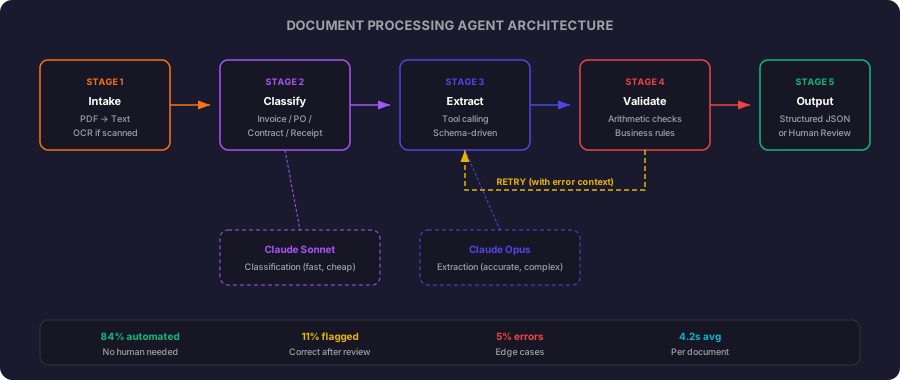
The agent processes documents through five stages:
- Intake. PDF arrives, text is extracted (OCR if needed)
- Classification. Agent determines document type (invoice, contract, purchase order, receipt)
- Extraction. Agent pulls structured fields based on document type
- Validation. Business rules check the extracted data, flag anomalies
- Output. Structured JSON written to downstream system
Each stage can fail independently, and the agent handles failures by retrying with additional context or escalating to human review.
Stage 1: Intake and Text Extraction
Before the LLM sees anything, we need clean text from the PDF. PyMuPDF handles both text extraction and table detection:
import fitz
from pathlib import Path


def extract_text(pdf_path: Path) -> dict:
    doc = fitz.open(pdf_path)
    pages = []

    for page_num, page in enumerate(doc):
        text = page.get_text()
        tables = _extract_tables(page)

        pages.append({
            "page_number": page_num + 1,
            "text": text,
            "tables": tables,
            "has_tables": len(tables) > 0,
        })

    doc.close()

    return {
        "filename": pdf_path.name,
        "page_count": len(pages),
        "pages": pages,
        "full_text": "\n\n".join(p["text"] for p in pages),
        "tables": [t for p in pages for t in p["tables"]],
    }


def _extract_tables(page) -> list[str]:
    tables = page.find_tables()
    extracted = []

    for table in tables:
        df = table.to_pandas()
        extracted.append(df.to_markdown(index=False))

    return extracted
Tables in PDFs lose their structure when converted to plain text. PyMuPDF’s table detection preserves the grid layout, which gives the LLM much better context for extraction. We convert them to markdown tables so the model can parse rows and columns reliably.
The LLM Abstraction
Before we get to classification, a quick note on the provider layer. The project supports both Anthropic and OpenAI through a thin wrapper in llm/client.py:
from doc_agent.llm import create_message

response = create_message(
    model="claude-sonnet-4-6-20250514",
    max_tokens=200,
    messages=[{"role": "user", "content": "..."}],
)

# response.text for plain text responses
# response.tool_input for tool calling responses
Set LLM_PROVIDER=openai in your environment and the same code routes to OpenAI models (Sonnet 4.6 maps to gpt-4o, Opus maps to gpt-4o with higher token limits). Tool calling schemas are converted automatically. The rest of this post shows the pipeline logic, which is identical regardless of provider.
Stage 2: Classification
The agent’s first job is determining what kind of document it is looking at. This determines which extraction schema to apply.
Every LLM call in this pipeline is wrapped in call_with_retry, which handles rate limits and transient errors with exponential backoff. We will implement it fully in the “Handling API Failures” section below. For now, just know that it retries on 429s, timeouts, and 5xx responses.
import json
from doc_agent.llm import create_message
from doc_agent.pipeline.retry import call_with_retry


def parse_json(text: str) -> dict:
    """Extract JSON from model response, handling markdown fences."""
    cleaned = text.strip()
    if cleaned.startswith("```"):
        cleaned = cleaned.split("\n", 1)[1].rsplit("```", 1)[0]
    return json.loads(cleaned)


CLASSIFICATION_PROMPT = """Classify this document into exactly one category.

Categories:
- invoice: A bill requesting payment for goods or services
- purchase_order: A buyer's request to a vendor for goods/services
- contract: A legal agreement between parties
- receipt: Proof of payment already made
- unknown: Does not fit any category above

Respond with a JSON object: {{"category": "...", "confidence": 0.0-1.0, "reasoning": "..."}}

Document text (first 3000 characters):
{text}"""


def classify_document(doc: dict) -> dict:
    text_preview = doc["full_text"][:3000]

    def _call():
        response = create_message(
            model="claude-sonnet-4-6-20250514",
            max_tokens=200,
            messages=[{
                "role": "user",
                "content": CLASSIFICATION_PROMPT.format(text=text_preview),
            }],
        )
        return parse_json(response.text)

    result = call_with_retry(_call)

    if result["confidence"] < 0.7:
        return _classify_with_full_context(doc)

    return result
Why a smaller model for classification? Classification is a constrained task. The document is clearly one thing or another in 95% of cases. A smaller model handles it reliably, responds in under a second, and costs a fraction of the larger models. We save the more capable model for extraction where nuance matters.
The confidence threshold of 0.7 triggers a retry with full document context. In practice, this catches edge cases like multi-page documents where the first 3000 characters are a cover page that gives no indication of document type.
Stage 3: Extraction with Tool Calling
This is where the agent earns its complexity. Different document types need different fields extracted. Rather than writing separate prompts for each, we define extraction schemas as tools and let the model call the appropriate one.
EXTRACTION_TOOLS = [
    {
        "name": "extract_invoice",
        "description": "Extract structured data from an invoice document",
        "input_schema": {
            "type": "object",
            "properties": {
                "vendor_name": {"type": "string", "description": "Company issuing the invoice"},
                "vendor_address": {"type": "string"},
                "invoice_number": {"type": "string"},
                "invoice_date": {"type": "string", "description": "ISO 8601 date"},
                "due_date": {"type": "string", "description": "ISO 8601 date"},
                "currency": {"type": "string", "description": "ISO 4217 currency code"},
                "line_items": {
                    "type": "array",
                    "items": {
                        "type": "object",
                        "properties": {
                            "description": {"type": "string"},
                            "quantity": {"type": "number"},
                            "unit_price": {"type": "number"},
                            "total": {"type": "number"},
                        },
                        "required": ["description", "quantity", "unit_price", "total"],
                    },
                },
                "subtotal": {"type": "number"},
                "tax_amount": {"type": "number"},
                "tax_rate": {"type": "number", "description": "Tax rate as percentage"},
                "total_amount": {"type": "number"},
                "payment_terms": {"type": "string"},
                "bank_details": {"type": "string"},
            },
            "required": ["vendor_name", "invoice_number", "invoice_date", "total_amount", "line_items"],
        },
    },
    {
        "name": "extract_purchase_order",
        "description": "Extract structured data from a purchase order",
        "input_schema": {
            "type": "object",
            "properties": {
                "buyer_name": {"type": "string"},
                "po_number": {"type": "string"},
                "issue_date": {"type": "string", "description": "ISO 8601 date"},
                "delivery_date": {"type": "string", "description": "ISO 8601 date"},
                "vendor_name": {"type": "string"},
                "shipping_address": {"type": "string"},
                "line_items": {
                    "type": "array",
                    "items": {
                        "type": "object",
                        "properties": {
                            "description": {"type": "string"},
                            "sku": {"type": "string"},
                            "quantity": {"type": "number"},
                            "unit_price": {"type": "number"},
                        },
                        "required": ["description", "quantity"],
                    },
                },
                "total_amount": {"type": "number"},
                "payment_terms": {"type": "string"},
                "notes": {"type": "string"},
            },
            "required": ["buyer_name", "po_number", "issue_date", "line_items"],
        },
    },
]
The extraction call uses the tool forcing pattern to ensure the model returns structured output:
from doc_agent.llm import create_message
from doc_agent.schemas import EXTRACTION_TOOLS
from doc_agent.pipeline.retry import call_with_retry


def extract_fields(doc: dict, doc_type: str) -> dict:
    tool_name = f"extract_{doc_type}"
    tool = next((t for t in EXTRACTION_TOOLS if t["name"] == tool_name), None)

    if tool is None:
        raise ValueError(f"No extraction schema for document type: {doc_type}")

    tables_text = "\n".join(doc.get("tables", []))

    def _call():
        response = create_message(
            model="claude-sonnet-4-6-20250514",
            max_tokens=4096,
            tools=[tool],
            tool_choice={"type": "tool", "name": tool_name},
            messages=[{
                "role": "user",
                "content": f"Extract all relevant fields from this {doc_type}.\n"
                           f"Be precise with numbers and dates. "
                           f"If a field is not present in the document, omit it.\n"
                           f"For line items, extract every row from the itemised table.\n\n"
                           f"Document:\n{doc['full_text']}\n\n"
                           f"Tables found in document:\n{tables_text}",
            }],
        )
        return response.tool_input

    return call_with_retry(_call)
Why tool_choice with forced tool use? Two reasons. First, it guarantees the response is valid JSON matching our schema, no parsing gymnastics. Second, it eliminates the “I’ll help you with that” preamble. The model goes directly to structured extraction.
Stage 4: Validation
Raw extraction output cannot be trusted blindly. We run a validation pass that catches common LLM errors:
from dataclasses import dataclass
from decimal import Decimal


@dataclass
class ValidationResult:
    valid: bool
    errors: list[str]
    warnings: list[str]


def validate_invoice(data: dict) -> ValidationResult:
    errors = []
    warnings = []

    # Line item totals must sum to subtotal
    if data.get("line_items") and data.get("subtotal"):
        computed_subtotal = sum(
            Decimal(str(item["total"])) for item in data["line_items"]
        )
        stated_subtotal = Decimal(str(data["subtotal"]))

        if abs(computed_subtotal - stated_subtotal) > Decimal("0.02"):
            errors.append(
                f"Line items sum to {computed_subtotal}, "
                f"but stated subtotal is {stated_subtotal}"
            )

    # Subtotal + tax should equal total
    if data.get("subtotal") and data.get("tax_amount") and data.get("total_amount"):
        expected_total = Decimal(str(data["subtotal"])) + Decimal(str(data["tax_amount"]))
        stated_total = Decimal(str(data["total_amount"]))

        if abs(expected_total - stated_total) > Decimal("0.02"):
            errors.append(
                f"Subtotal ({data['subtotal']}) + tax ({data['tax_amount']}) "
                f"!= total ({data['total_amount']})"
            )

    # Date sanity
    if data.get("due_date") and data.get("invoice_date"):
        if data["due_date"] < data["invoice_date"]:
            errors.append("Due date is before invoice date")

    # Tax rate sanity
    if data.get("tax_rate"):
        rate = data["tax_rate"]
        if rate > 30:
            warnings.append(f"Unusually high tax rate: {rate}%")
        if rate < 0:
            errors.append(f"Negative tax rate: {rate}%")

    # Invoice number format (catch hallucinated numbers)
    if data.get("invoice_number"):
        inv_num = data["invoice_number"]
        if len(inv_num) > 50:
            warnings.append(f"Unusually long invoice number: {inv_num}")

    return ValidationResult(
        valid=len(errors) == 0,
        errors=errors,
        warnings=warnings,
    )
The arithmetic checks are the most important. LLMs are unreliable at precise arithmetic, even when the numbers are right there in the document. A model might extract 9 of 10 line items correctly but miscopy one unit price, making the computed total diverge from the stated total. The validation catches this immediately.
The Retry Loop: Self-Correction
When validation fails, we do not discard the result. We send it back to the model with the specific errors and ask it to re-extract:
The retry orchestrator validates after each extraction and feeds errors back:
def _validate(doc_type: str, data: dict):
    if doc_type == "invoice":
        return validate_invoice(data)
    return validate_generic(data)


def extract_with_retry(doc: dict, doc_type: str, max_retries: int = 2) -> dict:
    result = extract_fields(doc, doc_type)

    for attempt in range(max_retries):
        validation = _validate(doc_type, result)

        if validation.valid:
            return {"data": result, "validation": validation, "attempts": attempt + 1}

        logger.info(f"Validation failed (attempt {attempt + 1}): {validation.errors}")
        result = _retry_extraction(doc, doc_type, result, validation.errors)

    validation = _validate(doc_type, result)

    if validation.valid:
        return {"data": result, "validation": validation, "attempts": max_retries + 1}

    return {
        "data": result,
        "validation": validation,
        "attempts": max_retries + 1,
        "needs_review": True,
    }
The retry function is where the multi-turn conversation happens. We include the previous extraction as an assistant message and the validation errors as a tool result, so the model knows exactly which fields to focus on:
def _retry_extraction(doc: dict, doc_type: str, previous: dict, errors: list[str]) -> dict:
    tool_name = f"extract_{doc_type}"
    tool = next(t for t in EXTRACTION_TOOLS if t["name"] == tool_name)

    error_context = "\n".join(f"- {e}" for e in errors)
    tables_text = "\n".join(doc.get("tables", []))

    def _call():
        response = create_message(
            model="claude-sonnet-4-6-20250514",
            max_tokens=4096,
            tools=[tool],
            tool_choice={"type": "tool", "name": tool_name},
            messages=[
                {
                    "role": "user",
                    "content": f"Extract all relevant fields from this {doc_type}.\n\n"
                               f"Document:\n{doc['full_text']}\n\n"
                               f"Tables:\n{tables_text}",
                },
                {
                    "role": "assistant",
                    "content": [
                        {"type": "tool_use", "id": "prev", "name": tool_name, "input": previous}
                    ],
                },
                {
                    "role": "user",
                    "content": [
                        {
                            "type": "tool_result",
                            "tool_use_id": "prev",
                            "content": f"Validation failed with these errors:\n{error_context}\n\n"
                                       f"Please re-extract, paying careful attention to the "
                                       f"specific fields mentioned in the errors. "
                                       f"Double-check all numbers against the original document.",
                        }
                    ],
                },
            ],
        )
        return response.tool_input

    return call_with_retry(_call)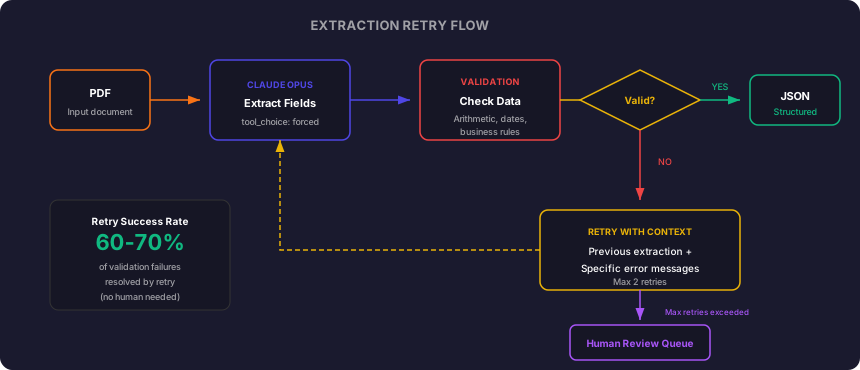
The retry uses multi-turn conversation to give the model context about what went wrong. By including the previous extraction as an assistant message and the validation errors as a tool result, the model understands exactly which fields to focus on. In production, this retry loop resolves 60-70% of validation failures without human intervention.
Stage 5: The Complete Pipeline
Bringing it all together into an orchestrator:
import json
import logging
from dataclasses import dataclass
from datetime import datetime, timezone
from pathlib import Path

from doc_agent.pipeline.intake import extract_text
from doc_agent.pipeline.classify import classify_document
from doc_agent.pipeline.extract import extract_with_retry

logger = logging.getLogger(__name__)


@dataclass
class ProcessingResult:
    filename: str
    document_type: str
    data: dict
    confidence: float
    processing_time_ms: int
    needs_review: bool
    review_reasons: list[str]


def elapsed_ms(start: datetime) -> int:
    return int((datetime.now(timezone.utc) - start).total_seconds() * 1000)


def process_document(pdf_path: Path) -> ProcessingResult:
    start = datetime.now(timezone.utc)

    doc = extract_text(pdf_path)

    classification = classify_document(doc)
    doc_type = classification["category"]

    if doc_type == "unknown":
        return ProcessingResult(
            filename=pdf_path.name,
            document_type="unknown",
            data={},
            confidence=classification["confidence"],
            processing_time_ms=elapsed_ms(start),
            needs_review=True,
            review_reasons=["Document could not be classified"],
        )

    extraction = extract_with_retry(doc, doc_type)

    review_reasons = []
    if extraction.get("needs_review"):
        review_reasons.append("Validation failed after max retries")
    if extraction["validation"].warnings:
        review_reasons.extend(extraction["validation"].warnings)
    if classification["confidence"] < 0.85:
        review_reasons.append(f"Low classification confidence: {classification['confidence']}")

    return ProcessingResult(
        filename=pdf_path.name,
        document_type=doc_type,
        data=extraction["data"],
        confidence=classification["confidence"],
        processing_time_ms=elapsed_ms(start),
        needs_review=bool(review_reasons),
        review_reasons=review_reasons,
    )
Running the Batch
For processing hundreds of documents, we run them concurrently with a thread pool, capped to avoid rate limits:
from concurrent.futures import ThreadPoolExecutor, as_completed


def process_batch(pdf_dir: Path, output_dir: Path, max_workers: int = 5):
    pdfs = list(pdf_dir.glob("*.pdf"))
    results = {"processed": [], "needs_review": [], "failed": []}

    with ThreadPoolExecutor(max_workers=max_workers) as executor:
        futures = {
            executor.submit(process_document, pdf): pdf
            for pdf in pdfs
        }

        for future in as_completed(futures):
            pdf = futures[future]
            try:
                result = future.result()

                output_file = output_dir / f"{pdf.stem}.json"
                output_file.write_text(json.dumps({
                    "filename": result.filename,
                    "document_type": result.document_type,
                    "data": result.data,
                    "confidence": result.confidence,
                    "processing_time_ms": result.processing_time_ms,
                    "needs_review": result.needs_review,
                    "review_reasons": result.review_reasons,
                }, indent=2))

                if result.needs_review:
                    results["needs_review"].append(result.filename)
                else:
                    results["processed"].append(result.filename)

                logger.info(
                    f"{result.filename}: {result.document_type} "
                    f"({result.processing_time_ms}ms) "
                    f"{'[REVIEW]' if result.needs_review else '[OK]'}"
                )

            except Exception as e:
                results["failed"].append({"file": pdf.name, "error": str(e)})
                logger.error(f"{pdf.name}: FAILED - {e}")

    return results
max_workers=5 is deliberate. LLM APIs have rate limits, and bursting 400 concurrent requests would hit them immediately. Five concurrent workers with typical extraction taking 3-5 seconds gives us throughput of roughly 60-100 documents per minute, which processes the full daily volume in under 7 minutes.
Production Numbers
After running this on a batch of ~400 documents per day for two weeks:
| Metric | Value |
|---|---|
| Documents processed daily | ~400 |
| Fully automated (no review) | 84% |
| Flagged for review (correct after review) | 11% |
| Actual extraction errors | 5% |
| Average processing time per document | 4.2 seconds |
| Cost per document (API usage) | ~$0.03 |
| Daily API cost | ~$12 |
The 5% error rate sounds high until you compare it to typical manual processing error rates (2-4% in most operations). The system catches most of its own errors through validation. The remaining 5% are edge cases like handwritten annotations, documents in mixed languages, or heavily damaged scans.
Sample Output
Here is what the pipeline produces for a typical invoice PDF:
{
  "filename": "INV-2026-0847.pdf",
  "document_type": "invoice",
  "data": {
    "vendor_name": "Nexus Cloud Solutions Pvt Ltd",
    "vendor_address": "42 Tech Park, Whitefield, Bengaluru 560066",
    "invoice_number": "NCS/2026/0847",
    "invoice_date": "2026-04-18",
    "due_date": "2026-05-18",
    "currency": "INR",
    "line_items": [
      {
        "description": "Cloud Infrastructure Consulting (April 2026)",
        "quantity": 40,
        "unit_price": 4500.00,
        "total": 180000.00
      },
      {
        "description": "AWS Architecture Review",
        "quantity": 1,
        "unit_price": 75000.00,
        "total": 75000.00
      },
      {
        "description": "Terraform Module Development",
        "quantity": 16,
        "unit_price": 5000.00,
        "total": 80000.00
      }
    ],
    "subtotal": 335000.00,
    "tax_rate": 18,
    "tax_amount": 60300.00,
    "total_amount": 395300.00,
    "payment_terms": "Net 30",
    "bank_details": "HDFC Bank, A/C 50100123456789, IFSC HDFC0001234"
  },
  "confidence": 0.94,
  "processing_time_ms": 3847,
  "needs_review": false,
  "review_reasons": []
}
Every field is typed, validated, and ready for downstream systems. The line items sum correctly (335000), tax at 18% checks out (60300), and subtotal + tax equals the stated total (395300). If any of those arithmetic checks failed, the retry loop would have fired.
Handling API Failures
The extraction code above assumes the API always responds. In production, you will hit rate limits, timeouts, and transient network errors. These are different from validation retries. Validation retries send a new prompt because the output was wrong. API retries resend the same request because the request never completed.
The call_with_retry function wraps every API call in the pipeline. It uses string matching on the error message to stay provider-agnostic (works with both Anthropic and OpenAI errors):
import time
import logging

logger = logging.getLogger(__name__)


def call_with_retry(fn, max_attempts=3, base_delay=2):
    for attempt in range(max_attempts):
        try:
            return fn()
        except Exception as e:
            err_str = str(e).lower()
            is_retryable = any(k in err_str for k in ["rate", "timeout", "500", "502", "503"])
            if is_retryable and attempt < max_attempts - 1:
                delay = base_delay * (2 ** attempt)
                logger.warning(f"Retryable error: {e}. Waiting {delay}s.")
                time.sleep(delay)
            else:
                raise

    raise RuntimeError(f"API call failed after {max_attempts} attempts")
You already saw this used in the classification and extraction functions above. Every LLM call is wrapped:
def _call():
    response = create_message(...)
    return response.tool_input

return call_with_retry(_call)
Exponential backoff is critical. If you hit a rate limit and immediately retry, you will get rate limited again. Doubling the wait time (2s, 4s, 8s) gives the API time to recover. For the batch processor running 5 concurrent workers, rate limits are the most common transient failure.
Why Build This Instead of Using AWS Textract or Google Document AI?
Fair question. Managed document processing services exist and work well for certain use cases. Here is when each approach makes sense.
Use managed services (Textract, Document AI, Azure Form Recognizer) when:
- Your documents follow a small set of known formats (e.g., only receipts, only W-2 forms)
- You want zero code for basic extraction (key-value pairs, tables)
- Volume is low enough that per-page pricing ($0.01-0.05/page) stays reasonable
- You do not need custom validation logic
Build your own agent (this approach) when:
- Documents come from dozens of vendors in different layouts
- You need custom extraction schemas that change over time
- Validation rules are business-specific (cross-field checks, domain constraints)
- You want to control the retry and escalation logic
- Cost at volume matters: at 400 documents/day, Textract costs ~$120-600/month depending on features used. This pipeline costs ~$360/month but gives you full control over accuracy and output format
- You need the same pipeline to handle new document types without retraining a managed model
In practice, we sometimes use both. Textract for raw table extraction (it is excellent at detecting table grids), then pass that structured text to Claude for semantic extraction and validation. Textract solves the layout problem, Claude solves the understanding problem.
Testing the Pipeline
You cannot ship a document processing system without a test suite. LLM outputs are non-deterministic, so you need a golden dataset approach.
Build a golden set: Take 20-30 documents across all types. Process them manually and record the correct extraction for each one. Store these as JSON fixtures.
# test_extraction.py
import json
from pathlib import Path


GOLDEN_DIR = Path("tests/golden")


def test_invoice_extraction():
    pdf_path = GOLDEN_DIR / "invoice-nexus-0847.pdf"
    expected = json.loads((GOLDEN_DIR / "invoice-nexus-0847.expected.json").read_text())

    result = process_document(pdf_path)

    # Check critical fields exactly
    assert result.data["invoice_number"] == expected["invoice_number"]
    assert result.data["total_amount"] == expected["total_amount"]
    assert result.data["vendor_name"] == expected["vendor_name"]

    # Check line item count
    assert len(result.data["line_items"]) == len(expected["line_items"])

    # Check arithmetic passes
    assert result.needs_review is False


def test_classification_accuracy():
    correct = 0
    total = 0

    for expected_file in GOLDEN_DIR.glob("*.expected.json"):
        expected = json.loads(expected_file.read_text())
        pdf_path = GOLDEN_DIR / expected_file.name.replace(".expected.json", ".pdf")

        if pdf_path.exists():
            result = process_document(pdf_path)
            if result.document_type == expected["document_type"]:
                correct += 1
            total += 1

    accuracy = correct / total
    assert accuracy >= 0.90, f"Classification accuracy {accuracy:.0%} below 90% threshold"
Run these as part of your CI pipeline. If a model update or prompt change causes accuracy to drop, you catch it before production. The key insight: do not assert exact string matches on every field. LLMs may format addresses or dates slightly differently between runs. Assert on critical fields (amounts, IDs, dates) and use fuzzy matching on freeform text fields.
What I Would Change
Add vision input for scanned documents. This version uses text extraction as the primary approach. Claude’s vision capability can now process document images directly. For scanned documents with complex layouts (tables spanning pages, watermarks interfering with text), sending the page image directly produces better results than OCR text. The next iteration will use vision for scanned documents while keeping text extraction for digital PDFs (faster, cheaper).
Add confidence scores per field. Currently the model returns extracted values without indicating certainty. A future version would ask the model to score each field’s confidence, letting us flag specific fields for review rather than entire documents.
Stream results to a queue. The batch processor writes to files. In production, each result should go to an SQS queue or event stream for downstream consumption. This decouples processing speed from consumption speed and enables retry without reprocessing.
Add document deduplication. The same invoice arrives via email and via a supplier portal. Without deduplication, both get processed and create duplicate records downstream. A hash of key fields (vendor + invoice number + total) catches exact duplicates. Fuzzy matching catches near-duplicates from slightly different scans.
Try It Yourself
Clone the repo and process the included sample invoice:
git clone https://github.com/taatal/blog-code.git
cd blog-code/ai/doc-agent
python -m venv .venv
source .venv/bin/activate
pip install -e .
export ANTHROPIC_API_KEY="sk-ant-..."

doc-agent --file ./documents/sample-invoice.pdf
This runs the full pipeline (classify, extract, validate) on a single document and prints the structured JSON output. To process a batch, point --input at a folder of PDFs.
The project also works with OpenAI. Set LLM_PROVIDER=openai and your OpenAI key instead.
What You Have Built
At this point you have:
- A text extraction layer that handles both digital and scanned PDFs
- A classification system that routes documents to the correct extraction schema
- Schema-driven extraction using LLM tool calling for guaranteed structured output
- Arithmetic validation that catches the most common LLM extraction errors
- A self-correcting retry loop that resolves 60-70% of failures without human help
- A batch processor that handles hundreds of documents concurrently
The total code is roughly 300 lines across 6 files. The entire system can run on a single machine, costs ~$0.03 per document, and processes at 60-100 documents per minute.
The Full Picture
Document processing agents are not magic. They are a composition of reliable pieces: good text extraction, constrained classification, schema-driven extraction, arithmetic validation, and a retry loop that gives the model a second chance with specific feedback.
The key insight: treat the LLM as one component in a pipeline, not the entire solution. The LLM handles the unstructured-to-structured conversion that is genuinely hard to do with rules. Everything else, text extraction, validation, retry logic, output formatting, is conventional software engineering. The agent is powerful because it combines both, not because it replaces one with the other.
The full source code is at github.com/taatal/blog-code/ai/doc-agent.