Build an MCP Server for Database Analytics
Building a production MCP server that lets AI assistants query your business database safely. Full Python implementation with FastMCP, read-only SQL execution, schema inspection tools, and analytics prompts.
Every data question is a context switch. A teammate in marketing asks what sold best last week. The ops lead wants to know the return rate by category. The CEO needs revenue numbers for the board deck. None of them can write SQL. You are the bottleneck. You stop what you are doing, write a query, format the results, paste them into Slack, and try to remember what you were working on.
This happens twenty times a day in most companies. The solution is not building a dashboard for every possible question. It is giving the AI assistant direct access to the database, with safety constraints that make it impossible to break anything.
That is what MCP does. You build one server, and every MCP-compatible AI client (Claude Desktop, Claude Code, Cursor, or your own applications) can query your data through natural language. This post is the full build.
The complete source code is on GitHub: taatal/blog-code/ai/db-mcp-server
What You Will Build
By the end of this post, you will have a working MCP server that:
- Exposes a business database to any MCP-compatible AI assistant
- Provides 10 tools: raw query execution, schema inspection, statistics, pre-built business metrics, and a dynamic data dictionary
- Publishes a sample query library as an MCP resource
- Includes prompt templates for monthly sales reports, trend analysis, and top-N rankings
- Enforces a safety layer that blocks all write operations, caps row limits, and times out slow queries
- Works with Claude Desktop (free tier), Claude Code, or any MCP client
You will run it from the command line:
db-mcp --db ./seed/sample.dbAnd in Claude Desktop, you will ask questions like “What were our top 5 products by revenue this month?” and get accurate answers pulled directly from your database.
What is MCP?
Model Context Protocol is an open standard for connecting AI applications to external data and tools. It defines three primitives: Tools (functions the AI can call), Resources (data it can read for context), and Prompts (reusable templates for analysis). The protocol uses JSON-RPC 2.0, with the server running either as a local subprocess (stdio transport) or a remote HTTP service.
The key value: you build one server, and it works with every MCP client. No custom integrations, no rebuilding when you switch tools. Claude Desktop, Claude Code, Cursor, Windsurf, and any custom application that speaks MCP can all use your server immediately.
Prerequisites
Python 3.11+. We use modern type hints and async/await.
python3 --versionProject setup:
git clone https://github.com/taatal/blog-code.git
cd blog-code/ai/db-mcp-server
python3 -m venv .venv
source .venv/bin/activate
pip install -e .
This installs the mcp SDK (v1.28+) and aiosqlite for async database access.
Generate the sample database. A pre-built sample.db is included in the repo, but you can regenerate it:
python3 seed/seed_data.pyThis creates a SQLite database with 500 customers, 200 products, 5000+ orders across 6 months of e-commerce data.
A free Claude account is enough to test with Claude Desktop. For production use with higher rate limits, Claude Pro or Max works better. The companion code is designed as a starting point. Swap the sample SQLite for your own PostgreSQL, MySQL, or any data source, point your MCP client at it, and it works.
Project Structure
db-mcp-server/
├── pyproject.toml
├── src/db_analytics_mcp/
│   ├── cli.py
│   ├── server.py
│   ├── config.py
│   ├── safety.py
│   ├── database.py
│   ├── formatting.py
│   ├── tools/
│   │   ├── query.py
│   │   ├── schema.py
│   │   ├── stats.py
│   │   └── metrics.py
│   ├── resources/
│   │   ├── data_dictionary.py
│   │   └── sample_queries.py
│   └── prompts/
│       ├── sales_report.py
│       ├── trend_analysis.py
│       └── top_n.py
├── seed/
│   ├── create_schema.sql
│   ├── seed_data.py
│   └── sample.db
├── tests/
│   ├── test_safety.py
│   ├── test_tools.py
│   └── test_client.py
└── claude_desktop_config.json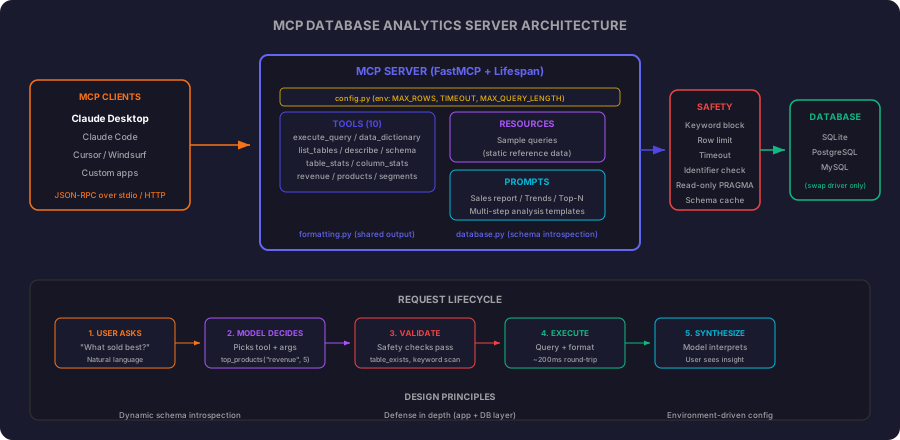
Stage 1: The Server Core
The foundation is a FastMCP server with a lifespan that manages the database connection. The lifespan pattern ensures the connection opens when the server starts and closes cleanly when it stops.
from contextlib import asynccontextmanager

from mcp.server.fastmcp import FastMCP

from db_analytics_mcp.config import load_safety_config
from db_analytics_mcp.database import Database


def create_server(db_path: str) -> FastMCP:

    @asynccontextmanager
    async def lifespan(server: FastMCP):
        config = load_safety_config()
        db = Database(db_path, config)
        await db.connect()
        try:
            yield {"db": db}
        finally:
            await db.close()

    mcp = FastMCP(
        "Database Analytics",
        instructions="Query and analyze business databases safely through natural language",
        lifespan=lifespan,
    )

    from db_analytics_mcp.tools.query import register as register_query
    from db_analytics_mcp.tools.schema import register as register_schema
    from db_analytics_mcp.tools.stats import register as register_stats
    from db_analytics_mcp.tools.metrics import register as register_metrics

    register_query(mcp)
    register_schema(mcp)
    register_stats(mcp)
    register_metrics(mcp)

    return mcp
The lifespan context manager yields a dictionary. This dictionary becomes available to every tool handler via ctx.request_context.lifespan_context["db"]. It is the MCP equivalent of dependency injection: the database connection lives for the server’s lifetime, and tools get it without managing connections themselves.
The load_safety_config() call reads configuration from environment variables (DB_MCP_MAX_ROWS, DB_MCP_TIMEOUT, DB_MCP_MAX_QUERY_LENGTH), falling back to sensible defaults. This means you can tune the safety constraints per deployment without changing code.
The CLI entry point is straightforward:
import argparse
from pathlib import Path


def main():
    parser = argparse.ArgumentParser(prog="db-mcp")
    parser.add_argument("--db", type=Path, default=Path("seed/sample.db"))
    parser.add_argument("--transport", choices=["stdio", "http"], default="stdio")
    parser.add_argument("--port", type=int, default=8000)

    args = parser.parse_args()
    server = create_server(str(args.db.resolve()))

    if args.transport == "stdio":
        server.run(transport="stdio")
    else:
        server.run(transport="streamable-http", host="0.0.0.0", port=args.port)
Stdio is the default because that is what Claude Desktop and Claude Code use. The HTTP transport is there for remote deployments and multi-user scenarios.
Stage 2: The Safety Layer
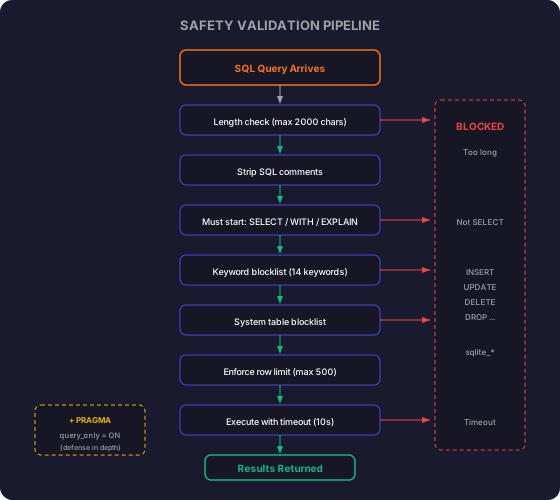
This is the most critical module in the project. An LLM will generate whatever SQL it thinks answers the question. Without guardrails, a creative model could produce DROP TABLE customers if it misunderstands the intent. The safety layer makes that impossible.
import re
from dataclasses import dataclass


BLOCKED_KEYWORDS = [
    "INSERT", "UPDATE", "DELETE", "DROP", "ALTER", "CREATE",
    "TRUNCATE", "REPLACE", "GRANT", "REVOKE", "ATTACH",
    "DETACH", "VACUUM", "REINDEX", "PRAGMA",
]

BLOCKED_TABLES = ["sqlite_master", "sqlite_sequence", "sqlite_stat1", "sqlite_stat4"]

ALLOWED_STARTERS = ["SELECT", "WITH", "EXPLAIN"]


@dataclass
class SafetyConfig:
    max_rows: int = 500
    timeout_seconds: float = 10.0
    max_query_length: int = 2000


@dataclass
class ValidationResult:
    safe: bool
    reason: str = ""


def validate_query(sql: str, config: SafetyConfig = SafetyConfig()) -> ValidationResult:
    if not sql or not sql.strip():
        return ValidationResult(safe=False, reason="Empty query")

    if len(sql) > config.max_query_length:
        return ValidationResult(
            safe=False,
            reason=f"Query exceeds maximum length of {config.max_query_length} characters",
        )

    cleaned = _strip_comments(sql)
    normalized = _normalize(cleaned).strip()

    if not normalized:
        return ValidationResult(safe=False, reason="Query is empty after removing comments")

    upper = normalized.upper()

    first_word = upper.split()[0] if upper.split() else ""
    if first_word not in ALLOWED_STARTERS:
        return ValidationResult(
            safe=False,
            reason=f"Query must start with SELECT, WITH, or EXPLAIN. Got: {first_word}",
        )

    for keyword in BLOCKED_KEYWORDS:
        pattern = rf"\b{keyword}\b"
        if re.search(pattern, upper):
            if keyword == "REPLACE" and "REPLACE(" in upper:
                continue
            return ValidationResult(safe=False, reason=f"Blocked keyword detected: {keyword}")

    for table in BLOCKED_TABLES:
        if table.lower() in normalized.lower():
            return ValidationResult(safe=False, reason=f"Access to system table blocked: {table}")

    return ValidationResult(safe=True)
Seven checks in sequence:
- Empty query. Reject immediately.
- Length limit. Prevents prompt injection via extremely long queries. 2000 characters is generous for analytics but stops abuse.
- Comment stripping. Remove
--and/* */comments. A model might hide malicious keywords inside comments to confuse pattern matching. - Statement type. Only SELECT, WITH (CTEs), and EXPLAIN are allowed. Everything else is rejected before we even check for keywords.
- Keyword blocklist. Catches INSERT, UPDATE, DELETE, DROP, and 10 other write/admin operations. Uses word boundaries (
\b) so legitimate column names containing these substrings pass through. - System table access. Blocks queries against sqlite_master and friends. No schema enumeration through raw queries (we provide dedicated tools for that).
- REPLACE function exception. The SQL function
REPLACE('hello', 'h', 'H')is safe. We only block theREPLACE INTOstatement.
The row limit enforcement is separate. It runs after validation:
def enforce_row_limit(sql: str, max_rows: int = 500) -> str:
    upper = sql.strip().upper()

    limit_match = re.search(r"\bLIMIT\s+(\d+)", upper)
    if limit_match:
        existing_limit = int(limit_match.group(1))
        if existing_limit > max_rows:
            sql = re.sub(r"\bLIMIT\s+\d+", f"LIMIT {max_rows}", sql, flags=re.IGNORECASE)
        return sql

    sql = sql.rstrip().rstrip(";")
    return f"{sql} LIMIT {max_rows}"
The logic respects existing LIMIT clauses that fall within bounds, caps absurdly high ones, and injects a default LIMIT when none is present. This prevents accidental full-table scans from returning millions of rows to the model context.
Defense in depth: SQLite’s PRAGMA query_only = ON is set at connection time. Even if the safety layer has a bug, the database itself will reject writes. Two independent layers, both blocking the same class of operations.
Stage 3: Query and Schema Tools
These are the foundational tools. The AI will reach for them on almost every question.
The Query Tool
from mcp.server.fastmcp import FastMCP, Context

from db_analytics_mcp.formatting import format_result


def register(mcp: FastMCP):

    @mcp.tool()
    async def execute_query(sql: str, ctx: Context) -> str:
        """Execute a read-only SQL query against the database.

        Only SELECT statements are allowed. Write operations (INSERT, UPDATE,
        DELETE, DROP) are blocked. Results are limited to 500 rows.

        Args:
            sql: A SELECT query to execute against the database.
        """
        db = ctx.request_context.lifespan_context["db"]
        result = await db.execute_safe_query(sql)

        if "error" in result:
            return f"Query blocked or failed: {result['error']}"

        return format_result(
            result["columns"],
            result["rows"],
            result["row_count"],
            result.get("truncated", False),
        )
The @mcp.tool() decorator registers this function with the MCP server. FastMCP injects the Context parameter automatically at call time. The type annotations on sql: str generate the tool’s input schema, which the AI reads when deciding what arguments to provide.
The docstring serves double duty: it is the tool description the AI reads when deciding which tool to call, and it documents the constraints for human developers. Stating “Only SELECT statements are allowed” in the tool description steers the model away from generating write queries before the safety layer even needs to intervene.
Schema Inspection Tools
from db_analytics_mcp.formatting import format_table


@mcp.tool()
async def list_tables(ctx: Context) -> str:
    """List all tables in the database with their row counts.

    Use this to understand what data is available before writing queries.
    """
    db = ctx.request_context.lifespan_context["db"]
    tables = await db.get_tables()

    if not tables:
        return "No tables found in the database."

    return format_table(["name", "row_count"], tables)


@mcp.tool()
async def describe_table(table_name: str, ctx: Context) -> str:
    """Show the columns, types, and constraints for a specific table.

    Args:
        table_name: The name of the table to describe.
    """
    db = ctx.request_context.lifespan_context["db"]

    if not await db.table_exists(table_name):
        return f"Table '{table_name}' not found."

    columns = await db.get_table_schema(table_name)
    fks = await db.get_foreign_keys(table_name)

    display_rows = [
        {
            "column": col["name"],
            "type": col["type"],
            "nullable": "YES" if col["nullable"] else "NO",
            "pk": "*" if col["primary_key"] else "",
        }
        for col in columns
    ]

    output = f"Table: {table_name}\n\n"
    output += format_table(["column", "type", "nullable", "pk"], display_rows)

    if fks:
        output += "\n\nRelationships:\n"
        for fk in fks:
            output += f"  {fk['from']} -> {fk['table']}.{fk['to']}\n"

    return output
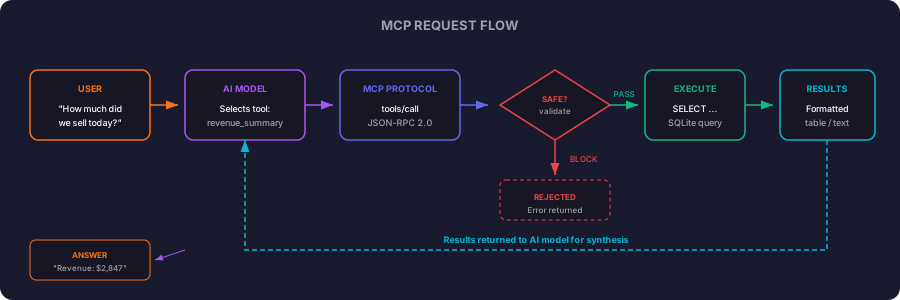
The model’s typical workflow: call list_tables to orient itself, call describe_table on the relevant tables to understand the columns, then compose and execute a query via execute_query. These three tools together give the model everything it needs to answer arbitrary data questions without any prior knowledge of your schema.
Stage 4: Business Metric Tools
Raw SQL covers every question, but it requires the model to compose complex JOINs every time. For the questions people ask repeatedly (revenue, top products, customer breakdown), purpose-built metric tools are faster and more reliable.
from db_analytics_mcp.formatting import format_table

VALID_PERIODS = {"daily", "weekly", "monthly"}
VALID_PRODUCT_METRICS = {"revenue", "quantity", "orders"}


@mcp.tool()
async def revenue_summary(period: str, last_n: int, ctx: Context) -> str:
    """Get revenue summary grouped by time period.

    Args:
        period: Grouping period. One of: daily, weekly, monthly.
        last_n: Number of periods to return (e.g., 6 for last 6 months).
    """
    if period not in VALID_PERIODS:
        return f"Invalid period: '{period}'. Must be one of: {', '.join(sorted(VALID_PERIODS))}."

    db = ctx.request_context.lifespan_context["db"]

    if not await db.table_exists("orders"):
        return "Required table 'orders' not found in this database."

    group_expressions = {
        "daily": "order_date",
        "weekly": "strftime('%Y-W%W', order_date)",
        "monthly": "strftime('%Y-%m', order_date)",
    }
    group_expr = group_expressions[period]
    last_n = min(max(1, last_n), 365)

    result = await db.execute_safe_query(
        f"SELECT {group_expr} as period, "
        f"COUNT(*) as orders, "
        f"ROUND(SUM(total_amount), 2) as revenue, "
        f"ROUND(AVG(total_amount), 2) as avg_order_value, "
        f"COUNT(DISTINCT customer_id) as unique_customers "
        f"FROM orders WHERE status = 'completed' "
        f"GROUP BY {group_expr} ORDER BY period DESC LIMIT {last_n}"
    )

    if "error" in result:
        return f"Query failed: {result['error']}"

    if not result["rows"]:
        return "No completed orders found for the specified period."

    header = f"Revenue Summary ({period}, last {last_n} periods)\n\n"
    return header + format_table(result["columns"], result["rows"])


@mcp.tool()
async def top_products(metric: str, limit: int, ctx: Context) -> str:
    """Get top products ranked by a metric.

    Args:
        metric: Ranking metric. One of: revenue, quantity, orders.
        limit: Number of products to return (max 50).
    """
    if metric not in VALID_PRODUCT_METRICS:
        return f"Invalid metric: '{metric}'. Must be one of: {', '.join(sorted(VALID_PRODUCT_METRICS))}."

    db = ctx.request_context.lifespan_context["db"]

    for table in ("orders", "order_items", "products", "categories"):
        if not await db.table_exists(table):
            return f"Required table '{table}' not found in this database."

    limit = min(max(1, limit), 50)

    aggregations = {
        "revenue": "ROUND(SUM(oi.total), 2)",
        "quantity": "ROUND(SUM(oi.quantity), 0)",
        "orders": "COUNT(DISTINCT oi.order_id)",
    }
    agg = aggregations[metric]

    result = await db.execute_safe_query(
        f"SELECT p.name as product, c.name as category, {agg} as {metric} "
        f"FROM order_items oi "
        f"JOIN products p ON oi.product_id = p.id "
        f"JOIN categories c ON p.category_id = c.id "
        f"JOIN orders o ON oi.order_id = o.id "
        f"WHERE o.status = 'completed' "
        f"GROUP BY p.id ORDER BY {metric} DESC LIMIT {limit}"
    )

    if "error" in result:
        return f"Query failed: {result['error']}"

    if not result["rows"]:
        return "No product data found."

    header = f"Top {limit} Products by {metric.title()}\n\n"
    return header + format_table(result["columns"], result["rows"])


@mcp.tool()
async def customer_segments(ctx: Context) -> str:
    """Segment customers by purchase frequency and total spending.

    Returns segments with counts and average metrics for each tier.
    """
    db = ctx.request_context.lifespan_context["db"]

    if not await db.table_exists("customers"):
        return "Required table 'customers' not found in this database."

    has_segment = await db.column_exists("customers", "segment")
    if not has_segment:
        return "Column 'segment' not found in customers table."

    result = await db.execute_safe_query(
        "SELECT segment, "
        "COUNT(*) as customers, "
        "ROUND(AVG(total_spent), 2) as avg_spent, "
        "ROUND(SUM(total_spent), 2) as total_revenue, "
        "ROUND(SUM(total_spent) * 100.0 / (SELECT SUM(total_spent) FROM customers), 1) as revenue_pct "
        "FROM customers GROUP BY segment ORDER BY avg_spent DESC"
    )

    if "error" in result:
        return f"Query failed: {result['error']}"

    if not result["rows"]:
        return "No customer data found."

    return "Customer Segments\n\n" + format_table(result["columns"], result["rows"])
A fair question: why build these at all when execute_query can already run any SELECT? The model could compose SQL from scratch every time. In practice, that approach breaks down for three reasons.
First, reliability. A pre-built revenue_summary always produces the correct query. An AI composing a 4-table JOIN from scratch may forget the WHERE status = 'completed' filter, group at the wrong level, or include cancelled orders in revenue. The more complex the query, the higher the error rate. Pre-built tools encode your business logic once and guarantee it runs correctly every time.
Second, consistency of interpretation. Your metric tools define what “revenue” means in your business: completed orders only, tax included, discounts subtracted. Without them, the model makes those definitional choices itself, possibly differently on each invocation. Two people asking “what was revenue last month” should always get the same answer.
Third, efficiency. Calling top_products(metric="revenue", limit=5) is one tool call with simple parameters. Without it, the model needs to call list_tables, then describe_table on three tables, then compose and execute a multi-JOIN query. That is four round-trips and more opportunities for error.
The execute_query tool exists as an escape hatch for ad-hoc questions, follow-up explorations, and anything the pre-built tools do not cover. Think of it as the difference between a well-designed API with named endpoints and a raw SQL console. You could run everything through the console, but the named endpoints are faster, safer, and more predictable.
Stage 5: Data Dictionary, Resources, and Prompts
Resources give the AI static contextual information. Prompts provide templates for common analysis patterns. The data dictionary bridges both: it is a tool that dynamically introspects the schema so the model always has accurate metadata.
Data Dictionary Tool
@mcp.tool()
async def get_data_dictionary(ctx) -> str:
    """Get the complete data dictionary for the connected database.

    Returns table names, column types, nullable flags, primary keys,
    and foreign key relationships. Auto-generated from the live schema.
    """
    db = ctx.request_context.lifespan_context["db"]
    return await db.generate_data_dictionary()
The data dictionary is a tool rather than a static resource because it needs live database access to introspect the schema at call time. The generate_data_dictionary() method queries PRAGMA table_info and PRAGMA foreign_key_list for every table, then produces a markdown document with column types, nullable flags, primary keys, and foreign key relationships. This means the output stays accurate regardless of which database you connect, and it reflects the current schema every time the model calls it.
Prompt Templates
@mcp.prompt()
async def monthly_sales_report(month: str = "current") -> str:
    """Generate a comprehensive monthly sales report.

    Args:
        month: Which month to analyze. Use 'current' for this month, or YYYY-MM.
    """
    return f"""Analyze the sales data for {month}. Use the available database tools to:

1. Total revenue and order count for the period
2. Comparison to the previous period (growth/decline percentage)
3. Top 5 products by revenue
4. Revenue breakdown by category
5. Payment method distribution
6. Customer segments contributing most revenue
7. Any notable daily patterns or anomalies

Format as a structured executive summary with key metrics at the top."""
Prompts differ from tools in a fundamental way. Tools execute logic and return data. Prompts expand into instructions that guide the model through a multi-step analysis. When a user selects the “monthly sales report” prompt in Claude Desktop, the model receives these instructions and orchestrates the relevant tool calls itself, gathering data and synthesizing a complete report without further user input.
Stage 6: The Sample Database
The companion database simulates a generic e-commerce store with 6 months of realistic transaction data.
CREATE TABLE customers (
    id INTEGER PRIMARY KEY,
    name TEXT NOT NULL,
    email TEXT,
    city TEXT NOT NULL,
    country TEXT NOT NULL,
    segment TEXT CHECK(segment IN ('regular', 'silver', 'gold', 'platinum')),
    created_at TEXT NOT NULL,
    total_spent REAL DEFAULT 0
);

CREATE TABLE orders (
    id INTEGER PRIMARY KEY,
    order_number TEXT UNIQUE NOT NULL,
    customer_id INTEGER REFERENCES customers(id),
    order_date TEXT NOT NULL,
    status TEXT CHECK(status IN ('completed', 'returned', 'cancelled')),
    subtotal REAL NOT NULL,
    tax_amount REAL NOT NULL,
    discount_amount REAL DEFAULT 0,
    total_amount REAL NOT NULL,
    payment_method TEXT CHECK(payment_method IN ('credit_card', 'paypal', 'bank_transfer', 'wallet'))
);
The full schema includes categories, products, order_items, and a pre-aggregated daily_summary table. The seed script generates:
- 500 customers across 20 international cities
- 200 products across 10 categories (Electronics, Fashion, Home, Sports, etc.)
- 5000+ orders with realistic patterns: credit card as dominant payment (~45%), Black Friday/holiday spikes, 5-8% return rate
- Customer segmentation by lifetime spending (platinum/gold/silver/regular)
Why SQLite? Zero setup. No server to install, no connection strings to configure. The database is a single file you can commit to git. Readers clone the repo and run immediately. In production, swap aiosqlite for asyncpg (PostgreSQL) or aiomysql and change the connection string. The MCP layer stays identical.
Running the Server
Start the server in stdio mode (for Claude Desktop / Claude Code):
db-mcp --db ./seed/sample.dbFor HTTP transport (remote access, multi-user):
db-mcp --db ./seed/sample.db --transport http --port 8000Claude Desktop Configuration
Add this to your Claude Desktop config file (claude_desktop_config.json):
{
  "mcpServers": {
    "db-analytics": {
      "command": "/absolute/path/to/db-mcp-server/.venv/bin/python3",
      "args": ["-m", "db_analytics_mcp", "--db", "/absolute/path/to/db-mcp-server/seed/sample.db"],
      "env": {}
    }
  }
}
On macOS, the config file is at ~/Library/Application Support/Claude/claude_desktop_config.json. On Windows, it is %APPDATA%\Claude\claude_desktop_config.json.
The command must point to the venv python where db-analytics-mcp is installed. Replace the paths with absolute paths to your clone. Restart Claude Desktop. The “Database Analytics” server will appear in the MCP tools panel.
Claude Code Configuration
For Claude Code, register the server via CLI from the project directory:
cd blog-code/ai/db-mcp-server
claude mcp add db-analytics .venv/bin/python3 -- -m db_analytics_mcp --db /absolute/path/to/seed/sample.db
Or add it manually to .claude/settings.json in your working directory:
{
  "mcpServers": {
    "db-analytics": {
      "command": "/absolute/path/to/db-mcp-server/.venv/bin/python3",
      "args": ["-m", "db_analytics_mcp", "--db", "/absolute/path/to/db-mcp-server/seed/sample.db"]
    }
  }
}
The command must point to the venv python where db-analytics-mcp is installed. Restart Claude Code after adding the config. Run /mcp to verify the server appears.
Sample Interaction
Here is what a real conversation looks like once the server is connected:
User: “What were our top 5 products by revenue this month?”
Claude calls: top_products(metric="revenue", limit=5)
Response:
Top 5 Products by Revenue

#   Product                       Category       | Revenue
--- ---                           ---            | ---
1   Portable Monitor 15.6in       Electronics    | 4199.79
2   Smart Watch Fitness Tracker   Electronics    | 3899.74
3   Mechanical Keyboard RGB       Electronics    | 3509.73
4   Document Scanner              Office Supplies| 2999.80
5   Noise Cancelling Earbuds      Electronics    | 2879.76
Claude synthesizes: “Electronics dominates the top 5 this month, with the Portable Monitor leading at $4,199.79 in revenue. Only one non-electronics product (Document Scanner) made the list. This suggests either a strong electronics promotion or seasonal buying pattern.”
User: “What’s the return rate by category?”
Claude calls: execute_query(sql="SELECT c.name as category, COUNT(CASE WHEN o.status = 'returned' THEN 1 END) as returns, COUNT(*) as total, ROUND(COUNT(CASE WHEN o.status = 'returned' THEN 1 END) * 100.0 / COUNT(*), 1) as return_rate FROM orders o JOIN order_items oi ON oi.order_id = o.id JOIN products p ON oi.product_id = p.id JOIN categories c ON p.category_id = c.id GROUP BY c.name ORDER BY return_rate DESC")
The model composed that query by reading the schema, understanding the table relationships, and building the correct JOIN chain. The safety layer validated it (SELECT, no blocked keywords), enforced the row limit, and executed it.
Production Considerations
| Metric | Value |
|---|---|
| Average query response time | ~200ms |
| Safety check overhead | <5ms |
| Queries blocked (write attempts) | 100% |
| Row limit enforcement | 500 rows max |
| Concurrent connections | 1 (SQLite limitation) |
| Memory footprint | ~30MB |
| Setup time (clone to running) | <3 minutes |
Taking It Further
The companion code is a working foundation, not a finished product. Here is how to take it into production:
Connect your own database. Replace the Database class internals with your connection library. For PostgreSQL, use asyncpg. For MySQL, use aiomysql. The MCP tools stay identical because they interact through the Database interface, not directly with a specific driver.
Add authentication. For HTTP transport in production, add bearer token validation. The MCP SDK supports auth settings out of the box for OAuth and API key patterns.
Scale to multiple users. SQLite is single-writer. For concurrent access, use PostgreSQL and increase the connection pool. The server architecture scales to hundreds of concurrent users with a proper database backend.
About Claude tiers. The free Claude account works for testing and exploration. Claude Pro or Max removes rate limits and gives faster responses, which matters if you are using this as a daily tool. The code works identically across all tiers.
Why MCP and Not a REST API or LangChain?
| Approach | Pros | Cons |
|---|---|---|
| MCP Server | Standard protocol, works with any MCP client, no custom UI needed, model decides when to call tools | Requires MCP-compatible client |
| REST API + Chat UI | Full control over UX, works in any browser | Need to build frontend, auth, rate limiting, conversation state |
| LangChain / LlamaIndex | Rich ecosystem, many pre-built components | Heavy dependency, Python-only clients, tightly coupled to one provider |
MCP wins when you want the AI to decide when and how to query data. You do not build a chat interface. You do not manage conversation state. The protocol handles discovery, the model handles reasoning, and your server handles execution. The separation is clean.
Testing
The safety layer has 24 unit tests covering every blocked keyword, edge cases (keywords inside strings, CTEs, system tables), and the row limit logic:
def test_blocks_delete(self):
    result = validate_query("DELETE FROM orders WHERE id = 1")
    assert result.safe is False
    assert "DELETE" in result.reason

def test_allows_replace_function(self):
    result = validate_query("SELECT REPLACE(name, ' ', '_') FROM customers")
    assert result.safe is True

def test_caps_high_limit(self):
    result = enforce_row_limit("SELECT * FROM orders LIMIT 9999")
    assert "LIMIT 500" in result
The integration test connects as an actual MCP client over stdio, calls every tool, and validates responses:
python3 tests/test_client.pyThis verifies the full stack: server startup, lifespan management, tool registration, safety validation, SQL execution, and result formatting. No Claude account needed.
Run all tests:
pytest tests/test_safety.py tests/test_tools.py -vWhat I Would Change
Add PostgreSQL and MySQL support. The Database class is already an abstraction. Adding async drivers for other databases is straightforward. A --driver CLI flag and connection string would make it production-ready for any backend.
Add query caching. Analytical queries on slow-changing data produce the same results for minutes or hours. An LRU cache keyed on the SQL string (with TTL) would eliminate redundant database hits.
Add write tools with human approval. For operations like “update customer segment” or “mark order as shipped”, expose write tools that require explicit user confirmation before executing. MCP supports this through the elicitation flow.
Add a visualization tool. A tool that takes query results and generates a chart (as an SVG or a markdown table with sparklines) would make the analytics output significantly more useful for executive reporting.
Stream large results. For queries returning hundreds of rows, streaming the results in chunks rather than buffering everything in memory would reduce latency to first byte.
Try It Yourself
git clone https://github.com/taatal/blog-code.git
cd blog-code/ai/db-mcp-server
python3 -m venv .venv
source .venv/bin/activate
pip install -e .

python3 seed/seed_data.py
pytest tests/ -v
python3 tests/test_client.py

db-mcp --db ./seed/sample.db
Configure Claude Desktop with the JSON config shown above, restart it, and start asking questions about your data.
The Full Picture
An MCP server is a controlled bridge between natural language and structured data. The model handles translation from intent to SQL. Your server handles execution, safety, and formatting. The protocol handles discovery and transport.
The key architectural decision here is isolating the safety layer from the execution layer. The safety module knows nothing about MCP, databases, or tools. It takes a string and returns a verdict. That isolation makes it independently testable, independently auditable, and reusable across contexts. The same validate_query function works whether it is called from an MCP tool, a REST endpoint, or a batch job.
The total implementation is under 1000 lines across 16 source files. It installs in under a minute, runs on a single machine, and turns any SQLite database into a conversational analytics layer. Fork it, point it at your own data, and the next time someone asks “how much did we sell last week,” the answer comes from the AI, not from you.
The full source code is at github.com/taatal/blog-code/ai/db-mcp-server.