Integrating Adobe Firefly Services into Your AEM Content Pipeline
A practitioner's guide to connecting Firefly's generative AI APIs with AEM Assets as a Cloud Service. Architecture patterns, working code, and honest notes on where this helps and where it falls short.
Every enterprise content team I have worked with hits the same bottleneck. Marketing needs 60 banner variants for a campaign launch. Creative produces 12. The remaining 48 sit in a queue while deadlines slide.
The constraint is never distribution. AEM handles that well. The constraint is generation. Getting net-new visual assets created, tagged, approved, and uploaded to the DAM fast enough to keep pace with channel demand.
Adobe Firefly Services is the API layer that addresses this. Not as a replacement for creative teams, but as a programmatic generation capability that sits upstream of your DAM and feeds assets into the same governance pipeline that everything else goes through.
This post covers the architecture for connecting Firefly’s generation APIs to AEM Assets as a Cloud Service. Real endpoints, working code, and the operational constraints you will hit in production. By the end, you will have a pipeline that turns a campaign brief into 60+ governed, tagged assets in AEM without a single manual upload.
The complete source code is on GitHub: taatal/blog-code/adobe/firefly-aem-pipeline
What You Will Build
By the end of this post, you will understand:
- How OAuth Server-to-Server authentication works for Firefly and AEM
- How to call the Firefly generation API with proper rate limiting
- How AEM’s Direct Binary Upload protocol works (the three-step handshake most teams get wrong)
- How AEM Eventing removes the need for polling
- Where to draw the line between custom orchestration and AEM’s built-in capabilities
The companion code is a runnable pipeline. If you have Firefly Services entitlement and an AEM Cloud Service instance, you can clone it, plug in credentials, and validate the pattern against your own environment:
pip install -e .
firefly-aem --config config.json
Where Firefly Sits in the Content Supply Chain
Before writing any code, you need a clear picture of which system does what.
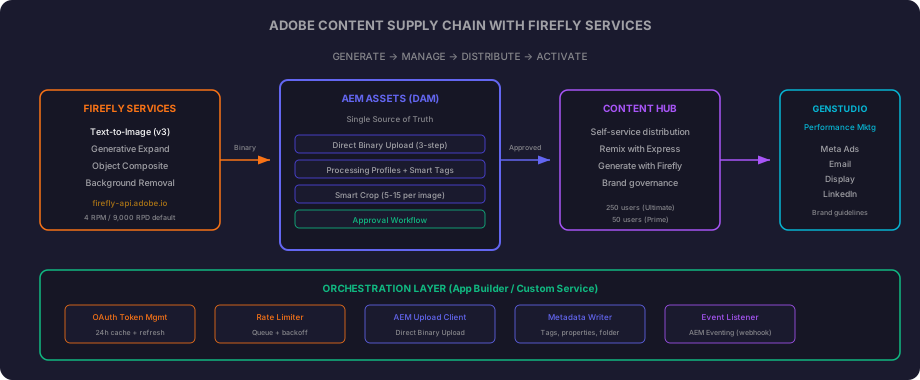
The flow is straightforward:
Firefly Services generates assets via API. Text-to-image, generative expand, object composite, background removal. Adobe indemnifies enterprise customers against IP claims on Firefly outputs because the models are trained exclusively on Adobe Stock, openly licensed content, and public domain material. For regulated industries, this is the differentiator over open-source image models.
AEM Assets is the single source of truth. Every asset, whether human-created or AI-generated, lands here. Processing Profiles run automatically: thumbnails, smart tags, smart crop. Approval workflows gate what moves downstream.
Content Hub is the self-service distribution layer. Only approved assets appear here. Non-creative users can remix existing assets using Adobe Express with Firefly capabilities built in. Assets Ultimate includes 250 Content Hub Limited users; Assets Prime includes 50.
GenStudio for Performance Marketing is the activation layer. It pulls approved assets from Content Hub and generates channel-specific variants (Meta ads, email, display, LinkedIn) while enforcing brand guidelines.
The critical architectural point: AI-generated assets go through the same approval gates as manually created ones. Generation is separated from governance. The API speeds up throughput without compromising control.
What the Firefly API Actually Offers
Here is what is generally available at the API level. Base URL: https://firefly-api.adobe.io
| Capability | Endpoint | Output |
|---|---|---|
| Text-to-Image | POST /v3/images/generate | 4MP budget (e.g. 2048x2048, 2688x1536), up to 4 variants per call |
| Text-to-Image (async) | POST /v3/images/generate-async | Same output, returns jobId for polling |
| Generative Expand | POST /v3/images/expand-async | Extends canvas with context-aware fill |
| Object Composite (generate scene) | POST /v3/images/generate-object-composite-async | Places product in generated environment |
| Precise Composite | POST /v3/images/precise-composite | Pixel-perfect placement, no subject alteration |
| Adaptive Composite | POST /v3/images/adaptive-composite | Subject adapts to match generated scene |
| Upscale | POST /v1/images/upsample-async | 2x, 3x, 4x, or 6x. Maximum output 6K |
| Background Removal | POST /v2/remove-background (Photoshop API*) | AI subject detection |
| Upload reference image | POST /v2/storage/image | For masks and source inputs |
*The Photoshop API (image.adobe.io) is a separate entitlement from the core Firefly API. You add it to the same Developer Console project, but it requires its own product profile assignment in Admin Console.
Published rate limits (defaults): 4 requests per minute, 9,000 requests per day. These are adjustable through your Adobe account team, but they are the starting point for any capacity planning.
Pricing is credit-based and negotiated at the enterprise level. Adobe does not publish per-call costs publicly, so factor in a conversation with your account team before committing to high-volume pipelines.
Authentication
Firefly Services uses OAuth Server-to-Server credentials via Adobe Developer Console. No user interaction, no browser redirects. Pure machine-to-machine.
Setup:
- Create a project in Adobe Developer Console
- Add the “Firefly - Firefly Services” API
- Select OAuth Server-to-Server credential type
- In Admin Console, assign the appropriate product profiles (requires System Administrator or Developer role)
The token request:
import httpx

IMS_TOKEN_URL = "https://ims-na1.adobelogin.com/ims/token/v3"

async def get_access_token(client_id: str, client_secret: str) -> str:
    async with httpx.AsyncClient() as client:
        response = await client.post(
            IMS_TOKEN_URL,
            data={
                "grant_type": "client_credentials",
                "client_id": client_id,
                "client_secret": client_secret,
                "scope": "openid,AdobeID,firefly_api,ff_apis",
            },
        )
        response.raise_for_status()
        return response.json()["access_token"]
The scopes shown (openid,AdobeID,firefly_api,ff_apis) are the minimum required for Firefly image generation. If you also use the Photoshop API, add firefly_enterprise to the scope string. Your Developer Console project will show the exact scopes available for your entitlement.
Token lifetime is 24 hours. Cache it. One token handles all Firefly API calls for the full duration. Requesting a fresh token per call is wasteful and risks hitting IMS rate limits.
A production-grade token manager:
import time

class TokenManager:
    def __init__(self, client_id: str, client_secret: str):
        self._client_id = client_id
        self._client_secret = client_secret
        self._token: str | None = None
        self._expires_at: float = 0

    async def get_token(self) -> str:
        if self._token and time.time() < self._expires_at:
            return self._token

        self._token = await get_access_token(self._client_id, self._client_secret)
        self._expires_at = time.time() + 82800  # Refresh 1 hour before expiry
        return self._token
Generating Assets
With authentication handled, generating an image is a single POST:
FIREFLY_BASE = "https://firefly-api.adobe.io"

async def generate_images(
    token_manager: TokenManager,
    client_id: str,
    prompt: str,
    width: int = 2048,
    height: int = 2048,
    num_variations: int = 4,
) -> list[str]:
    """Generate images and return presigned output URLs."""
    token = await token_manager.get_token()

    async with httpx.AsyncClient() as client:
        response = await client.post(
            f"{FIREFLY_BASE}/v3/images/generate",
            headers={
                "Authorization": f"Bearer {token}",
                "x-api-key": client_id,
                "Content-Type": "application/json",
            },
            json={
                "prompt": prompt,
                "size": {"width": width, "height": height},
                "numVariations": num_variations,
            },
            timeout=60.0,
        )
        response.raise_for_status()
        outputs = response.json()["outputs"]
        return [output["image"]["url"] for output in outputs]
Key points:
numVariationsaccepts 1 to 4. Each call generates up to 4 variants, which counts as one request against your rate limit. Use this for A/B variant generation.- Output URLs are presigned and temporary. Download immediately after generation. Do not store these URLs in a database expecting to fetch them later.
- The current default model produces native 4MP output. No model parameter needed unless you are using custom-trained models.
- Set an explicit timeout. Sync generation typically completes in 5-15 seconds, but network conditions vary.
For batch workloads exceeding a few dozen assets, use the async endpoint instead:
import asyncio
import time

async def generate_images_async(
    token_manager: TokenManager,
    client_id: str,
    prompt: str,
    width: int = 2048,
    height: int = 2048,
    num_variations: int = 4,
) -> str:
    """Submit async generation job. Returns job ID for status polling."""
    token = await token_manager.get_token()

    async with httpx.AsyncClient() as client:
        response = await client.post(
            f"{FIREFLY_BASE}/v3/images/generate-async",
            headers={
                "Authorization": f"Bearer {token}",
                "x-api-key": client_id,
                "Content-Type": "application/json",
            },
            json={
                "prompt": prompt,
                "size": {"width": width, "height": height},
                "numVariations": num_variations,
            },
        )
        response.raise_for_status()
        return response.json()["jobId"]


async def poll_job_status(
    token_manager: TokenManager,
    client_id: str,
    job_id: str,
    max_wait: int = 120,
) -> list[str]:
    """Poll until job completes. Returns output URLs."""
    token = await token_manager.get_token()
    start = time.time()

    async with httpx.AsyncClient() as client:
        while time.time() - start < max_wait:
            response = await client.get(
                f"{FIREFLY_BASE}/v3/status/{job_id}",
                headers={
                    "Authorization": f"Bearer {token}",
                    "x-api-key": client_id,
                },
            )
            response.raise_for_status()
            data = response.json()

            if data["status"] == "succeeded":
                return [out["image"]["url"] for out in data["outputs"]]
            if data["status"] == "failed":
                raise RuntimeError(f"Generation failed: {data}")

            await asyncio.sleep(3)

    raise TimeoutError(f"Job {job_id} did not complete within {max_wait}s")
Status polling calls (GET /v3/status/{jobId}) do not count against the 4 RPM generation rate limit. They are read-only status checks on a separate quota. Poll freely without worrying about consuming generation capacity.
Pushing Assets into AEM
This is where most teams get tripped up. AEM as a Cloud Service uses a three-step Direct Binary Upload protocol. You cannot simply POST a file to a path.
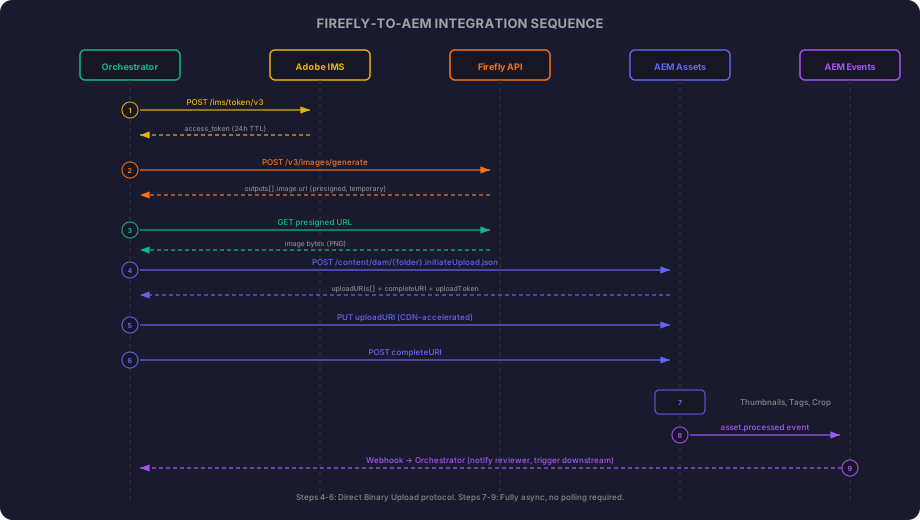
The three steps:
- Initiate - Tell AEM you want to upload a file of a specific size. AEM returns CDN-accelerated upload URIs.
- Upload binary - PUT the raw bytes to the returned URI. This goes to a CDN edge, not directly to AEM.
- Complete - Tell AEM the upload is done. AEM ingests the binary and kicks off processing.
The aem_token in the code below is a separate OAuth credential from your Firefly token. It comes from an AEM Cloud Service “Service Credentials” integration (also configured in Adobe Developer Console), scoped to the AEM instance. Same OAuth Server-to-Server flow, different API scope.
async def upload_to_aem(
    aem_host: str,
    aem_token: str,
    folder_path: str,
    file_name: str,
    image_bytes: bytes,
    mime_type: str = "image/png",
) -> None:
    """Upload binary to AEM Assets via Direct Binary Upload protocol."""
    async with httpx.AsyncClient(timeout=120.0) as client:
        # Step 1: Initiate upload
        initiate_url = f"{aem_host}/content/dam/{folder_path}.initiateUpload.json"
        initiate_resp = await client.post(
            initiate_url,
            headers={"Authorization": f"Bearer {aem_token}"},
            data={
                "fileName": file_name,
                "fileSize": str(len(image_bytes)),
            },
        )
        initiate_resp.raise_for_status()
        initiate_data = initiate_resp.json()

        # uploadURIs[0] works for files under the maxPartSize threshold (~10MB).
        # For larger files, iterate over uploadURIs and upload chunks sequentially.
        upload_uri = initiate_data["files"][0]["uploadURIs"][0]
        complete_uri = initiate_data["completeURI"]
        upload_token = initiate_data["files"][0]["uploadToken"]

        # Step 2: PUT binary to CDN
        put_resp = await client.put(
            upload_uri,
            content=image_bytes,
            headers={
                "Content-Type": mime_type,
                "Content-Length": str(len(image_bytes)),
            },
        )
        put_resp.raise_for_status()

        # Step 3: Complete upload
        complete_resp = await client.post(
            f"{aem_host}{complete_uri}",
            headers={"Authorization": f"Bearer {aem_token}"},
            data={
                "fileName": file_name,
                "mimeType": mime_type,
                "uploadToken": upload_token,
            },
        )
        complete_resp.raise_for_status()
After the upload completes, AEM’s cloud-native asset microservices take over automatically:
- Default processing generates thumbnails (48px, 140px, 319px) and a large preview (1280px)
- Smart Tags assign AI-based labels with confidence scores (English only)
- If you have configured Image Profiles on the target folder, Smart Crop generates responsive crops. Best practice is 5 to 15 crop ratios per image; the hard limit is 100.
- Metadata extraction runs for supported formats
No custom OSGi bundles. No workflow launchers. No code inside AEM. This is the cloud-native processing pipeline that runs for every asset regardless of how it arrived.
Once processing completes, the asset record in AEM looks like this (queried via Assets HTTP API):
{
  "jcr:path": "/content/dam/campaigns/summer-2026/hero-banner-v1.png",
  "jcr:primaryType": "dam:Asset",
  "dc:format": "image/png",
  "dam:size": 4194304,
  "dam:sha1": "a3f2b8c...",
  "metadata": {
    "dc:title": "hero-banner-v1.png",
    "dam:scene7FileStatus": "PublishComplete",
    "predictedTags": [
      {"name": "landscape", "confidence": 0.92},
      {"name": "nature", "confidence": 0.87},
      {"name": "outdoor", "confidence": 0.84}
    ],
    "smartCrops": {
      "16x9": {"left": 0.05, "top": 0.1, "width": 0.9, "height": 0.8},
      "1x1": {"left": 0.2, "top": 0.05, "width": 0.6, "height": 0.9}
    }
  },
  "renditions": [
    "cq5dam.thumbnail.48.48.png",
    "cq5dam.thumbnail.140.100.png",
    "cq5dam.thumbnail.319.319.png",
    "cq5dam.web.1280.1280.png"
  ]
}
Smart Tags, smart crops, and all renditions are generated without any pipeline code. Your orchestrator only needs to upload the binary and set metadata. Everything else is AEM’s responsibility.
The Orchestration Layer
Here is where architecture decisions matter. You need a service that coordinates between Firefly and AEM while respecting rate limits, handling failures, and providing visibility.
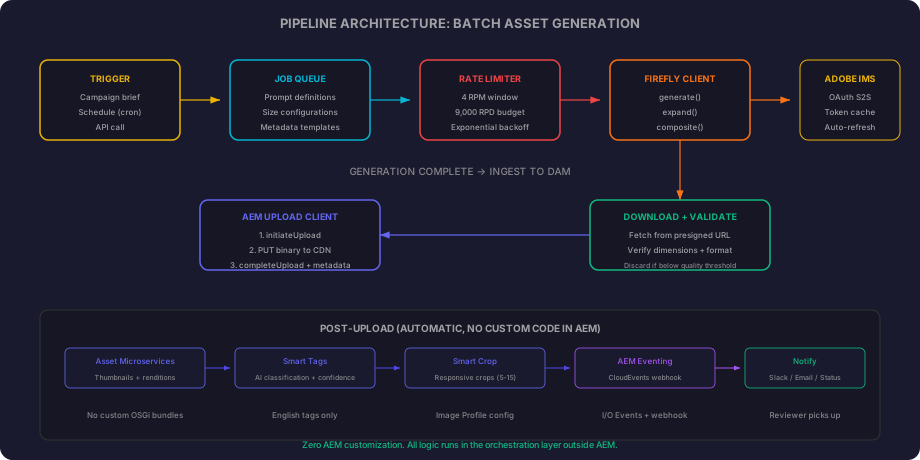
The rate limiter is the critical component. At 4 requests per minute (default), generating 100 banner variants takes 25 minutes minimum. A naive loop without throttling will hit HTTP 429 responses immediately.
import asyncio
from collections import deque

class FireflyRateLimiter:
    """Enforces Adobe's published rate limit: 4 requests per minute."""

    def __init__(self, rpm: int = 4):
        self._rpm = rpm
        self._timestamps: deque[float] = deque()
        self._lock = asyncio.Lock()

    async def acquire(self) -> None:
        async with self._lock:
            while True:
                now = time.time()

                while self._timestamps and now - self._timestamps[0] > 60:
                    self._timestamps.popleft()

                if len(self._timestamps) < self._rpm:
                    break

                sleep_duration = 60 - (now - self._timestamps[0]) + 0.1
                await asyncio.sleep(sleep_duration)

            self._timestamps.append(time.time())
Putting it all together, the pipeline orchestrator:
import asyncio
import logging
from dataclasses import dataclass

logger = logging.getLogger(__name__)


@dataclass
class AssetJob:
    prompt: str
    folder: str
    name_prefix: str
    width: int = 2048
    height: int = 2048
    num_variations: int = 4


async def run_pipeline(
    jobs: list[AssetJob],
    token_manager: TokenManager,
    client_id: str,
    aem_host: str,
    aem_token: str,
    rate_limiter: FireflyRateLimiter,
) -> list[str]:
    """Execute generation pipeline. Returns list of AEM asset paths."""
    created_paths: list[str] = []

    for job in jobs:
        await rate_limiter.acquire()

        image_urls = await generate_images(
            token_manager=token_manager,
            client_id=client_id,
            prompt=job.prompt,
            width=job.width,
            height=job.height,
            num_variations=job.num_variations,
        )

        async with httpx.AsyncClient() as http:
            for i, url in enumerate(image_urls):
                try:
                    resp = await http.get(url, timeout=30.0)
                    resp.raise_for_status()
                except httpx.HTTPError as e:
                    logger.warning(f"Failed to download variant {i+1}: {e}")
                    continue

                image_bytes = resp.content
                file_name = f"{job.name_prefix}-v{i+1}.png"
                await upload_to_aem(
                    aem_host=aem_host,
                    aem_token=aem_token,
                    folder_path=job.folder,
                    file_name=file_name,
                    image_bytes=image_bytes,
                )
                created_paths.append(f"/content/dam/{job.folder}/{file_name}")

    return created_paths
This is deliberately sequential per job. Parallelizing generation calls would require distributing across the rate limit window, and the added complexity is not worth it at 4 RPM. If your account team provisions higher limits, you can introduce concurrency with a semaphore.
Event-Driven Post-Processing
Once assets land in AEM, you want to know when processing completes. Polling AEM is the wrong pattern. Use AEM Eventing instead.
AEM as a Cloud Service publishes events following the CloudEvents specification in JSON format. You consume them via:
- Webhook push (recommended for real-time)
- Adobe I/O Runtime (serverless function execution)
- Amazon EventBridge (for AWS-native architectures)
- Journaling API (pull-based, for guaranteed delivery)
Configuration happens in Adobe Developer Console. You select the AEM event types you care about and register your webhook endpoint. No code changes in AEM required.
When an asset finishes processing, your orchestrator receives an event notification. You can then:
- Update a campaign management system with the asset status
- Notify a reviewer via Slack or email
- Trigger additional processing (e.g., upscale the best-performing variant)
- Move the asset into an approval workflow
This is the endorsed Adobe pattern for extending AEM without customizing the core. All logic runs in your orchestration layer outside AEM.
What AEM Gives You Natively
Before building custom integrations, understand what already exists without API code:
Generate Variations is available inside the Content Fragment Editor and Universal Editor. It produces copy variants (headlines, descriptions, CTAs) using generative AI. Each generation counts as one generative action against your AEM license. Good for text. For images, you need the Firefly API integration above.
Adobe Express embedded in Assets View gives authors one-click background removal, generative editing, and template-based creation directly in the AEM interface. Maximum file size is 80MB on desktop, 40MB on mobile. Good for one-off edits by non-developers.
Content Hub with Firefly lets non-creative users generate and remix assets within brand guardrails. No API needed. Self-service by design.
AI Translation uses LLMs (Azure OpenAI) inside AEM translation workflows. You can upload style guides for consistent terminology and tone.
The distinction: native features handle interactive, single-asset, human-in-the-loop use cases. The API integration we built above handles programmatic, batch, pipeline use cases. They are complementary, not competing.
Operational Reality
Honest notes from working with this in production:
Rate limits shape your architecture. 4 RPM default means batch generation is inherently slow. A campaign requiring 200 assets takes nearly an hour of generation time alone. Design pipelines that run overnight or during off-peak hours. Negotiate higher limits before launch if batch throughput is critical.
Credits are opaque. There is no public price list showing “X credits per generation.” Enterprise customers work directly with Adobe account teams on consumption-based pricing. Get clarity on this before committing to high-volume automated pipelines.
Quality varies by use case. Text-to-image works well for lifestyle imagery, abstract backgrounds, and atmospheric scenes. Product photography still needs human oversight and often performs better with the composite APIs (precise or adaptive) where you provide the product shot and generate only the environment.
No built-in AEM-to-Firefly trigger. Adobe provides the primitives but not the glue. You build the orchestration. This is intentional. It gives you control over when, how, and under what conditions generation happens. But it means engineering effort is required.
Presigned URLs expire. Download generated images immediately. Do not queue URLs for later processing. The pipeline must download bytes before moving to the next step.
Async jobs need dead-letter handling. Async generation can fail silently. Build timeout handling (120 seconds is a reasonable maximum), log failures, and implement retry logic with exponential backoff for transient errors.
Decision Framework
| Build this | Skip this |
|---|---|
| Campaign teams need 50+ asset variants per launch | A few banners per quarter is sufficient |
| Commercial safety is non-negotiable | You can use stock photography |
| Assets must land in AEM with metadata and governance | Assets go directly to social platforms |
| You run AEM as a Cloud Service | You are on AEM 6.5 on-premises |
| You have engineering capacity for the orchestration layer | No developer bandwidth available |
| Content Hub is part of your distribution strategy | Assets are managed outside Adobe’s ecosystem |
What Comes Next
Three things worth watching:
Custom Models. The Firefly API supports training custom models on your brand assets. You upload reference images, train a subject or style model, and then generate with a customModelId parameter. This is the logical next step once the basic pipeline is stable. Brand-specific generation rather than generic.
AEM Eventing maturity. The eventing model is relatively new. As more event types become available and the ecosystem matures, the post-processing possibilities expand. Today you can react to asset creation and processing completion. Tomorrow you will likely get approval state change events.
Agentic capabilities. Adobe has announced Content Optimization Agents and Brand Experience Agents. Documentation is sparse, and these appear to be in early access. Worth tracking, not worth building against today.
The pattern we built here (generation via API; ingestion into AEM; governance via standard workflows; eventing for integration) is already Adobe’s endorsed architectural direction. It is the App Builder and I/O Events model applied to content generation. If you are already comfortable with that pattern from other AEM integrations, this is the same mental model with a new upstream source.
The full source code is at github.com/taatal/blog-code/adobe/firefly-aem-pipeline.