Moving to AEM Cloud Service: A Practical Migration Guide
Migrating from AEM on-premise or AMS to AEM Cloud Service is a significant undertaking. Here is a practical guide based on real migration projects.
Adobe’s push toward AEM as a Cloud Service is not slowing down. If you are running AEM 6.5 on-premise or on Adobe Managed Services, the migration is inevitable, the question is when and how. Having led multiple AEM Cloud Service migrations, here is what we have learned about making the transition succeed without the pain that catches most teams off guard.
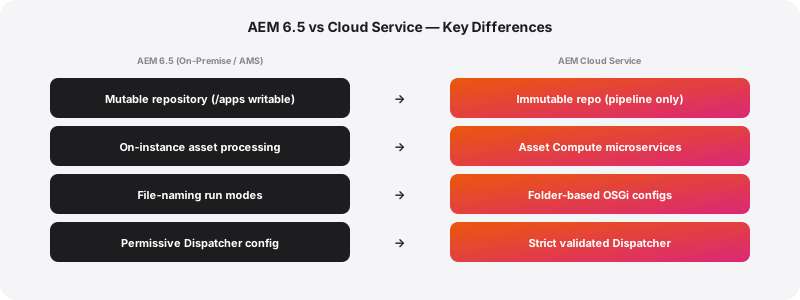
Why Cloud Service Is Different
AEM Cloud Service is not AEM 6.5 hosted on Adobe’s cloud. It is a fundamentally different runtime with a microservices architecture, immutable deployments, and operational constraints that require changes to how you build and deploy AEM applications.
Understanding these differences before writing migration code saves weeks of rework later.
Immutable Repository
On AEM 6.5, you can modify /apps, /libs, and other system paths at runtime through packages, the CRXDE console, or direct JCR manipulation. Teams routinely deploy hotfixes by uploading content packages to running instances.
On Cloud Service, the content repository is immutable for application code. Everything under /apps and /libs is deployed exclusively through Cloud Manager pipelines. You cannot install packages to these paths on a running instance. You cannot use CRXDE Lite to make code changes. You cannot use the Felix console to install bundles.
This means every piece of code that modifies these paths at runtime, install hooks that write to /apps, runtime configuration generators, dynamic template creation, must be refactored. In our experience, this is the single most labour-intensive part of most migrations.
OSGi Configuration Changes
AEM Cloud Service uses a different OSGi configuration model. Run-mode specific configurations follow a folder-based convention rather than the file naming convention used in AEM 6.5.
On 6.5, you might have com.example.MyService-author.cfg.json for author-specific configuration. On Cloud Service, this becomes config.author/com.example.MyService.cfg.json using folder-based run mode targeting.
Cloud Service also introduces environment-specific configurations through Cloud Manager environment variables. Sensitive values like API keys and credentials should not be stored in the repository at all, they go into Cloud Manager’s environment configuration and are injected at runtime.
We typically find 20-40 OSGi configurations per project that need restructuring. The changes are mechanical but tedious, and missing even one can cause subtle failures that are difficult to diagnose in Cloud Service’s containerised environment.
Asset Processing
On-instance asset processing is gone. AEM Cloud Service uses Asset Compute microservices for all asset processing, rendition generation, metadata extraction, smart tagging. Custom asset workflows that run on the AEM instance need to be rebuilt as Asset Compute workers deployed to Adobe I/O Runtime.
For teams with simple asset processing needs (standard renditions, basic metadata), this transition is straightforward, Cloud Service handles it automatically. For teams with custom processing (watermarking, format conversion, integration with external DAM systems), expect significant rework. Each custom processing step becomes an Asset Compute worker, which means rewriting Java-based workflow steps as JavaScript/TypeScript microservices with a different execution model.
We budget 2-4 weeks specifically for asset processing migration on projects with custom workflows. Teams that do not budget for this inevitably blow their timelines.
Dispatcher Configuration
The Dispatcher configuration format has changed substantially. Cloud Service uses an immutable/flexible configuration model with stricter validation than AEM 6.5’s relatively permissive Dispatcher setup.
Key differences:
- Dispatcher configuration is split into immutable (provided by Adobe) and flexible (customer-configurable) layers
- The validation pipeline rejects configurations that would have worked silently on 6.5, overly broad rewrite rules, missing error handlers, and non-standard virtualhost configurations all trigger validation errors
- Caching rules follow a different structure, and the default cache invalidation behaviour differs from on-premise
- SSL termination happens at the CDN layer, not at the Dispatcher
We have seen teams spend more time on Dispatcher migration than on any other single component. The Dispatcher Converter tool helps, but it handles perhaps 60% of configurations correctly. The remaining 40% require manual rework and testing.
Our Migration Framework
After several migrations, we have developed a five-phase framework that consistently delivers successful outcomes.
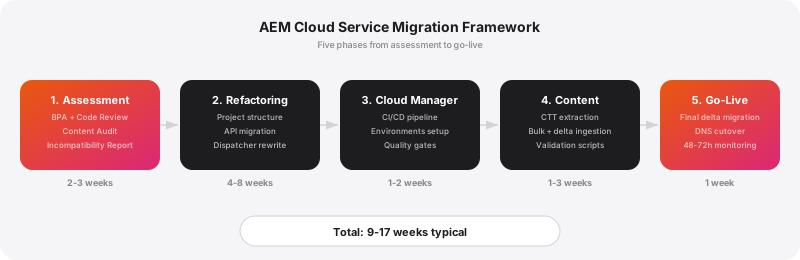
Phase 1: Assessment (2-3 weeks)
Before touching any code, run a thorough compatibility assessment:
Best Practices Analyzer (BPA): Run this on your existing AEM instance. It identifies code patterns, configurations, and content structures that are incompatible with Cloud Service. Pay attention to every finding, including warnings. What is a warning in the BPA report often becomes a hard failure in Cloud Manager.
Repository Modernizer: Run this tool on your project codebase. It restructures your Maven project to comply with Cloud Service’s content package separation requirements (mutable vs. immutable content).
Manual code review: Automated tools catch structural issues but miss semantic problems. Review your codebase specifically for: runtime JCR writes to /apps, CRXDE-dependent workflows, custom authentication handlers, direct Sling Servlet registration patterns that rely on deprecated APIs, and any code that assumes a persistent filesystem.
Content audit: Assess the volume and structure of content that needs to migrate. Large binary assets, complex content hierarchies, and multilingual content structures all affect migration planning and timeline.
Produce a detailed migration report that categorises every incompatibility by effort level (trivial, moderate, significant) and priority (blocks deployment, causes runtime issues, cosmetic).
Phase 2: Code Refactoring (4-8 weeks)
Work through the incompatibilities systematically, starting with deployment blockers:
Project structure: Restructure your Maven project using the AEM Project Archetype for Cloud Service. This typically means splitting your single content package into separate packages for immutable content (code, templates, configurations) and mutable content (content pages, assets, user-generated content).
API migration: Replace deprecated APIs with their Cloud Service equivalents. Common replacements include migrating from javax.jcr.Session admin session usage to ServiceResourceResolver patterns, replacing deprecated Sling API calls, and updating any code that uses the @Reference annotation with patterns compatible with the Cloud Service OSGi runtime.
Sling Model updates: Review every Sling Model for compatibility. Common issues include models that inject resources from paths that will not exist in Cloud Service, models that use deprecated injector annotations, and models that rely on runtime content structures that differ between 6.5 and Cloud Service.
Dispatcher refactoring: Rewrite your Dispatcher configuration for the Cloud Service model. We recommend starting from the Cloud Service Dispatcher archetype and selectively migrating rules rather than trying to convert your existing configuration wholesale. This is slower initially but results in a cleaner, more maintainable configuration.
Asset workflow migration: If you have custom asset processing, build Asset Compute workers for each custom processing step. Test these thoroughly against your actual asset library, edge cases in file formats, large files, and corrupted metadata will surface problems that unit tests miss.
Phase 3: Cloud Manager Setup and CI/CD (1-2 weeks)
Set up your Cloud Manager program, configure environments, and establish the deployment pipeline:
- Create dev, stage, and production environments
- Configure the CI/CD pipeline with appropriate quality gates
- Set up environment-specific variables for each tier
- Establish branching strategy that works with Cloud Manager’s pipeline model
- Run initial deployments to the dev environment and iterate until the build is green
Cloud Manager’s quality gates are strict. Code quality checks, security scanning, and performance testing all run automatically. Expect to spend time addressing findings that your existing CI/CD pipeline did not catch.
Phase 4: Content Migration (1-3 weeks)
Use the Content Transfer Tool (CTT) to migrate content from your existing AEM instance to Cloud Service:
Extraction: CTT extracts content from your source AEM instance into a migration set. For large repositories (over 100 GB), plan for extraction to take several hours. We run extraction during off-peak hours to minimise impact on the production instance.
Ingestion: The migration set is ingested into your Cloud Service environment. Ingestion time depends on content volume and Cloud Service environment tier.
Delta migration: After the initial bulk migration, run delta extractions to capture content changes that occurred since the first extraction. Plan for 2-3 delta migrations leading up to go-live to keep the content gap as small as possible.
Validation: After each ingestion, validate content integrity: page rendering, asset availability, reference integrity, and URL structure. Automated validation scripts save enormous time here, we typically write custom validators for each project that check content structure, rendition availability, and critical page rendering.
Phase 5: Go-Live (1 week)
The go-live sequence:
- Final delta content migration with the shortest possible content freeze window
- DNS cutover from old infrastructure to Cloud Service CDN
- Cache warming on the CDN
- Smoke testing of critical user journeys
- Monitoring period (48-72 hours of heightened observation)
- Decommission old infrastructure (after a comfortable buffer period)
Pitfalls That Catch Every Team
Underestimating Dispatcher effort. Budget double what you think you need. Every team we have worked with has spent more time on Dispatcher than planned.
Testing integrations late. Cloud Service environments have different network configurations, security policies, and IP ranges than your on-premise or AMS environments. External integrations (APIs, SSO providers, analytics services) may need reconfiguration. Test these in Cloud Service dev environments as early as possible.
Ignoring the content freeze window. Content authors need to stop editing during the final delta migration and go-live. Coordinate this with your editorial team weeks in advance and establish clear communication channels. A content author making edits during the migration window creates inconsistencies that are painful to resolve.
Skipping the assessment phase. Teams that jump straight to code refactoring inevitably discover incompatibilities late in the process, leading to rework and timeline pressure. The assessment phase takes 2-3 weeks but saves 4-6 weeks of rework on average.
One-big-bang migration for large sites. For sites with more than 50,000 pages, consider a phased approach. Migrate sections of the site incrementally rather than attempting to move everything at once. This reduces risk and allows you to learn and adapt between phases.
The Investment Is Worth It
AEM Cloud Service migration is not trivial. It requires significant engineering effort, thorough testing, and careful project management. But the outcome justifies the investment: automatic scaling, rolling updates without downtime, continuous security patching, access to the latest features, and substantially lower infrastructure management overhead.
The organisations that migrate successfully are the ones that invest in thorough assessment, bring experienced AEM architects into the process early, and give their teams realistic timelines. This is not a project you rush.