AEM Edge Delivery Services and Universal Editor: An Architect's Take
How EDS changes content delivery in the Adobe ecosystem, where Universal Editor fits, and practical architectural decisions for enterprise implementations.
I have been working with AEM since the CQ5 days. Through every iteration (6.0 through 6.5, AMS, Cloud Service), the fundamental delivery model stayed the same: content authored in JCR, rendered server-side by Sling, cached by Dispatcher, served from CDN. Edge Delivery Services throws that entire model out.
This post is for architects and technical leads evaluating EDS. Not the marketing pitch. The actual architectural implications.
The Core Idea
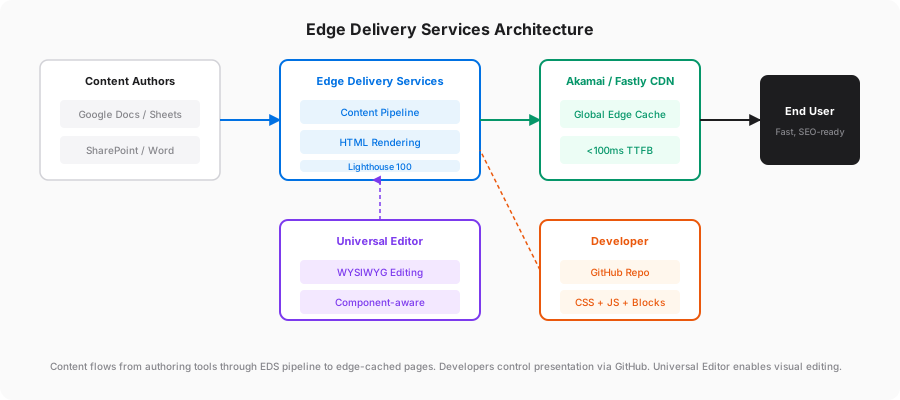
EDS takes content from Google Docs or SharePoint, converts it to semantic HTML, and serves it from edge nodes globally. No AEM runtime involved in page delivery. No Sling. No Dispatcher. No JCR.
The authored document IS the content source. A Google Doc maps to a page. Tables inside that document map to components (called “blocks” in EDS). The system interprets document structure as page structure.
Think of it as a high-performance static site generator with a content pipeline designed for non-technical authors.
Why Performance is Non-Negotiable in EDS
Every EDS page scores Lighthouse 100 by default. Not as an optimisation target. As a system constraint.
TTFB under 100ms. LCP under 1.2 seconds. No render-blocking resources. Zero cumulative layout shift. These numbers are consistent because the architecture makes it impossible to violate them.
In traditional AEM, performance degrades over time. Teams add client libraries, component JavaScript grows, third-party scripts pile up. I have seen Lighthouse Performance scores drop from 80 to 35 over 18 months on production sites.
EDS prevents this by limiting what you can do. No heavy JavaScript frameworks. No server-side rendering. No dynamic page assembly. The constraints are the feature.
The Content Authoring Model
Document-Based Authoring
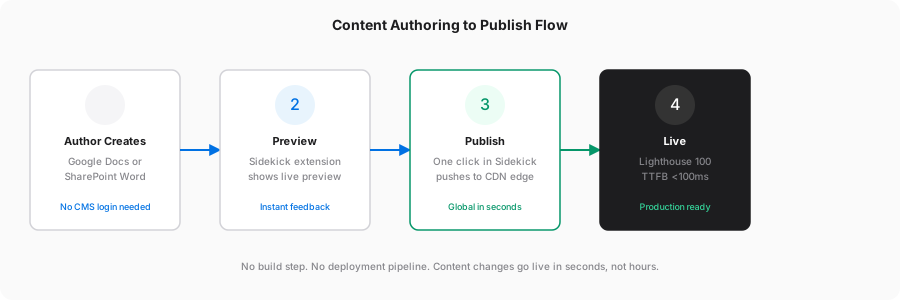
Authors work in Google Docs or SharePoint Word. No CMS login. No training on a content management interface. They write content using headings, paragraphs, lists, and images. They define components using tables.
A table with the header row “Columns” becomes a two-column layout. A table headed “Hero” becomes a hero banner. The conventions are simple enough that an author learns them in an afternoon.
The Sidekick (a Chrome extension) provides Preview and Publish buttons. Author edits a document, clicks Preview to see the rendered page, clicks Publish to push it live. Entire round-trip takes seconds.
This is genuinely faster than any CMS-based workflow I have implemented. No staging environments. No approval queues (unless you add them). No deployment pipeline between edit and live.
Universal Editor
For teams that need structured component editing beyond what documents support, there is the Universal Editor.
It loads the actual rendered page in a browser-based editor. Authors click on elements to select them, edit inline, drag to reorder. A property panel on the right shows component fields. It looks and feels like editing the real page because it IS the real page.
Universal Editor connects to a content source through instrumented HTML. You annotate your markup with data-aue-* attributes. The editor reads these to understand what is editable and where to persist changes.
<div class="hero"
  data-aue-resource="urn:aem:/content/mysite/hero"
  data-aue-type="container"
  data-aue-label="Hero Banner">
  <h1 data-aue-prop="title" data-aue-type="text">Your headline here</h1>
  <p data-aue-prop="description" data-aue-type="richtext">Supporting text goes here</p>
  <a data-aue-prop="ctaLink" data-aue-type="text" href="/get-started">Get Started</a>
</div>
data-aue-resource points to where the content lives. data-aue-type tells the editor what kind of field it is (text, richtext, reference, media). data-aue-prop maps the element to a content property.
The important bit: Universal Editor is content-source agnostic. It works with AEM, with a headless CMS, with a custom backend. The instrumentation tells it what to edit. The service layer tells it where to save.
Developer Experience
An EDS project is a GitHub repository. That is it. No Maven. No OSGi bundles. No content packages. No Cloud Manager.
/
├── blocks/
│   ├── hero/
│   │   ├── hero.js
│   │   └── hero.css
│   ├── columns/
│   │   ├── columns.js
│   │   └── columns.css
│   ├── cards/
│   │   ├── cards.js
│   │   └── cards.css
│   ├── header/
│   │   ├── header.js
│   │   └── header.css
│   └── footer/
│       ├── footer.js
│       └── footer.css
├── scripts/
│   ├── aem.js
│   ├── scripts.js
│   └── delayed.js
├── styles/
│   ├── styles.css
│   └── fonts.css
└── head.html
Each block is a folder with one JS file and one CSS file. The JS file exports a decorate function that receives a DOM element and transforms it:
export default function decorate(block) {
  const items = [...block.children];

  items.forEach((item) => {
    const image = item.querySelector('picture');
    const content = item.querySelector('div:last-child');

    if (image) {
      item.classList.add('card-item');
      image.closest('div').classList.add('card-image');
      content.classList.add('card-content');
    }
  });
}
No framework. No build tooling. No transpilation. The JavaScript runs as-is in the browser. Blocks are lazy-loaded. CSS is loaded only when the block enters the viewport.
Deployment is git push. Code reaches production globally in under two minutes. Rollback is git revert.
Local development uses the AEM CLI:
aem upThat starts a local proxy that serves your blocks against live or preview content. Hot-reloading included. Full development environment running in seconds.
Architectural Decision: EDS vs Traditional AEM Sites
This is the question every architect has to answer. The answer depends on what the site does.
Use EDS when:
- The site is primarily marketing content (pages, blogs, landing pages, product information)
- SEO performance directly impacts revenue
- The content team wants to publish fast without developer involvement
- You want zero infrastructure management for the delivery tier
- The front-end team prefers vanilla HTML/CSS/JS
Stay on Traditional AEM Sites when:
- You need server-side personalisation (Adobe Target integration, context-aware components)
- The site has authenticated experiences (account portals, member areas)
- Content Fragments and Experience Fragments are central to your architecture
- You have complex multi-site inheritance structures
- AEM Forms or AEM Workflows are part of the content lifecycle
The Hybrid Pattern
Most enterprise implementations will run both. I recommend this approach:
- Marketing pages, blogs, campaign landing pages on EDS
- Application experiences, authenticated flows on Traditional AEM Sites or a SPA with AEM headless
- Shared CDN layer routing traffic based on URL patterns
- Shared design system (the EDS blocks and the AEM components render the same visual output)
From the user’s perspective, it is one site. From the infrastructure perspective, two delivery systems optimised for different use cases.
Performance Numbers
These are from real implementations on AEM as a Cloud Service (not on-prem 6.5, which performs worse):
| Metric | AEM CS Sites | EDS |
|---|---|---|
| Time to First Byte | 200-800ms | Under 100ms |
| Largest Contentful Paint | 2.5-6 seconds | Under 1.2 seconds |
| Lighthouse Performance | 40-75 (varies by implementation) | 98-100 (consistent) |
| Content publish time | 5-30 minutes (pipeline dependent) | Under 30 seconds |
| Build tooling | Maven, webpack/vite, clientlibs | None. Vanilla JS. No build step. |
| Deployment | Cloud Manager pipeline | Git push to main |
| Authoring | AEM Page Editor | Google Docs, SharePoint, or Universal Editor |
| Infrastructure | Author + Publish + Dispatcher + CDN | CDN edge nodes only |
| Operational cost | High (AEM license + compute + DevOps) | Low (included in AEM license) |
| Team to maintain | 2-4 developers + DevOps | 1-2 front-end developers |
The traditional AEM range is wide because it depends heavily on implementation quality. I have seen well-optimised AEM sites hit 85 on Lighthouse. I have also seen sites with 200+ client libraries scoring 28.
EDS removes the variability. The architecture enforces performance.
How Blocks Actually Load: The E-L-D Model
Adobe documents three loading phases. Understanding these is essential for developers writing blocks.
Phase E (Eager): The body starts hidden. The DOM is decorated with CSS classes. The first section is loaded with priority given to the first image. This phase targets LCP. Total network payload before LCP must stay under 100KB on mobile.
Phase L (Lazy): Subsequent sections load sequentially. Each section’s blocks are discovered, and their JS/CSS files are dynamically imported. Images outside the viewport are lazy-loaded. This phase must not affect Total Blocking Time or First Input Delay.
Phase D (Delayed): Fires at least 3 seconds after LCP. Third-party scripts (analytics, marketing tags, chat widgets) go here. Adobe is explicit: anything that does not have an immediate impact on the user experience belongs in Delayed.
In code, this maps to the three functions in scripts.js:
async function loadPage() {
  await loadEager(document);   // LCP-critical: first section only
  await loadLazy(document);    // Rest of page: remaining sections, header, footer
  loadDelayed();               // 3s later: analytics, third-party scripts
}
aem.js handles block discovery. It finds all elements with block class names, calls loadBlock() which dynamically imports the block’s JS module and injects its CSS file. The block’s decorate() function then transforms the DOM.
Key constraint from Adobe’s documentation: minification of JS and CSS does not add measurable benefit in EDS. Files are small and served over HTTP/2. Keep code readable.
Boundaries: What EDS Cannot Do
EDS is a content delivery system. It is not an application platform. Know these limits before committing.
No server-side logic. There is no runtime processing on page request. If your feature requires evaluating conditions on the server (personalisation rules, A/B test assignment, geo-based content), EDS cannot do it natively.
Forms are limited. A forms block exists in the block collection but it is marked deprecated. For complex form workflows (multi-step, validation, file upload, integration with backend systems), you will need a separate forms solution. AEM Forms or a third-party service called from client-side JavaScript.
Search requires external indexing. A search block exists but relies on a pre-built index. For large sites, you will likely integrate Algolia, Elasticsearch, or Adobe Search. The built-in approach works for smaller content sets.
No server-side personalisation. Adobe Target integration for server-side decisioning is not available in the EDS delivery tier. Client-side personalisation (loading different content via JavaScript after page load) is possible in the Delayed phase but affects performance and is visible to the user.
No authenticated content. EDS serves public content from CDN. There is no session management, no login, no access control at the page level. Authenticated experiences need a separate delivery layer.
Third-party scripts are delayed by design. If your business requires a chat widget, consent manager, or analytics tag to load immediately, EDS will fight you. The architecture intentionally delays these to protect performance.
Realistic Project Timeline
Based on implementations I have been involved with:
Greenfield EDS site (marketing, 20-50 pages):
- Week 1-2: Project setup, design system, core blocks (hero, columns, cards, header, footer)
- Week 3-4: Content migration, custom blocks, author training
- Week 5: QA, redirects, DNS, go-live
Total: 4-5 weeks with a small team (1 developer, 1 content lead).
Traditional AEM Sites equivalent:
- Weeks 1-4: Maven project setup, component development, template creation, dispatcher configuration
- Weeks 5-8: Content authoring, DAM setup, workflow configuration
- Weeks 9-12: Performance optimisation, security review, Cloud Manager pipeline setup, go-live
Total: 10-12 weeks with a larger team (2-3 developers, 1 DevOps, 1 content lead).
The difference is not just calendar time. It is team size and infrastructure overhead. EDS removes the operational complexity that consumes 40-50% of traditional AEM project effort.
What I Tell My Clients
If you are starting a new public-facing marketing site in the Adobe ecosystem today, start with EDS. The performance advantage is real. The authoring experience is faster. The operational cost is lower.
If you have an existing AEM Sites implementation with hundreds of custom components and templates, do not rewrite it. Run EDS alongside it for new content sections. Migrate gradually as you rebuild components into blocks.
If your authors hate the AEM Page Editor (and many do), Universal Editor on EDS gives them a genuinely better editing experience without the overhead of the traditional authoring stack.
The shift toward edge-delivered content is happening across the industry. Vercel, Netlify, Cloudflare Pages, and now Adobe with EDS all converge on the same principle: pre-render content, serve from the edge, eliminate origin processing. Adobe’s version connects this to enterprise content workflows. That is the differentiator.
Glossary
| Term | Full Form |
|---|---|
| AEM | Adobe Experience Manager |
| AEM CS | AEM as a Cloud Service |
| AMS | Adobe Managed Services |
| CDN | Content Delivery Network |
| CMS | Content Management System |
| CQ5 | Communiqué 5 (original name of AEM) |
| CRXDE | Content Repository Extreme Development Environment |
| DAM | Digital Asset Management |
| DOM | Document Object Model |
| EDS | Edge Delivery Services |
| FID | First Input Delay |
| HTTP/2 | Hypertext Transfer Protocol version 2 |
| JCR | Java Content Repository |
| JS | JavaScript |
| LCP | Largest Contentful Paint |
| OSGi | Open Services Gateway initiative |
| RTE | Rich Text Editor |
| RUM | Real User Monitoring |
| SPA | Single Page Application |
| TBT | Total Blocking Time |
| TTFB | Time to First Byte |
| UE | Universal Editor |
| WYSIWYG | What You See Is What You Get |