Build a CI/CD Pipeline From Scratch: GitHub Actions to AWS with Canary Deploys
A step-by-step build of a production CI/CD pipeline. GitHub Actions, ECR, ECS Fargate, canary deployments, automated rollback, and Slack alerts. Every decision explained.
Most CI/CD tutorials stop at “deploy to production.” They show you a green checkmark and call it done. Real pipelines need to answer harder questions: what happens when the deploy is bad? How do you know it is bad? Who gets told? How fast can you undo it?
This post builds a complete pipeline from zero. Not a toy. A pipeline you could run in production tomorrow. We will use GitHub Actions deploying a containerised application to ECS Fargate, with canary traffic shifting, automated rollback on failed health checks, and Slack notifications at every stage.
What You Will Build
By the end of this post, you will have:
- A GitHub Actions workflow that tests, builds, and deploys your application on every push to
main - A Docker image pushed to Amazon ECR, tagged by commit SHA
- An ECS Fargate service running your containers behind an Application Load Balancer
- Canary deployments that shift 10% of traffic to the new version, monitor for 5 minutes, then shift the rest
- Automatic rollback triggered by a CloudWatch alarm if error rate exceeds 5%
- Slack notifications on build, deploy success, and deploy failure
- Infrastructure as code (Terraform) for the entire setup
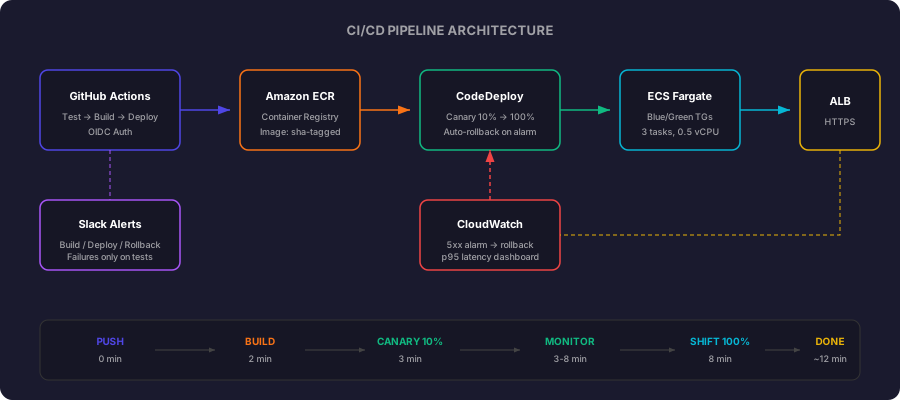
The flow: git push → tests pass → image builds → canary starts → health monitored → full rollout. Total time: ~12 minutes. Rollback time if something breaks: ~30 seconds.
Prerequisites
An AWS account. You need access to create ECS clusters, load balancers, CodeDeploy applications, and IAM roles. If you are on a team, you need permissions for these services or an admin to create them.
Terraform installed. We define all infrastructure as code.
terraform --version # Should be 1.5+AWS CLI configured. With credentials that can create resources.
aws sts get-caller-identity # Should return your account infoDocker installed. For building container images locally.
docker --versionA GitHub repository. With a containerised application (any language). If you do not have one, a simple Express.js API with a Dockerfile works:
FROM node:20-alpine
WORKDIR /app
COPY package*.json ./
RUN npm ci --production
COPY . .
EXPOSE 8080
CMD ["node", "server.js"]
A Slack webhook URL. Create one at api.slack.com/messaging/webhooks. This is optional but recommended for the notifications part.
Estimated cost: ~$85/month for the running infrastructure (ECS + ALB + ECR + CloudWatch). GitHub Actions and CodeDeploy are free for this usage level. Costs vary by region. Use the AWS Pricing Calculator for exact numbers.
Project Structure
Your repository will have these CI/CD-related files by the end:
your-repo/
├── .github/
│   └── workflows/
│       └── deploy.yml          # The full pipeline definition
├── terraform/
│   ├── main.tf                 # ECS cluster, service, task definition
│   ├── alb.tf                  # Load balancer + target groups (blue/green)
│   ├── codedeploy.tf           # CodeDeploy app + deployment group
│   ├── cloudwatch.tf           # 5xx alarm + dashboard
│   ├── iam.tf                  # Roles for ECS, CodeDeploy, GitHub OIDC
│   └── variables.tf            # VPC IDs, subnet IDs, certificate ARN
├── Dockerfile                  # Your application container
├── server.js                   # (or whatever your app entrypoint is)
└── package.json
Each Terraform file maps to one concern. The workflow file contains the full pipeline logic.
Why Terraform and not CloudFormation?
Both work. CloudFormation is AWS-native, requires no extra tooling, and has built-in stack rollback on failure. If your team is 100% AWS and does not want to manage Terraform state, CloudFormation is a solid choice.
We use Terraform here because: (1) the pipeline already crosses system boundaries (GitHub Actions + AWS), so multi-tool fluency is assumed; (2) terraform plan gives clearer dry-run output than CloudFormation changesets; (3) HCL is more concise, the same infrastructure that takes 400 lines of CloudFormation YAML fits in ~150 lines of Terraform; and (4) if you later add Cloudflare, Datadog, or any non-AWS service, Terraform handles it without a second IaC tool. Everything in this post can be adapted to CloudFormation if that is your team’s standard.
What We Are Building
A Node.js API (could be anything containerised) deployed to AWS ECS Fargate behind an Application Load Balancer. The pipeline:
- Runs tests and linting on every push
- Builds a Docker image and pushes to ECR
- Deploys to staging automatically on
main - Deploys to production with canary traffic shifting (10% → 50% → 100%)
- Monitors health during canary and rolls back automatically on failure
- Sends Slack alerts at every stage transition
The Infrastructure: Terraform
Before the pipeline can deploy anything, the infrastructure needs to exist. Here is the ECS cluster, ALB, and target groups defined in Terraform.
resource "aws_ecs_cluster" "main" {
  name = "api-cluster"

  setting {
    name  = "containerInsights"
    value = "enabled"
  }
}

resource "aws_lb" "api" {
  name               = "api-alb"
  internal           = false
  load_balancer_type = "application"
  security_groups    = [aws_security_group.alb.id]
  subnets            = var.public_subnet_ids
}

resource "aws_lb_listener" "https" {
  load_balancer_arn = aws_lb.api.arn
  port              = 443
  protocol          = "HTTPS"
  ssl_policy        = "ELBSecurityPolicy-TLS13-1-2-2021-06"
  certificate_arn   = var.certificate_arn

  default_action {
    type             = "forward"
    target_group_arn = aws_lb_target_group.blue.arn
  }
}
The critical piece for canary deployments is two target groups. One holds the current production version (blue), the other receives the new version (green):
resource "aws_lb_target_group" "blue" {
  name        = "api-blue"
  port        = 8080
  protocol    = "HTTP"
  vpc_id      = var.vpc_id
  target_type = "ip"

  health_check {
    path                = "/health"
    healthy_threshold   = 2
    unhealthy_threshold = 3
    interval            = 10
    timeout             = 5
  }
}

resource "aws_lb_target_group" "green" {
  name        = "api-green"
  port        = 8080
  protocol    = "HTTP"
  vpc_id      = var.vpc_id
  target_type = "ip"

  health_check {
    path                = "/health"
    healthy_threshold   = 2
    unhealthy_threshold = 3
    interval            = 10
    timeout             = 5
  }
}
The ECS service uses CodeDeploy for blue/green deployment orchestration:
resource "aws_ecs_service" "api" {
  name            = "api-service"
  cluster         = aws_ecs_cluster.main.id
  task_definition = aws_ecs_task_definition.api.arn
  desired_count   = 3
  launch_type     = "FARGATE"

  network_configuration {
    subnets          = var.private_subnet_ids
    security_groups  = [aws_security_group.ecs.id]
    assign_public_ip = false
  }

  load_balancer {
    target_group_arn = aws_lb_target_group.blue.arn
    container_name   = "api"
    container_port   = 8080
  }

  deployment_controller {
    type = "CODE_DEPLOY"
  }

  lifecycle {
    ignore_changes = [task_definition, load_balancer]
  }
}
The deployment_controller set to CODE_DEPLOY is what enables traffic shifting. ECS hands off deployment orchestration to CodeDeploy, which manages the canary logic.
CodeDeploy Configuration
CodeDeploy needs an application, deployment group, and a traffic shifting configuration:
resource "aws_codedeploy_app" "api" {
  compute_platform = "ECS"
  name             = "api-deploy"
}

resource "aws_codedeploy_deployment_group" "api" {
  app_name               = aws_codedeploy_app.api.name
  deployment_group_name  = "api-production"
  deployment_config_name = "CodeDeployDefault.ECSCanary10Percent5Minutes"
  service_role_arn       = aws_iam_role.codedeploy.arn

  auto_rollback_configuration {
    enabled = true
    events  = ["DEPLOYMENT_FAILURE", "DEPLOYMENT_STOP_ON_ALARM"]
  }

  alarm_configuration {
    alarms  = [aws_cloudwatch_metric_alarm.api_5xx.name]
    enabled = true
  }

  blue_green_deployment_config {
    deployment_ready_option {
      action_on_timeout = "CONTINUE_DEPLOYMENT"
    }

    terminate_blue_instances_on_deployment_success {
      action                           = "TERMINATE"
      termination_wait_time_in_minutes = 5
    }
  }

  deployment_style {
    deployment_option = "WITH_TRAFFIC_CONTROL"
    deployment_type   = "BLUE_GREEN"
  }

  ecs_service {
    cluster_name = aws_ecs_cluster.main.name
    service_name = aws_ecs_service.api.name
  }

  load_balancer_info {
    target_group_pair_info {
      prod_traffic_route {
        listener_arns = [aws_lb_listener.https.arn]
      }

      target_group {
        name = aws_lb_target_group.blue.name
      }

      target_group {
        name = aws_lb_target_group.green.name
      }
    }
  }
}
The deployment config ECSCanary10Percent5Minutes sends 10% of traffic to the new version for 5 minutes. If CloudWatch alarms stay clean, the remaining 90% shifts over. If the 5xx alarm fires during that window, CodeDeploy automatically rolls back. No human intervention required.
The CloudWatch Alarm That Triggers Rollback
This is the safety net. If the new deployment starts generating errors, this alarm fires and CodeDeploy aborts:
resource "aws_cloudwatch_metric_alarm" "api_5xx" {
  alarm_name          = "api-5xx-rate-high"
  comparison_operator = "GreaterThanThreshold"
  evaluation_periods  = 2
  threshold           = 5

  metric_query {
    id          = "error_rate"
    expression  = "(errors / requests) * 100"
    label       = "5xx Error Rate"
    return_data = true
  }

  metric_query {
    id = "errors"
    metric {
      metric_name = "HTTPCode_Target_5XX_Count"
      namespace   = "AWS/ApplicationELB"
      period      = 60
      stat        = "Sum"
      dimensions = {
        LoadBalancer = aws_lb.api.arn_suffix
      }
    }
  }

  metric_query {
    id = "requests"
    metric {
      metric_name = "RequestCount"
      namespace   = "AWS/ApplicationELB"
      period      = 60
      stat        = "Sum"
      dimensions = {
        LoadBalancer = aws_lb.api.arn_suffix
      }
    }
  }
}
If more than 5% of requests return 5xx for two consecutive minutes, the alarm triggers. CodeDeploy sees the alarm, stops the deployment, and routes all traffic back to the blue target group. The entire rollback happens in under 30 seconds.
The GitHub Actions Pipeline
Now the pipeline itself. This is the full workflow file:
name: Deploy API

on:
  push:
    branches: [main]
  pull_request:
    branches: [main]

env:
  AWS_REGION: eu-west-1
  ECR_REPOSITORY: api-service
  ECS_CLUSTER: api-cluster
  ECS_SERVICE: api-service
  CODEDEPLOY_APP: api-deploy
  CODEDEPLOY_GROUP: api-production

permissions:
  id-token: write
  contents: read

jobs:
  test:
    runs-on: ubuntu-latest
    steps:
      - uses: actions/checkout@v4

      - uses: actions/setup-node@v4
        with:
          node-version: 20
          cache: npm

      - run: npm ci
      - run: npm run lint
      - run: npm test

      - name: Notify test result
        if: always()
        uses: slackapi/slack-github-action@v2
        with:
          webhook: ${{ secrets.SLACK_WEBHOOK }}
          webhook-type: incoming-webhook
          payload: |
            {
              "text": "Tests ${{ job.status }} on `${{ github.ref_name }}` by ${{ github.actor }}"
            }

  build:
    needs: test
    if: github.event_name == 'push' && github.ref == 'refs/heads/main'
    runs-on: ubuntu-latest
    outputs:
      image: ${{ steps.build.outputs.image }}
    steps:
      - uses: actions/checkout@v4

      - name: Configure AWS credentials
        uses: aws-actions/configure-aws-credentials@v4
        with:
          role-to-assume: ${{ secrets.AWS_DEPLOY_ROLE_ARN }}
          aws-region: ${{ env.AWS_REGION }}

      - name: Login to ECR
        id: ecr-login
        uses: aws-actions/amazon-ecr-login@v2

      - name: Build and push image
        id: build
        env:
          REGISTRY: ${{ steps.ecr-login.outputs.registry }}
          IMAGE_TAG: ${{ github.sha }}
        run: |
          docker build -t $REGISTRY/$ECR_REPOSITORY:$IMAGE_TAG .
          docker push $REGISTRY/$ECR_REPOSITORY:$IMAGE_TAG
          echo "image=$REGISTRY/$ECR_REPOSITORY:$IMAGE_TAG" >> $GITHUB_OUTPUT

      - name: Notify build complete
        uses: slackapi/slack-github-action@v2
        with:
          webhook: ${{ secrets.SLACK_WEBHOOK }}
          webhook-type: incoming-webhook
          payload: |
            {
              "text": "Image built: `${{ github.sha }}`. Starting canary deployment..."
            }

  deploy:
    needs: build
    runs-on: ubuntu-latest
    steps:
      - uses: actions/checkout@v4

      - name: Configure AWS credentials
        uses: aws-actions/configure-aws-credentials@v4
        with:
          role-to-assume: ${{ secrets.AWS_DEPLOY_ROLE_ARN }}
          aws-region: ${{ env.AWS_REGION }}

      - name: Download current task definition
        run: |
          aws ecs describe-task-definition \
            --task-definition api-service \
            --query taskDefinition \
            > task-def.json

      - name: Update task definition with new image
        id: task-def
        uses: aws-actions/amazon-ecs-render-task-definition@v1
        with:
          task-definition: task-def.json
          container-name: api
          image: ${{ needs.build.outputs.image }}

      - name: Register new task definition
        id: register
        run: |
          ARN=$(aws ecs register-task-definition \
            --cli-input-json file://${{ steps.task-def.outputs.task-definition }} \
            --query 'taskDefinition.taskDefinitionArn' \
            --output text)
          echo "task_def_arn=$ARN" >> $GITHUB_OUTPUT

      - name: Create AppSpec file
        run: |
          cat > appspec.json << EOF
          {
            "version": 1,
            "Resources": [{
              "TargetService": {
                "Type": "AWS::ECS::Service",
                "Properties": {
                  "TaskDefinition": "${{ steps.register.outputs.task_def_arn }}",
                  "LoadBalancerInfo": {
                    "ContainerName": "api",
                    "ContainerPort": 8080
                  }
                }
              }
            }]
          }
          EOF

      - name: Create CodeDeploy deployment
        id: deploy
        run: |
          DEPLOY_ID=$(aws deploy create-deployment \
            --application-name $CODEDEPLOY_APP \
            --deployment-group-name $CODEDEPLOY_GROUP \
            --revision revisionType=AppSpecContent,appSpecContent={content="$(cat appspec.json)"} \
            --query 'deploymentId' \
            --output text)
          echo "deployment_id=$DEPLOY_ID" >> $GITHUB_OUTPUT

      - name: Wait for deployment
        run: |
          aws deploy wait deployment-successful \
            --deployment-id ${{ steps.deploy.outputs.deployment_id }}

      - name: Notify deployment success
        if: success()
        uses: slackapi/slack-github-action@v2
        with:
          webhook: ${{ secrets.SLACK_WEBHOOK }}
          webhook-type: incoming-webhook
          payload: |
            {
              "text": "Canary deployment complete. `${{ github.sha }}` is now serving 100% traffic."
            }

      - name: Notify deployment failure
        if: failure()
        uses: slackapi/slack-github-action@v2
        with:
          webhook: ${{ secrets.SLACK_WEBHOOK }}
          webhook-type: incoming-webhook
          payload: |
            {
              "text": "DEPLOY FAILED - rolled back. Commit: `${{ github.sha }}`. Check CloudWatch and CodeDeploy console."
            }
How the Canary Actually Works
Let me walk through what happens when you push to main:
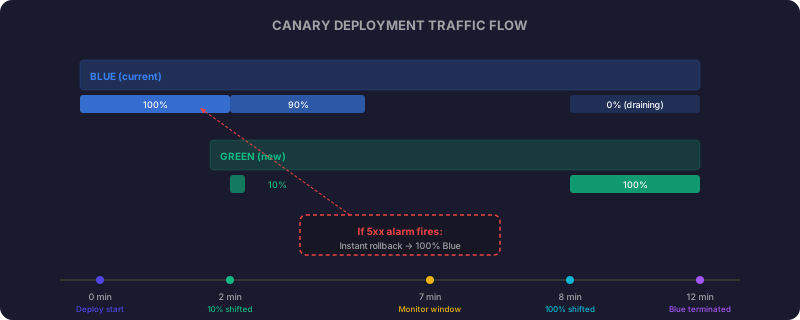
Minute 0: CodeDeploy registers the new task definition and starts new ECS tasks in the green target group. The ALB continues sending all traffic to the blue target group.
Minute 1-2: New tasks pass health checks. CodeDeploy shifts 10% of traffic to the green target group. Both versions serve traffic simultaneously.
Minutes 2-7: The 5-minute canary window. CloudWatch monitors error rates across both target groups. If the 5xx alarm fires, CodeDeploy immediately shifts all traffic back to blue and terminates green tasks.
Minute 7: If no alarms fired, CodeDeploy shifts the remaining 90% to green. The green target group is now primary.
Minute 12: Blue tasks are terminated after a 5-minute drain period. The deployment is complete.
Total time from push to full production: approximately 12 minutes. Total time to rollback if something is wrong: under 30 seconds from alarm to traffic shift.
Note: These timings are based on observed behaviour with CodeDeployDefault.ECSCanary10Percent5Minutes and typical ECS task start times. Actual times depend on image size, health check intervals, and task startup speed. These are not AWS SLA guarantees.
The Health Endpoint
This is the one piece of application code that matters for the pipeline. Your service needs a health endpoint that CodeDeploy can check:
app.get('/health', async (req, res) => {
  const checks = {
    database: await checkDatabase(),
    cache: await checkRedis(),
    uptime: process.uptime(),
    version: process.env.APP_VERSION || 'unknown',
  };

  const healthy = checks.database && checks.cache;

  res.status(healthy ? 200 : 503).json({
    status: healthy ? 'healthy' : 'degraded',
    checks,
  });
});
Two important decisions here. First, the health check verifies downstream dependencies (database, cache), not just that the process is running. A service that is up but cannot reach its database is not healthy. Second, it returns 503 when degraded rather than 200 with a bad status. The ALB health check only looks at HTTP status codes, so a 200 with "status": "unhealthy" in the body would be invisible to the load balancer.
OIDC Authentication: No Static Credentials
Notice the workflow uses role-to-assume instead of AWS_ACCESS_KEY_ID and AWS_SECRET_ACCESS_KEY. This uses GitHub’s OIDC provider to assume an IAM role directly, no long-lived credentials stored in GitHub Secrets.
The IAM trust policy:
{
  "Version": "2012-10-17",
  "Statement": [
    {
      "Effect": "Allow",
      "Principal": {
        "Federated": "arn:aws:iam::123456789012:oidc-provider/token.actions.githubusercontent.com"
      },
      "Action": "sts:AssumeRoleWithWebIdentity",
      "Condition": {
        "StringEquals": {
          "token.actions.githubusercontent.com:aud": "sts.amazonaws.com"
        },
        "StringLike": {
          "token.actions.githubusercontent.com:sub": "repo:your-org/your-repo:ref:refs/heads/main"
        }
      }
    }
  ]
}
The sub condition restricts the role to only be assumed by the main branch of a specific repository. Even if someone forks your repo, they cannot assume your deployment role. This is significantly more secure than static credentials and should be the default for any new pipeline.
Slack Notifications: What to Send
Do not send everything to Slack. Alert fatigue is real. Here is what I send and why:
| Event | Send? | Why |
|---|---|---|
| Tests pass on PR | No | Normal operation, no action needed |
| Tests fail on PR | Yes | Author needs to fix |
| Build complete, deploying | Yes | Team awareness |
| Canary started (10% traffic) | No | Intermediate state, no action needed |
| Deployment successful | Yes | Confirmation that the change is live |
| Deployment failed/rolled back | Yes | Requires investigation |
| CloudWatch alarm triggered | Yes | Separate channel, ops team |
The key principle: only notify when someone needs to do something or when an important state change happened. Everything else is noise.
Staging Environment
The workflow above deploys directly to production. In practice, you want a staging environment that receives every push to main without canary logic:
  deploy-staging:
    needs: build
    runs-on: ubuntu-latest
    environment: staging
    steps:
      - name: Configure AWS credentials
        uses: aws-actions/configure-aws-credentials@v4
        with:
          role-to-assume: ${{ secrets.AWS_DEPLOY_ROLE_ARN_STAGING }}
          aws-region: ${{ env.AWS_REGION }}

      - name: Deploy to staging (direct, no canary)
        run: |
          aws ecs update-service \
            --cluster api-cluster-staging \
            --service api-service \
            --task-definition ${{ steps.register.outputs.task_def_arn }} \
            --force-new-deployment

      - name: Wait for stability
        run: |
          aws ecs wait services-stable \
            --cluster api-cluster-staging \
            --services api-service

  deploy-production:
    needs: deploy-staging
    runs-on: ubuntu-latest
    environment: production
    steps:
      # ... canary deployment as above
Staging deploys immediately with a rolling update (no canary). Production deploys only after staging is stable. The environment: production setting in GitHub Actions enables branch protection rules and required reviewers before the production job runs.
Database Migrations During Canary Deploys
The hardest real-world problem with canary deployments: what happens when the new version needs a database schema change? During the canary window, both old and new code run simultaneously against the same database. If the new version requires a column that does not exist yet, the old version breaks. If you drop a column the old version needs, the old version breaks.
The rule: every migration must be forward-compatible. Both versions must work against the same schema during the transition.
The expand-contract pattern:
Deploy 1 (compatible with both old and new code):
-- Add the new column, but make it nullable
ALTER TABLE orders ADD COLUMN delivery_notes TEXT NULL;
Deploy 2 (the actual feature, uses the new column):
// New code writes to delivery_notes
// Old code ignores it (column is nullable, so it does not break)
Deploy 3 (cleanup, after old version is fully drained):
-- Now safe to add constraints or remove old columns
ALTER TABLE orders ALTER COLUMN delivery_notes SET NOT NULL DEFAULT '';
Never do these in a single deploy:
- Add a NOT NULL column without a default
- Rename a column (old code still references the old name)
- Drop a column (old code still reads it)
- Change a column type (old code expects the original type)
Each migration must be a separate deployment. This slows you down slightly but prevents the scenario where a rollback leaves your database in an inconsistent state. If CodeDeploy rolls back from deploy 2 to deploy 1, the nullable column still exists and causes no harm.
For ECS specifically, add a migration step to your pipeline that runs before the canary shift. Use a one-off ECS task:
      - name: Run database migration
        run: |
          aws ecs run-task \
            --cluster $ECS_CLUSTER \
            --task-definition api-service-migrate \
            --launch-type FARGATE \
            --network-configuration '{"awsvpcConfiguration":{"subnets":["subnet-abc"],"securityGroups":["sg-xyz"]}}' \
            --overrides '{"containerOverrides":[{"name":"api","command":["node","migrate.js"]}]}'

          # Wait for migration task to complete
          aws ecs wait tasks-stopped --cluster $ECS_CLUSTER --tasks $TASK_ARN
Connection Draining
When CodeDeploy shifts traffic from blue to green, what happens to requests that are currently in-flight on blue? If a user is mid-request and the target group is deregistered, they get a 502.
The ALB handles this with a deregistration delay. When a target is removed from a target group, the ALB stops sending new requests to it but allows existing connections to complete within the deregistration window:
resource "aws_lb_target_group" "blue" {
  # ... existing config ...

  deregistration_delay = 30  # seconds to drain existing connections
}
30 seconds is enough for most APIs. If your endpoints include long-polling or WebSocket connections, increase this. If your responses are always sub-second, you can reduce it to 10 seconds for faster deployments.
The termination_wait_time_in_minutes = 5 in the CodeDeploy config serves a similar purpose at the task level. After traffic shifts, blue tasks stay alive for 5 minutes to finish any remaining work before ECS terminates them.
Secrets Management for the Application
OIDC handles deployment credentials. But your application also needs secrets: database passwords, API keys for third-party services, encryption keys. These should not be in environment variables defined in your task definition (visible in the ECS console) or committed to your repository.
Use AWS Secrets Manager with ECS native integration:
resource "aws_secretsmanager_secret" "db_password" {
  name = "api/production/db-password"
}

resource "aws_ecs_task_definition" "api" {
  family                   = "api-service"
  requires_compatibilities = ["FARGATE"]
  network_mode             = "awsvpc"
  cpu                      = 512
  memory                   = 1024
  execution_role_arn       = aws_iam_role.ecs_execution.arn

  container_definitions = jsonencode([{
    name  = "api"
    image = "123456789012.dkr.ecr.eu-west-1.amazonaws.com/api-service:latest"
    portMappings = [{ containerPort = 8080 }]

    secrets = [
      {
        name      = "DATABASE_URL"
        valueFrom = aws_secretsmanager_secret.db_password.arn
      },
      {
        name      = "STRIPE_SECRET_KEY"
        valueFrom = "arn:aws:secretsmanager:eu-west-1:123456789012:secret:api/production/stripe-key"
      }
    ]

    environment = [
      { name = "NODE_ENV", value = "production" },
      { name = "PORT", value = "8080" }
    ]
  }])
}
The secrets block tells ECS to fetch values from Secrets Manager at container start and inject them as environment variables. Your application code reads them with process.env.DATABASE_URL as normal. The values never appear in the task definition, CloudFormation output, or Terraform state.
The execution role needs permission to read these secrets:
resource "aws_iam_role_policy" "ecs_secrets" {
  name = "ecs-read-secrets"
  role = aws_iam_role.ecs_execution.id

  policy = jsonencode({
    Version = "2012-10-17"
    Statement = [{
      Effect   = "Allow"
      Action   = ["secretsmanager:GetSecretValue"]
      Resource = ["arn:aws:secretsmanager:eu-west-1:123456789012:secret:api/production/*"]
    }]
  })
}
Scope the IAM policy to only the secrets your service needs. Do not grant access to all secrets in the account.
Testing That Rollback Actually Works
You have built an automatic rollback system. But have you seen it work? If you have never triggered a rollback, you are trusting infrastructure you have never exercised. Deploy a deliberately broken version to verify the full chain.
Create a test that forces a failure:
// server.js - temporary broken version for rollback testing
app.get('/health', (req, res) => {
  // Return 503 to trigger the 5xx alarm
  res.status(503).json({ status: 'deliberately-broken', testing: true });
});
Push this to a branch, merge it, and watch:
- CodeDeploy starts the canary (10% traffic to green)
- The ALB health check marks green targets as unhealthy
- CloudWatch alarm fires (5xx rate exceeds 5%)
- CodeDeploy stops the deployment and shifts traffic back to blue
- Slack notification arrives confirming the rollback
Time this end-to-end. On our setup, from the moment the broken code reaches the green target group to the moment all traffic is back on blue: 90 seconds. That number should be consistent with your health check intervals (10s interval, 3 unhealthy threshold = 30s detection) plus the alarm evaluation period (2 x 60s) plus the actual traffic shift (~5s).
Do this exercise once per quarter. It validates that:
- Your CloudWatch alarm thresholds are correct
- CodeDeploy auto-rollback is actually enabled (not just configured)
- Slack webhooks still work
- The blue target group is still healthy and can absorb 100% traffic instantly
- Your team knows what a rollback looks like (so nobody panics when it happens for real)
Monitoring Beyond the Alarm
The 5xx alarm handles catastrophic failures. But what about subtle degradation? A new version that is 200ms slower, that returns correct responses but leaks memory, that works now but will fall over in 4 hours?
Add these CloudWatch dashboards to your post-deployment monitoring:
resource "aws_cloudwatch_dashboard" "deploy" {
  dashboard_name = "api-deployment"
  dashboard_body = jsonencode({
    widgets = [
      {
        type   = "metric"
        properties = {
          title   = "Response Time (p50, p95, p99)"
          metrics = [
            ["AWS/ApplicationELB", "TargetResponseTime", "LoadBalancer", aws_lb.api.arn_suffix, { stat = "p50" }],
            ["...", { stat = "p95" }],
            ["...", { stat = "p99" }]
          ]
          period = 60
          annotations = {
            horizontal = [{ value = 0.5, label = "SLA threshold (500ms)" }]
          }
        }
      },
      {
        type   = "metric"
        properties = {
          title   = "Active Connections & Request Rate"
          metrics = [
            ["AWS/ApplicationELB", "ActiveConnectionCount", "LoadBalancer", aws_lb.api.arn_suffix],
            ["AWS/ApplicationELB", "RequestCount", "LoadBalancer", aws_lb.api.arn_suffix]
          ]
          period = 60
        }
      },
      {
        type   = "metric"
        properties = {
          title   = "ECS CPU & Memory"
          metrics = [
            ["AWS/ECS", "CPUUtilization", "ClusterName", "api-cluster", "ServiceName", "api-service"],
            ["AWS/ECS", "MemoryUtilization", "ClusterName", "api-cluster", "ServiceName", "api-service"]
          ]
          period = 60
        }
      }
    ]
  })
}
After every deployment, glance at response times and resource utilisation for the next hour. Automated rollback catches hard failures. Dashboard review catches slow degradation.
Cost of This Setup
For a service running 3 Fargate tasks (0.5 vCPU, 1GB each) in eu-west-1:
| Component | Monthly Cost (approx.) |
|---|---|
| ECS Fargate (3 tasks, 24/7) | ~$55 |
| Application Load Balancer | ~$22 |
| ECR (image storage) | ~$3 |
| CodeDeploy | Free |
| CloudWatch (metrics + alarms) | ~$5 |
| GitHub Actions (minutes) | Free tier covers most teams |
| Total | ~$85/month |
These are approximate estimates based on eu-west-1 pricing as of early 2026. Actual costs vary by region, data transfer volume, and usage patterns. Use the AWS Pricing Calculator for exact figures based on your workload. Refer to ECS Fargate pricing, ALB pricing, and CloudWatch pricing for current rates.
Compare that to the cost of a bad deployment reaching 100% of traffic before anyone notices. The canary infrastructure pays for itself the first time it catches a broken deploy.
Decisions I Made and Why
GitHub Actions over CodePipeline: CodePipeline is AWS-native and integrates tightly, but GitHub Actions has better developer experience, more community actions, and your team is already looking at GitHub for PRs. One fewer console to check.
CodeDeploy for traffic shifting over manual ALB weight adjustment: CodeDeploy gives you automatic rollback on alarm, deployment history, and the canary timing logic built in. Doing this manually with Lambda functions adjusting ALB weights is more work for less reliability.
ECS Fargate over Lambda: For a long-running API with consistent traffic, Fargate gives predictable latency (no cold starts) and simpler container-based development. Lambda would be better for event-driven workloads with spiky traffic.
10% canary for 5 minutes: Conservative enough to catch most issues with minimal blast radius. If 10% of traffic hits a broken endpoint for 5 minutes, that is roughly 0.8% of total requests affected before rollback. Acceptable for most applications. Adjust the percentage and duration based on your traffic volume and risk tolerance.
OIDC over static credentials: No secret rotation burden, no risk of leaked keys, tighter scoping per branch. There is no good reason to use static credentials for GitHub Actions in 2026.
What You Have Built
At this point you have:
- Terraform infrastructure. ECS cluster, ALB with blue/green target groups, CodeDeploy app with canary config, CloudWatch alarm for auto-rollback
- GitHub Actions pipeline. Three-stage workflow (test, build, deploy) with OIDC authentication
- Canary deployment logic. 10% traffic shift, 5-minute monitor window, automatic 100% shift on success
- Automated rollback. CloudWatch alarm triggers CodeDeploy rollback in under 30 seconds
- Slack notifications. Targeted alerts for builds, deploys, and failures
- Monitoring dashboard. p50/p95/p99 latency, request rate, CPU/memory utilisation
The total infrastructure cost is ~$85/month. The pipeline takes ~12 minutes from push to full production. Rollback happens in 30 seconds without human intervention.
What You Get
Push to main. Tests run. Image builds. Canary deploys. Health is monitored. If anything breaks, traffic rolls back in 30 seconds and Slack tells you what happened. If everything is fine, the new version serves all traffic in 12 minutes.
No manual steps. No SSH-ing into servers. No “it works on my machine.” No praying after deploy.
The entire pipeline definition lives in version control. The infrastructure is in Terraform. The deployment logic is in the GitHub Actions workflow. Everything is auditable, reproducible, and testable. That is what production CI/CD looks like.