AWS Cost Optimisation: Strategies That Actually Reduce Your Bill
AWS cost optimisation is not about penny-pinching. It is about right-sizing your architecture so you pay for what you use and nothing more.
Every organisation on AWS is overspending. That is not a provocative claim, it is a consistent finding across every cost review we conduct. The overspend ranges from 20% to 60%, and the root causes are remarkably similar across companies of different sizes and industries.
Here are the strategies that consistently deliver the biggest savings, ranked by impact and implementation effort, based on real consulting engagements where we have tracked the before-and-after numbers.
Start With Visibility
You cannot optimise what you cannot see. Before making any changes, establish a clear picture of where your money is going.
Cost Explorer and Tagging
Open AWS Cost Explorer and sort by service. For most organisations, the top three services, typically EC2, RDS, and S3, account for 70-80% of the total bill. This is where your effort should focus.
But service-level visibility is not enough. You need to know which team, application, and environment is responsible for each dollar. This requires a tagging strategy.
At minimum, every resource should have four tags: Environment (production, staging, dev), Team (the owning team), Application (the application or service name), and CostCenter (for financial allocation). Enforce tagging at deployment time using AWS Config rules or SCPs. Resources without required tags should be flagged and, after a grace period, terminated.
We implement tagging enforcement in Terraform using a module that validates tags before any resource creation:
variable "required_tags" {
  type = map(string)
  validation {
    condition     = contains(keys(var.required_tags), "Environment")
    error_message = "Environment tag is required."
  }
}
This prevents untagged resources from ever reaching AWS. Prevention is cheaper than remediation.
AWS Cost Anomaly Detection
Enable Cost Anomaly Detection for every service you use. It uses machine learning to identify unusual spending patterns and alerts you before a misconfigured auto-scaling policy or a forgotten test cluster turns into a five-figure surprise on your next bill. Setup takes five minutes and has saved our clients from significant unexpected charges multiple times.
EC2: Right-Size Before Anything Else
EC2 is typically the largest line item, and right-sizing is the highest-impact, lowest-risk optimisation you can make.
Identify Over-Provisioned Instances
AWS Compute Optimizer analyses your instance utilisation metrics and recommends right-sizing changes. Enable it across all accounts and let it collect at least two weeks of data before acting on recommendations.
The pattern we see consistently: development teams choose an instance size during initial deployment (often based on a guess or a “let’s play it safe” mentality), it works, and the decision is never revisited. An m5.2xlarge running at 15% average CPU utilisation should be an m5.large, that is a 75% cost reduction on that instance with zero performance impact.
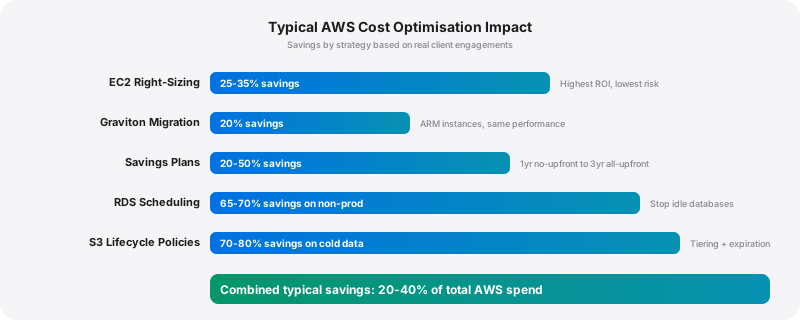
In our experience, right-sizing alone typically reduces EC2 spend by 25-35%. It is the single highest-ROI activity in most cost optimisation engagements.
Graviton Instances
AWS Graviton processors (ARM-based) deliver equivalent or better performance at 20% lower cost compared to equivalent x86 instances. For workloads that support ARM, which includes most Java applications, Node.js services, Python workloads, and containerised applications, switching to Graviton is straightforward.
The migration path: deploy to a Graviton instance in your staging environment, run your test suite, validate performance metrics, and promote to production. For containerised workloads, you need multi-architecture Docker images, which most modern CI/CD pipelines support natively.
We recommend Graviton as the default instance family for all new deployments unless there is a specific reason to use x86 (typically Windows workloads or applications with x86-specific binary dependencies).
Reserved Instances and Savings Plans
On-demand pricing for predictable workloads is the single biggest source of overspend on AWS. If you know a workload will run for the next year, you should be paying committed-use pricing.
Compute Savings Plans offer the best flexibility. They apply automatically to EC2, Fargate, and Lambda usage across any instance family, size, OS, or region. A 1-year Compute Savings Plan with no upfront payment saves roughly 20%. A 3-year plan with all upfront payment saves roughly 50%.
Our approach: analyse 3 months of historical usage using Cost Explorer’s Savings Plans recommendations. Start with a commitment level covering 60-70% of your baseline compute, enough to capture guaranteed savings without overcommitting. Increase the commitment as you gain confidence in your usage patterns.
Important caveat: Never buy Reserved Instances before right-sizing. You do not want to commit to paying for an oversized instance for three years. Right-size first, stabilise, then commit.
RDS: The Hidden Cost Centre
RDS instances run 24/7 by default, and many non-production databases do not need to. This single fact accounts for a surprising amount of waste.
Stop Non-Production Databases
A development database running 24/7 costs the same as a production database. If your developers work 8 hours a day, 5 days a week, that database is idle 76% of the time.
We implement automated start/stop schedules using AWS Instance Scheduler or a simple EventBridge + Lambda combination. The Lambda function tags databases with their schedule (office-hours, business-hours-extended, always-on), and the scheduler starts and stops them accordingly.
Typical savings: 65-70% on development and staging RDS costs with zero impact on developer productivity. The databases start in 2-5 minutes, and developers quickly adjust to triggering a start when they need their environment.
Right-Size RDS Instances
RDS Performance Insights provides detailed database performance metrics. Use it to identify instances where CPU and memory utilisation are consistently low. A db.r5.2xlarge running at 20% CPU should be a db.r5.large.
Also review storage provisioning. Many RDS instances have provisioned IOPS storage (io1 or io2) when general purpose storage (gp3) would suffice. The price difference is substantial, gp3 at 3,000 IOPS costs $0.08/GB/month, while io1 provisioned at the same IOPS costs significantly more. Check your actual IOPS usage in CloudWatch before making the switch.
Aurora Serverless v2
For workloads with variable or unpredictable database load, Aurora Serverless v2 scales capacity automatically between a minimum and maximum ACU (Aurora Capacity Unit) configuration. You pay for the capacity you actually use rather than provisioning for peak.
We have seen Aurora Serverless v2 reduce database costs by 40-60% for development environments and 20-30% for production workloads with variable traffic patterns. The trade-off is slightly higher per-ACU pricing compared to provisioned Aurora, so it is not always cheaper for steady-state high-load databases.
S3: Lifecycle Policies Are Free Money
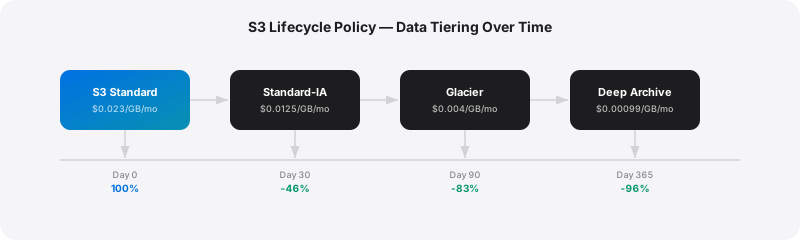
S3 costs are driven by two factors: storage volume and access frequency. Most organisations store everything in S3 Standard and never set up lifecycle policies. This means you are paying premium storage prices for data that has not been accessed in months or years.
Intelligent-Tiering
S3 Intelligent-Tiering automatically moves objects between access tiers based on actual usage patterns. Objects not accessed for 30 days move to Infrequent Access (40% cheaper). Objects not accessed for 90 days move to Archive Instant Access (68% cheaper). Objects not accessed for 180 days can optionally move to Deep Archive (up to 95% cheaper).
There is a small monitoring fee per object ($0.0025 per 1,000 objects/month), but for any bucket where data access patterns vary, the savings vastly exceed the monitoring cost.
Enable Intelligent-Tiering as the default storage class for all new buckets. For existing buckets, create a lifecycle rule that transitions objects to Intelligent-Tiering.
Lifecycle Rules for Known Patterns
For data with predictable access patterns, explicit lifecycle rules are more cost-effective than Intelligent-Tiering:
{
  "Rules": [
    {
      "ID": "archive-old-logs",
      "Status": "Enabled",
      "Filter": { "Prefix": "logs/" },
      "Transitions": [
        { "Days": 30, "StorageClass": "STANDARD_IA" },
        { "Days": 90, "StorageClass": "GLACIER" },
        { "Days": 365, "StorageClass": "DEEP_ARCHIVE" }
      ],
      "Expiration": { "Days": 730 }
    }
  ]
}
This rule transitions logs through progressively cheaper tiers and deletes them after two years. For a bucket with 10 TB of logs, this typically saves 70-80% compared to keeping everything in Standard.
Clean Up the Junk
Every S3 audit we conduct finds the same waste:
Incomplete multipart uploads accumulate silently and cost money. Add an AbortIncompleteMultipartUpload lifecycle rule with a 7-day threshold to every bucket.
Old versioned objects in version-enabled buckets. If you enable versioning for data protection, also add a lifecycle rule that transitions non-current versions to cheaper storage and deletes them after a retention period.
Unused buckets with data nobody remembers putting there. S3 Storage Lens provides bucket-level analytics that make these easy to identify.
Architecture-Level Optimisations
Beyond right-sizing and lifecycle management, the biggest long-term savings come from architectural decisions.
Serverless Where Appropriate
Lambda, Fargate, and API Gateway eliminate the cost of idle compute. You pay only for actual invocations and execution time. For workloads with variable traffic, APIs with bursty patterns, batch processing jobs, event-driven workflows, serverless pricing is almost always cheaper than maintaining always-on instances.
The break-even point is roughly 30-40% average utilisation. If your EC2 instances consistently run above 40% utilisation, they are probably cheaper than the equivalent serverless implementation. Below 40%, serverless wins.
Spot Instances for Fault-Tolerant Workloads
Spot Instances offer 60-90% savings over on-demand pricing for workloads that can tolerate interruptions. Batch processing, CI/CD build agents, data pipeline workers, and stateless web tier instances behind a load balancer are all excellent Spot candidates.
We implement Spot using mixed instance policies in Auto Scaling Groups, a combination of on-demand instances for baseline capacity and Spot instances for burst capacity, spread across multiple instance families and availability zones to minimise interruption risk.
Caching
CloudFront for static assets and API responses. ElastiCache (Redis) for database query results and session data. Every cache hit is a request that does not reach your origin servers, reducing both compute costs and latency.
We have seen well-implemented caching strategies reduce origin server load by 60-80%, which directly translates to smaller (cheaper) backend infrastructure.
Making It Sustainable
One-off cost optimisation projects deliver temporary results. Within six months, costs creep back up as new resources are deployed without cost discipline. Sustainable savings require governance.
Monthly cost reviews with engineering leads. Review the top 10 cost items, identify anomalies, and assign owners for optimisation actions. This takes 30 minutes per month and prevents the gradual cost drift that undoes optimisation work.
Budget alerts in AWS Budgets for every team and environment. Set alerts at 80% and 100% of expected monthly spend. Teams that see their budget alerts learn to think about cost as part of their engineering decisions.
FinOps as a practice, not a project. Cost is an architectural constraint, just like latency, availability, and security. It belongs in design reviews, deployment checklists, and engineering team OKRs. The organisations that sustain their savings are the ones that treat cost efficiency as an ongoing engineering discipline rather than an annual cost-cutting exercise.
AWS cost optimisation is not about being cheap. It is about being deliberate. Every dollar saved on infrastructure is a dollar available for building products, hiring talent, or investing in growth. The strategies here are not theoretical, they are the same playbook we run for every client, and they consistently deliver 20-40% savings with minimal risk and no impact on performance.